Log Parser Lizard
Log Parser Lizard: A free Windows desktop tool for SQL-driven local log investigation and reporting. Ranked #91 of 109 in Log Management Software by our editors (3.0/10); pricing: Free plan; best for windows users needing free local log analysis.
At a glance
- Editor score3.0 / 10
- PricingFree plan
- Best forWindows users needing free local log analysis
- Free planYes
- Paid fromFree
- Founded2006
- Facts checked21 Sep 2026
Where it wins
- SQL queries, reusable files, filters, charts and dashboards
- Reads logs, files and databases in many structured formats
- Exports results and reports without mandatory cloud ingestion
Where it doesn't
- Windows desktop application with no hosted management layer
- Live tailing, pipelines and deployment coverage are not provided
- No AI-assisted analysis features
Our verdict on Log Parser Lizard
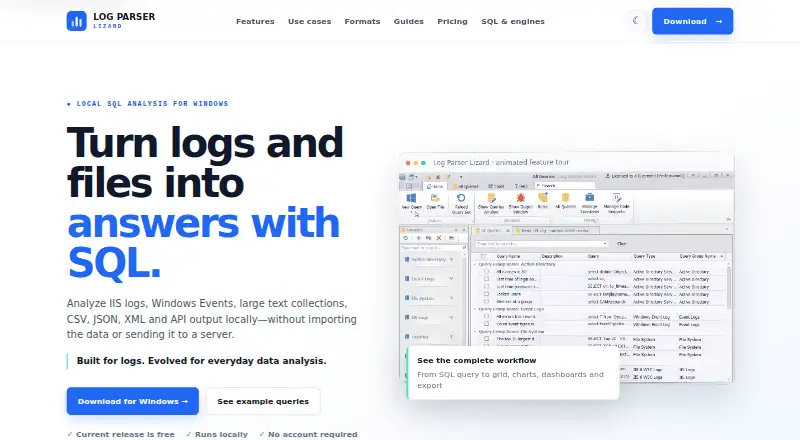
Log Parser Lizard is a free Windows desktop application for querying and investigating IIS, Windows Event Logs, text, CSV, JSON, XML and database data locally with SQL. It suits developers, IT operations and SRE teams, security and forensics users, consultants, and anyone who needs to inspect operational data without sending it to a hosted log-ingestion service. Its workspace includes SQL syntax highlighting, query tabs, libraries and reusable files, while the result grid supports sorting, filtering, grouping and conditional formatting.
The Free plan costs 0 USD with no subscription. It includes the SQL query and editor workspace, advanced grid and visualization, and current input and export options. Log Parser Lizard supports Microsoft Log Parser 2.2, SQLite, SQL Server, Google BigQuery, Active Directory and PowerShell. Input coverage includes IIS/W3C, Windows Event Logs, CSV, TSV, JSON, XML, text and databases. Results can be exported to Excel, CSV, TSV, JSON, XML, YAML, Markdown and HTML. Charts, pivots, dashboards, reusable visual layouts and an interactive report designer extend the tool beyond basic text inspection.
Local processing is the defining choice: command-line and ETL workflows can use Web API, C# and PowerShell data sources, while reports can target PDF, HTML and office-friendly output. That makes the product a strong fit for ad hoc analysis, archive review, structured parsing, reporting and Windows-centered operational work. It is less suitable for teams seeking hosted log management, live tailing, pipelines or deployment coverage. Organizations that need a centrally managed service should choose a product built around hosted ingestion and operational monitoring instead; Windows users who value SQL control and local analysis can start with the free release.
Questions about Log Parser Lizard
Does Log Parser Lizard have a free plan? Yes, there is a free plan.
What does Log Parser Lizard run on? Windows. It runs as a desktop app.
What does Log Parser Lizard integrate with? 6 integrations, including Microsoft Log Parser 2.2, SQLite, SQL Server, Google BigQuery and Active Directory.
Who is Log Parser Lizard built for? Solo users, small businesses and mid-market companies (our editorial estimate).
Your product? Our editors can test Log Parser Lizard in depth and publish a review, labelled as paid · from $149/mo →
Log Parser Lizard pricing
All 1 Log Parser Lizard plans and prices →
Log Parser Lizard fact sheet
| Free plan | Yes |
|---|---|
| Paid from | Free |
| Included ingestion | Not verified |
| Log retention | Not verified |
| Log pipelines | Not verified |
| Archive export | Yes |
| Live log tailing | Not verified |
| Deployment options | Not verified |
| Structured log parsing | Yes |
| Deployment | Desktop |
| Platforms | Windows |
| Support | Docs |
| Built for | Solo, Small business, Mid-market (editorial estimate) |
| Integrations | 6 integrations: Microsoft Log Parser 2.2, SQLite, SQL Server, Google BigQuery, Active Directory, PowerShell |
| Pricing | Free plan (source) |
| Website | log-parser.com |
| Facts checked | 21 Sep 2026 |
Log Parser Lizard integrations
Log Parser Lizard lists 6 integrations on its own site.
- Microsoft Log Parser 2.2
- SQLite
- SQL Server
- Google BigQuery
- Active Directory
- PowerShell
Alternatives to Log Parser Lizard
- ELK StackA flexible open-source log stack with broad deployment options and layered pricing.9.4
- Splunk EnterpriseA broad, self-managed log analytics platform for large enterprises with sales-led pricing.9.3
- Google Cloud LoggingA capable Google Cloud logging service with usage-based pricing and broad routing options.9.2



See all Log Parser Lizard alternatives →
Used Log Parser Lizard? Be the first to review it
The editor score above is our own research. What this page doesn't have yet is a reader's view — what you used Log Parser Lizard for, what worked and what didn't. No stars are seeded and no review is paid for; an editor reads every one before it appears.
Write a reviewTwo minutes · verified accounts only · read by an editor before it appears
Featured on iTechGuides

Log Parser Lizard is listed in our Log Management Software directory. Add the badge to your site — it links back to this page.
<a href="https://www.itechguides.com/products/log-parser-lizard/"><img src="https://www.itechguides.com/best/badge/log-parser-lizard.svg" alt="Featured on iTechGuides" width="230" height="46"></a>
Reviewed by iTechGuides Editors · Editorial team · Updated Nov 2026
Advertiser disclosure: iTechGuides is reader-supported. Vendors can pay for top positions in our rankings and for a place on other products' pages, and we may earn a commission when you click some links. Bought places stand at the number bought; this page and our disclosure say so. Paying vendors may get a fuller, more detailed review from our editors, and that review can change their score. How we rank.
Last updated · How we research and update