Lettuce
Lettuce: A free Python BDD tool with Gherkin-style workflows, Django integration, and CI output. Ranked #23 of 29 in BDD Testing Tools by our editors (6.0/10); pricing: Free plan; best for legacy or Django-focused Python BDD.
At a glance
- Editor score6.0 / 10
- PricingFree plan
- Best forLegacy or Django-focused Python BDD
- Free planYes
- Paid fromFree
- Gherkin supportYes
- Founded2010
- Facts checked21 Sep 2026
Where it wins
- Plain-text scenarios with outlines, example tables, hooks, and tags
- Django integration plus Subunit and coverage workflow support
- Free, open-source Python BDD execution from the command line
Where it doesn't
- Windows is the listed platform
- Does not provide browser testing
- Narrower ecosystem than broader BDD tools
Our verdict on Lettuce
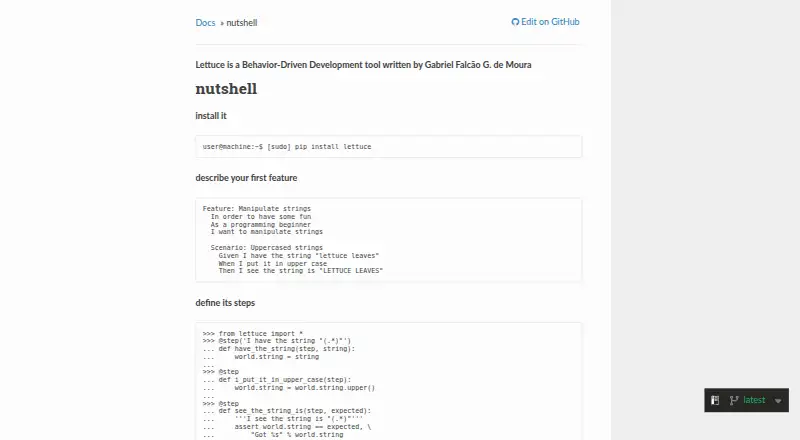
Lettuce is an open-source behavior-driven development tool for Python projects. It is designed for developers and teams creating automated functional or acceptance tests, particularly those working with legacy Python codebases or Django projects. Teams describe features and scenarios in plain text, connect them to Python step definitions with decorators, and execute scenarios or features through a command-line utility. Gherkin-style support includes scenario outlines, example tables, hooks, shared test state, tags, and natural-language keywords for 18 languages.
For Python teams with Django projects, the product’s strongest advantage is its focused workflow. Django integration connects the BDD process to a common Python web framework, while Subunit output supports continuous-integration workflows and coverage integration supports code-coverage processes. These capabilities make Lettuce more suitable for functional and acceptance-test routines than a tool limited to scenario authoring alone. Its execution model is local, with command-line operation at the center of the workflow.
The trade-off is breadth. Windows is the listed platform, and browser testing is not part of the described feature set, so teams needing cross-platform execution or browser-focused automation should choose a broader alternative. Lettuce fits best when plain-text BDD scenarios, Python step definitions, Django integration, and established local or CI workflows are the priority. It is less suitable for teams seeking an extensive browser-testing ecosystem or a wider multi-platform testing surface. The published documentation version is 0.2.19, while the linked repository README identifies version 0.2.23.
Your product? Our editors can test Lettuce in depth and publish a review, labelled as paid · from $149/mo →
Lettuce pricing
Lettuce fact sheet
| Free plan | Yes |
|---|---|
| Paid from | Free |
| Gherkin support | Yes |
| Supported languages | Not verified |
| Execution mode | Local |
| Parallel execution | Not verified |
| Browser testing | Not verified |
| API access | Not verified |
| Deployment | Desktop |
| Platforms | Windows |
| Support | Community, Docs |
| Built for | Solo, Small business (editorial estimate) |
| Integrations | 3 integrations: Django, Subunit, coverage |
| Pricing | Free plan |
| Website | lettuce.readthedocs.io |
| Facts checked | 21 Sep 2026 |
Lettuce integrations
Lettuce lists 3 integrations on its own site.
- Django
- Subunit
- coverage
Alternatives to Lettuce
- Cucumber OpenA mature, extensible Cucumber workflow for local and CI-based BDD testing.9.1
- CucumberStudioA shared BDD workspace connecting Gherkin, test execution, automation results, and documentation.8.6
- KarateA self-hosted testing framework spanning API, UI, performance, and mock testing.8.3


See all Lettuce alternatives →
Used Lettuce? Be the first to review it
The editor score above is our own research. What this page doesn't have yet is a reader's view — what you used Lettuce for, what worked and what didn't. No stars are seeded and no review is paid for; an editor reads every one before it appears.
Write a reviewTwo minutes · verified accounts only · read by an editor before it appears
Featured on iTechGuides

Lettuce is listed in our BDD Testing Tools directory. Add the badge to your site — it links back to this page.
<a href="https://www.itechguides.com/products/lettuce-bdd-testing-tool/"><img src="https://www.itechguides.com/best/badge/lettuce-bdd-testing-tool.svg" alt="Featured on iTechGuides" width="230" height="46"></a>
Reviewed by iTechGuides Editors · Editorial team · Updated Oct 2026
Advertiser disclosure: iTechGuides is reader-supported. Vendors can pay for top positions in our rankings and for a place on other products' pages, and we may earn a commission when you click some links. Bought places stand at the number bought; this page and our disclosure say so. Paying vendors may get a fuller, more detailed review from our editors, and that review can change their score. How we rank.
Last updated · How we research and update