
komorebi
komorebi: A capable window manager, but a poor fit for desktop wallpaper management. Ranked #30 of 34 in Desktop Wallpaper Software by our editors (6.2/10); pricing: Free plan; best for not recommended for desktop wallpaper use.
At a glance
- Editor score6.2 / 10
- PricingFree plan
- Best forNot recommended for desktop wallpaper use
- Free planYes
- Paid from$110/user/yr
- Facts checked19 Sep 2026
Where it wins
- Tiling layouts support BSP, columns, rows, stacks, grid, and scrolling
- Workspace and application rules support complex multi-monitor setups
- Command-line control works with whkd, AutoHotKey, and other hotkey tools
Where it doesn't
- No verified wallpaper management features
- Keyboard input relies on external hotkey software
- Commercial use requires a recurring individual subscription
Our verdict on komorebi
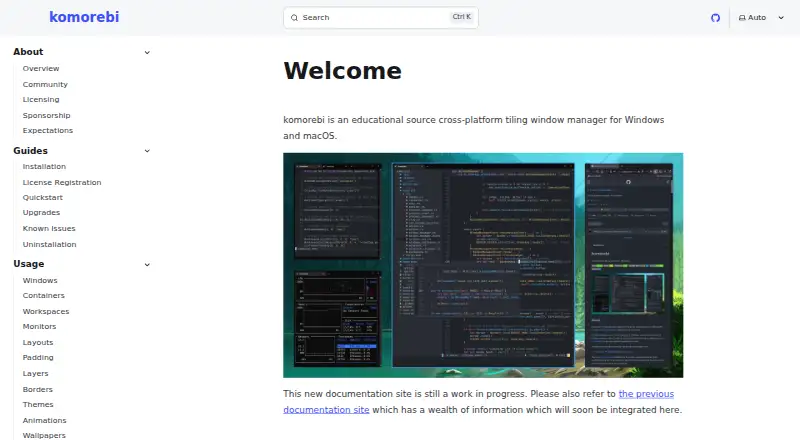
komorebi is a configuration-driven tiling window manager for Windows and macOS. It is designed for users who want structured application windows, virtual workspaces, monitor-specific configurations, and command-line control. Its focus is workspace and window organization rather than desktop appearance, making it a poor match for people choosing software specifically to manage, rotate, or customize wallpapers.
Window management is its strongest area. komorebi supports BSP, columns, rows, stacks, grid, and scrolling layouts, along with custom layout ratios and threshold-based rules. Users can organize virtual workspaces per physical monitor, define initial workspace placement, and create application rules based on executable, title, or class. Floating, ignore, and force-manage behaviors add control over how individual applications behave, while multi-monitor support extends those rules across monitor-specific configurations. Command-line control through komorebic fits users who prefer configuration-driven workflows. External hotkey software, including whkd and AutoHotKey, can provide keyboard input.
The pricing structure separates personal and commercial use. Personal use is permitted under the Komorebi License. For commercial Windows use, the published plans show an individual license at $10 per user per month or $110 per user per year. The Mac single-platform commercial license costs $10 per user per month, while Windows and macOS commercial use costs $15 per user per month for an individual multi-platform license. Choose komorebi if your priority is configurable tiling, workspace control, and application placement on Windows or macOS. If your priority is desktop wallpaper management, choose a product built around that narrower purpose instead.
Your product? Our editors can test komorebi in depth and publish a review, labelled as paid · from $149/mo →
komorebi pricing
All 4 komorebi plans and prices →
komorebi fact sheet
| Free plan | Yes |
|---|---|
| Paid from | $110/user/yr |
| Platform coverage | Not verified |
| Live wallpapers | Not verified |
| Automatic rotation | Not verified |
| Multi-monitor support | Not verified |
| Video wallpapers | Not verified |
| Interactive wallpapers | Not verified |
| Performance controls | Not verified |
| Deployment | Desktop |
| Platforms | Windows, macOS |
| Integrations | 3 integrations: whkd, AutoHotKey, third-party hotkey software |
| Pricing | Free plan (source) |
| Website | komorebi.lgug2z.com |
| Facts checked | 19 Sep 2026 |
komorebi integrations
komorebi lists 3 integrations on its own site.
- whkd
- AutoHotKey
- third-party hotkey software
Alternatives to komorebi
- Lively WallpaperA feature-rich free wallpaper app for Windows users who want animated, interactive desktops.9.3
- DesktopHutA capable free choice for Windows users who want flexible live wallpapers.9.2
- Wallpaper EngineA broad wallpaper platform for power users who want creation tools and control.9.1



See all komorebi alternatives →
Also Ranked In
komorebi is ranked in 2 of our directories.
Used komorebi? Be the first to review it
The editor score above is our own research. What this page doesn't have yet is a reader's view — what you used komorebi for, what worked and what didn't. No stars are seeded and no review is paid for; an editor reads every one before it appears.
Write a reviewTwo minutes · verified accounts only · read by an editor before it appears
Featured on iTechGuides

komorebi is listed in our Desktop Wallpaper Software directory. Add the badge to your site — it links back to this page.
<a href="https://www.itechguides.com/products/komorebi/"><img src="https://www.itechguides.com/best/badge/komorebi.svg" alt="Featured on iTechGuides" width="230" height="46"></a>
Reviewed by iTechGuides Editors · Editorial team · Updated Oct 2026
Advertiser disclosure: iTechGuides is reader-supported. Vendors can pay for top positions in our rankings and for a place on other products' pages, and we may earn a commission when you click some links. Bought places stand at the number bought; this page and our disclosure say so. Paying vendors may get a fuller, more detailed review from our editors, and that review can change their score. How we rank.
Last updated · How we research and update