
Koder
Koder: A capable free iOS editor for local files, remote connections, and quick code changes. Ranked #39 of 44 in Code Editors by our editors (5.2/10); pricing: Free plan; best for iOS users editing files on the move.
At a glance
- Editor score5.2 / 10
- PricingFree plan
- Best foriOS users editing files on the move
- Free planYes
- Paid fromFree
- Facts checked22 Sep 2026
Where it wins
- Syntax highlighting for more than 80 programming languages
- FTP, SFTP, cloud, WebDAV, and SSH connections
- File synchronization, previews, snippets, and keyboard support
Where it doesn't
- Available only on iPhone and iPad
- Mobile-only workflow limits broader development use
- No verified debugger or extension support
Our verdict on Koder
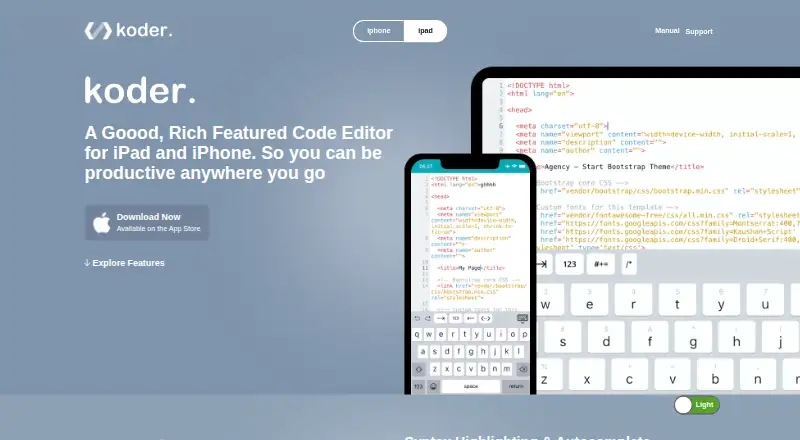
Koder is a free code editor for iPhone and iPad, aimed at people who need to inspect, update, and manage files from a mobile device. It combines syntax highlighting for more than 80 programming languages with autocomplete, tabbed editing, find and replace, function lists, a file browser, custom snippets, and an HTML preview browser. Local file management is paired with file transfers, synchronization, archive extraction, multitasking, dark mode, and support for external keyboards, making the product most suitable for solo users and small teams working away from a desktop.
The published plan structure is straightforward: the Free plan provides the code editor for iPhone and iPad. Koder also connects to FTP, SFTP, FTPS, FTPES, Dropbox, and WebDAV resources, with integrations for Working Copy and Files. Its built-in SSH client adds a direct route to remote work, while upload, download, synchronization, and archive extraction cover practical file-management tasks. These capabilities make Koder a useful fit for iOS users who need local and remote access in one mobile workflow rather than a desktop development environment.
Koder’s main constraint is its platform and scope. It is available only on iOS and deployed as a mobile product, so it is better suited to editing, reviewing, previewing, and transferring files than to a complete development workflow. The lack of verified debugger or extension support further limits its breadth for developers who need deeper tooling. Choose Koder for free mobile code editing with broad connection options; choose a broader development environment instead when debugging, extensibility, or desktop and non-iOS platforms are central requirements.
Your product? Our editors can test Koder in depth and publish a review, labelled as paid · from $149/mo →
Koder pricing
All 1 Koder plans and prices →
Koder fact sheet
| Free plan | Yes |
|---|---|
| Paid from | Free |
| Supported platforms | ios |
| Extension support | Not verified |
| Built-in debugger | Not verified |
| Remote development | Yes |
| Language server support | Not verified |
| Editor type | Not verified |
| Deployment | Mobile |
| Platforms | iOS |
| Support | Email, Docs |
| Built for | Solo, Small business (editorial estimate) |
| Integrations | 8 integrations: Dropbox, FTP, SFTP, FTPS, FTPES, WebDAV … |
| Pricing | Free plan (source) |
| Website | koderapp.com |
| Facts checked | 22 Sep 2026 |
Koder integrations
Koder lists 8 integrations on its own site.
- Dropbox
- FTP
- SFTP
- FTPS
- FTPES
- WebDAV
- Working Copy
- Files
Alternatives to Koder
- Visual Studio CodeA free, open-source editor with editing, debugging, Git, terminal, and extension support.9.4
- ZedA fast, open-source editor with strong native tooling and flexible AI integrations.9.1
- VSCodiumA familiar desktop editor for VS Code users who want telemetry-disabled binaries.8.9



Used Koder? Be the first to review it
The editor score above is our own research. What this page doesn't have yet is a reader's view — what you used Koder for, what worked and what didn't. No stars are seeded and no review is paid for; an editor reads every one before it appears.
Write a reviewTwo minutes · verified accounts only · read by an editor before it appears
Featured on iTechGuides

Koder is listed in our Code Editors directory. Add the badge to your site — it links back to this page.
<a href="https://www.itechguides.com/products/koder/"><img src="https://www.itechguides.com/best/badge/koder.svg" alt="Featured on iTechGuides" width="230" height="46"></a>
Reviewed by iTechGuides Editors · Editorial team · Updated Oct 2026
Advertiser disclosure: iTechGuides is reader-supported. Vendors can pay for top positions in our rankings and for a place on other products' pages, and we may earn a commission when you click some links. Bought places stand at the number bought; this page and our disclosure say so. Paying vendors may get a fuller, more detailed review from our editors, and that review can change their score. How we rank.
Last updated · How we research and update