Kinovea
Kinovea: A focused Windows tool for frame-accurate motion analysis, measurement, and export. Ranked #22 of 34 in Video Annotation Software by our editors (6.7/10); pricing: Free plan; best for free motion analysis and measurement.
At a glance
- Editor score6.7 / 10
- PricingFree plan
- Best forFree motion analysis and measurement
- Free planYes
- Paid fromFree
- Frame-accurate markingYes
- Facts checked20 Sep 2026
Where it wins
- Free and open source for personal, educational, research, and commercial use
- Frame-based playback, synchronized comparison, annotation, and motion tracking
- Exports annotated video, images, and CSV measurement data
Where it doesn't
- Windows-only desktop application
- No collaboration workflows or integrations
- Focused on sport and human-motion analysis rather than broader platforms
Our verdict on Kinovea
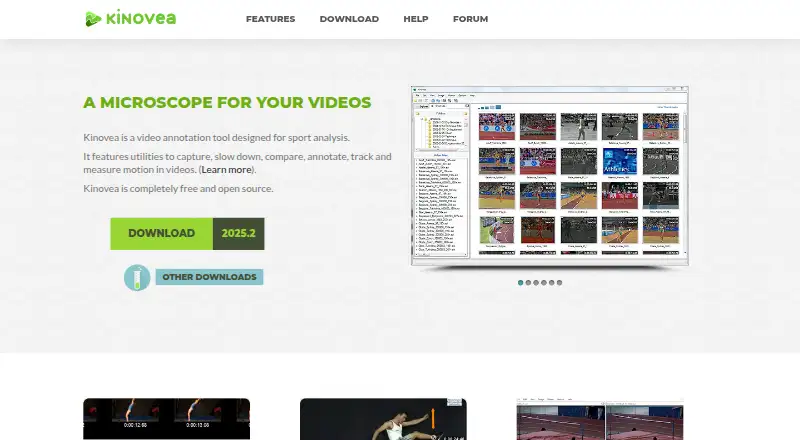
Kinovea is free, open-source desktop software for sport and human-motion analysis. It supports video capture, camera-stream recording, slow-motion playback, and frame-based review. Users can compare and synchronize videos, mark key positions with text, labels, arrows, lines, curves, rectangles, markers, and freehand drawings, then save analyses in KVA annotation files. Its intended audiences include personal, educational, research, professional, and commercial users who need focused video analysis without a paid plan.
The product’s strongest area is motion analysis depth. It provides manual measurement of time, distance, and angles, along with single-point and multi-point motion tracking. Custom XML-based analysis tools extend the workflow, while frame-accurate playback supports detailed review of movement. Results can be exported as annotated videos, images, or CSV measurement data for further processing. This combination makes Kinovea particularly suitable for coaches, educators, researchers, and professionals who need to inspect movement and preserve measurable results alongside visual annotations.
Kinovea is a standalone Windows application, so platform fit is straightforward for Windows-based users but limited for teams working across other operating systems. The product also does not provide collaboration workflows or integrations, which makes it less suitable for shared review processes or connected software environments. Choose Kinovea when free motion analysis, drawing tools, measurement, tracking, and export are the priority. Consider another option when broader platform coverage, collaboration, or integrations matter more than focused desktop analysis.
Your product? Our editors can test Kinovea in depth and publish a review, labelled as paid · from $149/mo →
Kinovea pricing
All 1 Kinovea plans and prices →
Kinovea fact sheet
| Free plan | Yes |
|---|---|
| Paid from | Free |
| Frame-accurate marking | Yes |
| Drawing annotations | Yes |
| Custom labels or fields | Not verified |
| Review workflow | Not verified |
| Dataset export | Yes |
| Video length limit | Not verified |
| Deployment | Desktop |
| Platforms | Windows |
| Support | Email, Community, Docs |
| Built for | Solo, Small business, Mid-market (editorial estimate) |
| Pricing | Free plan (source) |
| Website | kinovea.org |
| Facts checked | 20 Sep 2026 |
Alternatives to Kinovea
- Frame.ioFrame-accurate review, approvals, version comparison, and production-tool integrations.9.3
- KollaborateA mature review hub with strong editing-app integrations and low-cost entry pricing.9.1
- FrameQueryA strong choice for AI-assisted footage search, precise review, and editing exports.9.0



See all Kinovea alternatives →
Used Kinovea? Be the first to review it
The editor score above is our own research. What this page doesn't have yet is a reader's view — what you used Kinovea for, what worked and what didn't. No stars are seeded and no review is paid for; an editor reads every one before it appears.
Write a reviewTwo minutes · verified accounts only · read by an editor before it appears
Featured on iTechGuides

Kinovea is listed in our Video Annotation Software directory. Add the badge to your site — it links back to this page.
<a href="https://www.itechguides.com/products/kinovea/"><img src="https://www.itechguides.com/best/badge/kinovea.svg" alt="Featured on iTechGuides" width="230" height="46"></a>
Reviewed by iTechGuides Editors · Editorial team · Updated Oct 2026
Advertiser disclosure: iTechGuides is reader-supported. Vendors can pay for top positions in our rankings and for a place on other products' pages, and we may earn a commission when you click some links. Bought places stand at the number bought; this page and our disclosure say so. Paying vendors may get a fuller, more detailed review from our editors, and that review can change their score. How we rank.
Last updated · How we research and update