
Kidera
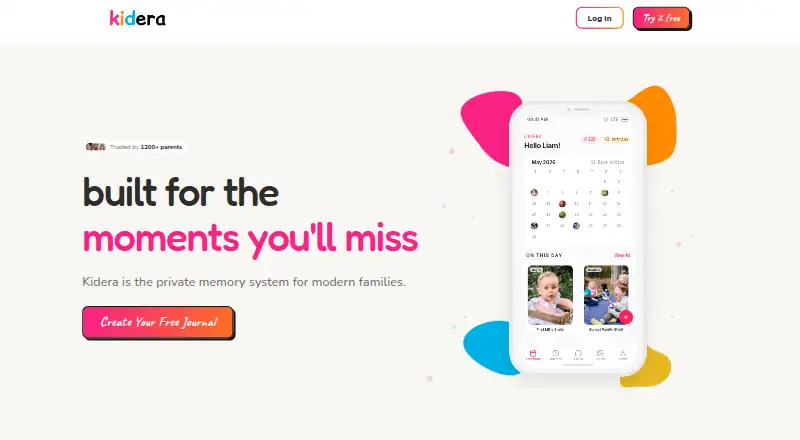
Kidera: A web-based memory journal with AI recall, timelines, and 5 GB free storage. Ranked #66 of 70 in Photo Storage Services by our editors (3.0/10); pricing: Free plan; best for web users turning family memories into a journal.
At a glance
- Editor score3.0 / 10
- PricingFree plan
- Best forWeb users turning family memories into a journal
- Free planYes
- Paid from$6/mo
- Facts checked22 Sep 2026
Where it wins
- Calendar, timeline, gallery, and milestone views organize family memories.
- AI descriptions and semantic journal search make memories easier to recall.
- Free plan includes 5 GB of photo and video storage.
Where it doesn't
- Kidera is currently available only on the web.
- Partner sharing is limited to the Pro plan.
- The free tier has 5 GB of photo and video storage.
Our verdict on Kidera
Kidera is a web-based private family journaling service for parents who want to preserve photos, videos, written entries, and childhood milestones in one ongoing record. Its calendar and continuous timeline views give dated memories a clear structure, while the media gallery keeps photo and video entries together. The free plan makes it accessible for smaller collections, with unlimited text entries, 5 GB of photo and video storage, milestone tracking, calendar and timeline views, and 10 AI questions each month. It is a focused choice for families building a searchable journal rather than a general-purpose photo library.
Kidera’s strongest distinction is the combination of memory organization and AI-assisted recall. The service can generate photo descriptions, answer questions about a journal through semantic search, detect and track milestones, and provide weekly email summaries. These features are available with unlimited AI questions and AI photo descriptions on Pro. Data export for posts and media also gives the journal a way to move beyond the service. For families who want context around images—not only storage—the feature set is more purposeful than a basic gallery.
Pricing is straightforward. Free provides 5 GB of photo and video storage, while Pro costs $6 per month or $72 per year and adds unlimited storage, unlimited AI questions, AI photo descriptions, partner invitation, weekly summaries, and priority support. Kidera is currently web-only, so it suits people comfortable managing a family journal in a browser. It should appeal most to parents who value written context, milestones, and searchable memories. Those looking specifically for shared albums, native mobile apps, or a broader photo-storage workflow should consider alternatives with those priorities.
Your product? Our editors can test Kidera in depth and publish a review, labelled as paid · from $149/mo →
Kidera pricing
All 2 Kidera plans and prices →
Kidera fact sheet
| Free plan | Yes |
|---|---|
| Paid from | $6/mo |
| Free storage | 5 GB |
| Original-quality storage | Not verified |
| Face search | Not verified |
| Shared albums | Not verified |
| Family sharing | Yes |
| Desktop app | No |
| Video backup | Yes |
| Deployment | Cloud |
| Platforms | Web |
| Compliance & security | 2FA |
| Support | |
| Built for | Solo, Small business (editorial estimate) |
| Pricing | Free plan (source) |
| Website | kidera.co |
| Facts checked | 22 Sep 2026 |
Alternatives to Kidera
- Google PhotosAn easy photo backup service with broad search, editing, sharing, and device coverage.9.4
- Apple PhotosA capable photo library for Apple households, with affordable entry pricing and limited free storage.9.2
- Amazon PhotosA capable photo backup and sharing service, especially for Prime members.9.0



Used Kidera? Be the first to review it
The editor score above is our own research. What this page doesn't have yet is a reader's view — what you used Kidera for, what worked and what didn't. No stars are seeded and no review is paid for; an editor reads every one before it appears.
Write a reviewTwo minutes · verified accounts only · read by an editor before it appears
Featured on iTechGuides

Kidera is listed in our Photo Storage Services directory. Add the badge to your site — it links back to this page.
<a href="https://www.itechguides.com/products/kidera/"><img src="https://www.itechguides.com/best/badge/kidera.svg" alt="Featured on iTechGuides" width="230" height="46"></a>
Reviewed by iTechGuides Editors · Editorial team · Updated Oct 2026
Advertiser disclosure: iTechGuides is reader-supported. Vendors can pay for top positions in our rankings and for a place on other products' pages, and we may earn a commission when you click some links. Bought places stand at the number bought; this page and our disclosure say so. Paying vendors may get a fuller, more detailed review from our editors, and that review can change their score. How we rank.
Last updated · How we research and update