
KGet
KGet: A free, open-source Linux download manager with practical transfer controls. Ranked #8 of 58 in Download Manager Software by our editors (8.4/10); pricing: Free plan; best for linux users wanting a lightweight file manager.
At a glance
- Editor score8.4 / 10
- PricingFree plan
- Best forLinux users wanting a lightweight file manager
- Free planYes
- Paid fromFree
- Facts checked20 Sep 2026
Where it wins
- Free and open source with FTP and HTTP(S) support
- Pauses, resumes, restarts, and retries broken downloads
- Metalink checksums, clipboard monitoring, and download grouping
Where it doesn't
- Linux-only platform scope
- Konqueror is the listed browser integration
- No documented scheduling, concurrent downloads, or video support
Our verdict on KGet
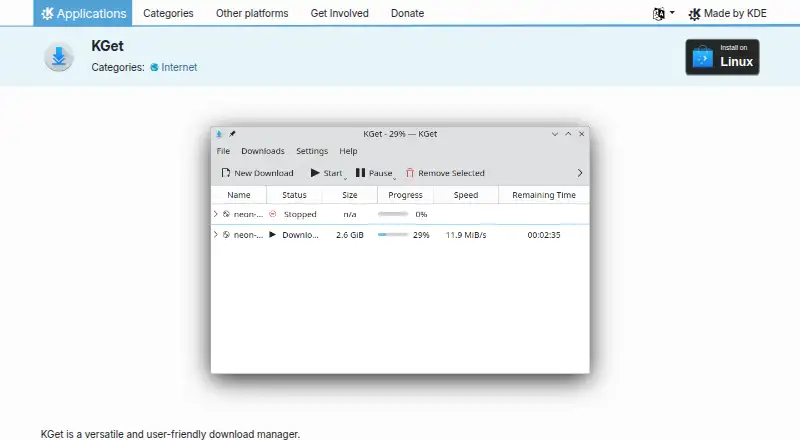
KGet is an open-source download manager from KDE for Linux desktop users, particularly those who want a focused way to handle FTP and HTTP(S) transfers. It displays current and pending downloads, can run in the system tray, and supports pausing, resuming, and restarting files. Its free availability and Linux desktop focus make it a practical fit for users who prefer open-source software and do not need a cross-platform download tool.
Its feature set covers several everyday transfer needs without extending beyond download management. KGet can monitor the clipboard for download URLs, group downloads, assign default folders, and retry transfers after broken connections. Metalink support adds multiple URLs and checksums, while a configurable local web interface provides another way to interact with downloads. Konqueror integration connects the manager to KDE's listed browser ecosystem, although the broader integration scope is centered on that single browser.
KGet is best suited to Linux users who value straightforward file transfers, desktop integration, and control over interrupted downloads. The product is less suitable for anyone seeking broader platform coverage or a download manager with documented scheduling, concurrent-download, or video-focused capabilities. Its Linux-only scope keeps the product focused, while the lack of paid tiers means there is no plan structure to compare. KDE distributes KGet under the GPL-2.0-or-later license, reinforcing its open-source positioning. Choose KGet for FTP and HTTP(S) downloads, Metalink handling, clipboard monitoring, and configurable organization; consider an alternative when browser breadth, other operating systems, or those additional download workflows are priorities.
Your product? Our editors can test KGet in depth and publish a review, labelled as paid · from $149/mo →
KGet pricing
KGet fact sheet
| Free plan | Yes |
|---|---|
| Paid from | Free |
| Supported platforms | Linux |
| Browser integration | Yes |
| Video downloading | Not verified |
| Download scheduling | Not verified |
| Concurrent downloads | Not verified |
| Remote control | Not verified |
| Portable version | Not verified |
| Deployment | Desktop |
| Platforms | Linux |
| Support | Community, Docs |
| Built for | Solo, Small business (editorial estimate) |
| Integrations | 1 integrations: Konqueror |
| Pricing | Free plan |
| Website | apps.kde.org |
| Facts checked | 20 Sep 2026 |
KGet integrations
KGet lists 1 integrations on its own site.
- Konqueror
Alternatives to KGet
- Free Download ManagerA broad free manager with acceleration, torrents, scheduling, and multi-platform support.9.3
- JDownloaderA broad free download manager for queues, plugins, archives, streams, and remote control.9.2
- Internet Download ManagerA capable paid Windows manager for organized, resumable and scheduled downloads.9.1


KGet vs the competition
- KGet vs Free Download Manager
- KGet vs JDownloader
- KGet vs Internet Download Manager
- KGet vs BitComet
- KGet vs Motrix
- KGet vs GNU Wget


Compare KGet with any tool side by side →
Used KGet? Be the first to review it
The editor score above is our own research. What this page doesn't have yet is a reader's view — what you used KGet for, what worked and what didn't. No stars are seeded and no review is paid for; an editor reads every one before it appears.
Write a reviewTwo minutes · verified accounts only · read by an editor before it appears
Featured on iTechGuides

KGet is listed in our Download Manager Software directory. Add the badge to your site — it links back to this page.
<a href="https://www.itechguides.com/products/kget/"><img src="https://www.itechguides.com/best/badge/kget.svg" alt="Featured on iTechGuides" width="230" height="46"></a>
Reviewed by iTechGuides Editors · Editorial team · Updated Oct 2026
Advertiser disclosure: iTechGuides is reader-supported. Vendors can pay for top positions in our rankings and for a place on other products' pages, and we may earn a commission when you click some links. Bought places stand at the number bought; this page and our disclosure say so. Paying vendors may get a fuller, more detailed review from our editors, and that review can change their score. How we rank.
Last updated · How we research and update