Ketarin
Ketarin: A flexible open-source choice for maintaining custom Windows installers. Ranked #20 of 29 in Software Update Tools by our editors (7.1/10); pricing: Open source; best for power users managing custom Windows installers.
At a glance
- Editor score7.1 / 10
- PricingOpen source
- Best forPower users managing custom Windows installers
- Paid fromFree
- Operating systemsWindows-only
- Facts checked21 Sep 2026
Where it wins
- User-defined rules and regular expressions support custom download sources.
- Silent installs, commands, and scripts support repeatable update workflows.
- Portable use, XML profiles, batch operations, and scheduled scans add flexibility.
Where it doesn't
- Windows-only, with no support for macOS or Linux.
- Maintains setup packages rather than directly updating installed software.
- Scheduled operation relies on command-line use rather than a dedicated scheduling page.
Our verdict on Ketarin
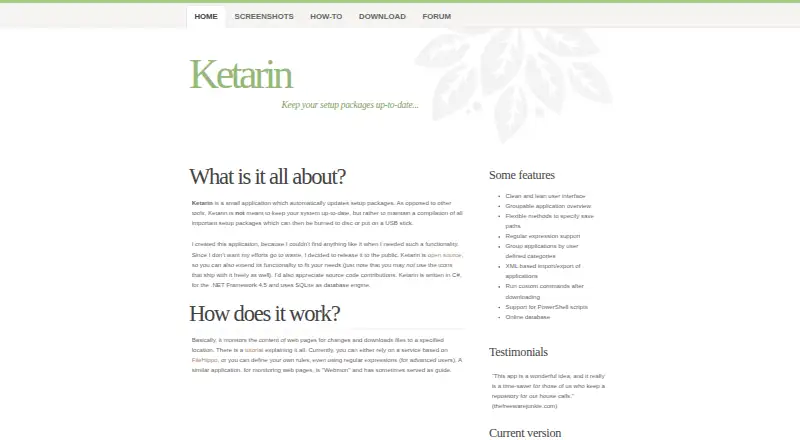
Ketarin is an open-source Windows desktop application for monitoring software download pages and maintaining current setup packages. It suits power users, administrators, and technical teams that need to collect installers locally, apply custom download logic, and keep installation files organized. The tool can monitor web pages for changes, download updated packages, and store files in specified locations. It is designed for installer maintenance rather than direct updates to software already installed on a computer.
Its main strength is the control it gives over custom workflows. Users can define download rules with regular expressions, use predefined setup instructions, copy files, and run custom commands after downloads. Silent installations and command-line options support repeatable deployment tasks, while batch, C#, and PowerShell scripts extend the workflow for more involved operations. Applications can be grouped into user-defined categories and installation lists, and profiles can be imported or exported as XML. These features make Ketarin a practical fit when standard update catalogs do not cover a particular application or download page.
Ketarin also fits portable maintenance workflows: it runs without installation and can use a database from a USB drive. Bulk operations, custom application support, and scheduled scans add useful range, with scheduled operation handled through command-line use. Its focus is deliberately narrow, however. The platform is Windows-only, and the documented integration is FileHippo. It also maintains setup packages rather than acting as a general installed-software updater. Choose Ketarin when custom rules, scripts, silent installs, and local installer storage matter more than a broad cross-platform catalog. Choose an alternative if you need macOS or Linux support, direct application updating, or a wider integrated ecosystem.
Your product? Our editors can test Ketarin in depth and publish a review, labelled as paid · from $149/mo →
Ketarin pricing
Ketarin fact sheet
| Free plan | Not verified |
|---|---|
| Paid from | Free |
| Operating systems | Windows-only |
| Silent installation | Yes |
| Bulk app updates | Yes |
| Custom app support | Yes |
| Portable version | Yes |
| Scheduled scans | Yes |
| Update rollback | Not verified |
| Deployment | Desktop |
| Platforms | Windows |
| Support | Community, Docs |
| Built for | Solo, Small business (editorial estimate) |
| Integrations | 1 integrations: FileHippo |
| Pricing | Open source |
| Website | ketarin.org |
| Facts checked | 21 Sep 2026 |
Ketarin integrations
Ketarin lists 1 integrations on its own site.
- FileHippo
Alternatives to Ketarin
- UniGetUIA free, broad package-management interface for bulk updates, automation, and backups.9.4
- Patch My PCA Microsoft-integrated patching platform with a free option and paid enterprise reporting.9.2
- Ninite ProA focused Windows patching tool with bulk actions, policies, reporting, and RMM integrations.9.0


See all Ketarin alternatives →
Used Ketarin? Be the first to review it
The editor score above is our own research. What this page doesn't have yet is a reader's view — what you used Ketarin for, what worked and what didn't. No stars are seeded and no review is paid for; an editor reads every one before it appears.
Write a reviewTwo minutes · verified accounts only · read by an editor before it appears
Featured on iTechGuides

Ketarin is listed in our Software Update Tools directory. Add the badge to your site — it links back to this page.
<a href="https://www.itechguides.com/products/ketarin/"><img src="https://www.itechguides.com/best/badge/ketarin.svg" alt="Featured on iTechGuides" width="230" height="46"></a>
Reviewed by iTechGuides Editors · Editorial team · Updated Oct 2026
Advertiser disclosure: iTechGuides is reader-supported. Vendors can pay for top positions in our rankings and for a place on other products' pages, and we may earn a commission when you click some links. Bought places stand at the number bought; this page and our disclosure say so. Paying vendors may get a fuller, more detailed review from our editors, and that review can change their score. How we rank.
Last updated · How we research and update