Kanvaz
Kanvaz: A broad local canvas for visual reference work, with no collaboration and limited export. Ranked #14 of 24 in Mood Board Software by our editors (6.1/10); pricing: Free plan; best for power users wanting a local open-source canvas.
At a glance
- Editor score6.1 / 10
- PricingFree plan
- Best forPower users wanting a local open-source canvas
- Free planYes
- Paid fromNone
- Collaboration levelNone
- Facts checked22 Sep 2026
Where it wins
- Supports images, video, audio, notes, URLs, files, and 3D models
- Combines typed connections, Map View, annotations, search, and templates
- Free, open source, offline, and available for Windows, macOS, and Linux
Where it doesn't
- No collaboration features for shared board editing
- Export is limited to the .kanvaztemplate format
- The broad feature set may be more than simple mood boards require
Our verdict on Kanvaz
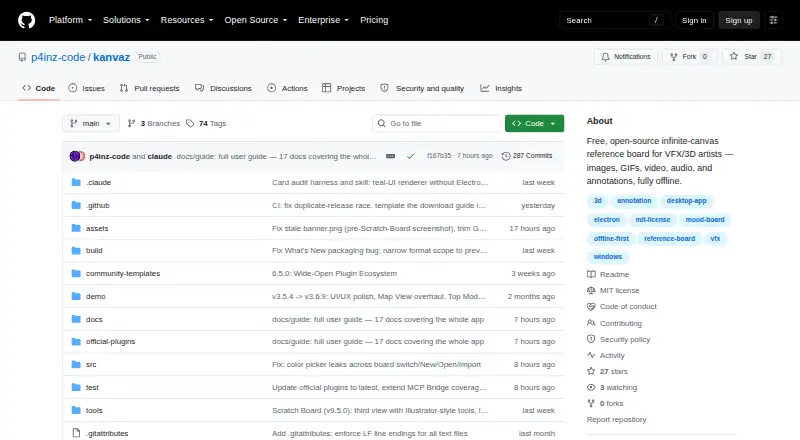
Kanvaz is a free, open-source desktop reference board for VFX artists, 3D artists, and other visual creatives. Its offline infinite canvas supports images, GIFs, video, audio, notes, colors, URLs, file references, and 3D models. Boards are stored locally, with multiple boards per file and no accounts, cloud storage, telemetry, or subscriptions. Windows, macOS, and Linux versions make it suitable for creators who want their reference library on a desktop rather than in a shared online workspace.
Its strongest area is the depth of the canvas itself. Typed directional connections and graph-based Map View let users relate references, while pen, highlighter, arrows, shapes, text stamps, pixel measurement, and eyedropper tools support visual analysis. Tags, live search, Smart Folders, and color search help organize larger boards. Presentation Mode provides a read-only, card-by-card display, and board templates can be created and exported. The plugin API adds official MCP Bridge, Template Maker, and Theme Creator plugins, with integrations for Claude Desktop and Claude Code.
Kanvaz is a strong fit for power users who value local storage, many media types, structured visual research, and an open-source workflow. Local profiles can be exported and imported, but the product is not designed for collaborative editing: collaboration is not included. Export is also narrow, with the documented template format set to .kanvaztemplate rather than a broader range of image or board formats. Choose Kanvaz when a detailed personal canvas, graph relationships, annotations, and offline access matter most. A simpler mood-board tool may suit users who need only quick arrangement, while shared teams or workflows centered on flexible image export should look elsewhere.
Kanvaz pricing
Kanvaz fact sheet
| Free plan | Yes |
|---|---|
| Paid from | None |
| Collaboration level | None |
| Guest access | Not verified |
| Brand kit | Not verified |
| Presentation mode | Yes |
| Export formats | .kanvaztemplate |
| Supported platforms | windows, macos, linux |
| Deployment | Desktop |
| Platforms | Windows, macOS, Linux |
| Support | Email, Community, Docs |
| Built for | Solo, Small business (editorial estimate) |
| Integrations | 2 integrations: Claude Desktop, Claude Code |
| Pricing | Free plan |
| Website | github.com |
| Facts checked | 22 Sep 2026 |
Kanvaz integrations
Kanvaz lists 2 integrations on its own site.
- Claude Desktop
- Claude Code
Alternatives to Kanvaz
- MilanoteA flexible, collaborative canvas for building rich mood boards across devices.9.1
- RayonA focused workspace for mood boards, CAD assets, presentations, and design collaboration.9.0
- MattoboardA focused web workspace for 3D interiors, materials, AI concepts, and client-ready specifications.8.1


Used Kanvaz? Be the first to review it
The editor score above is our own research. What this page doesn't have yet is a reader's view — what you used Kanvaz for, what worked and what didn't. No stars are seeded and no review is paid for; an editor reads every one before it appears.
Write a reviewTwo minutes · verified accounts only · read by an editor before it appears
Featured on iTechGuides

Kanvaz is listed in our Mood Board Software directory. Add the badge to your site — it links back to this page.
<a href="https://www.itechguides.com/products/kanvaz/"><img src="https://www.itechguides.com/best/badge/kanvaz.svg" alt="Featured on iTechGuides" width="230" height="46"></a>
Reviewed by iTechGuides Editors · Editorial team · Updated Sep 2026
Advertiser disclosure: iTechGuides is reader-supported. We may earn a commission when you click some links. How we rank.
Last updated · How we research and update