
Kanbanote
Kanbanote: A focused Kanban view for Evernote notes, with extra boards and tags on Premium. Ranked #25 of 28 in Kanban Software by our editors (6.1/10); pricing: Free plan; best for evernote users organizing notes on a kanban board.
At a glance
- Editor score6.1 / 10
- PricingFree plan
- Best forEvernote users organizing notes on a kanban board
- Free planYes
- Paid from$40/yr
- Facts checked23 Sep 2026
Where it wins
- Turns Evernote notes into draggable cards across lists and boards
- Lists can be based on Evernote notebooks or tags
- Connects with Gmail snoozed email through Snoozever, plus IFTTT and Zapier
Where it doesn't
- Free plan is limited to one board and one tag per list
- Free boards display advertisements
- Designed around Evernote rather than broader Kanban controls
Our verdict on Kanbanote
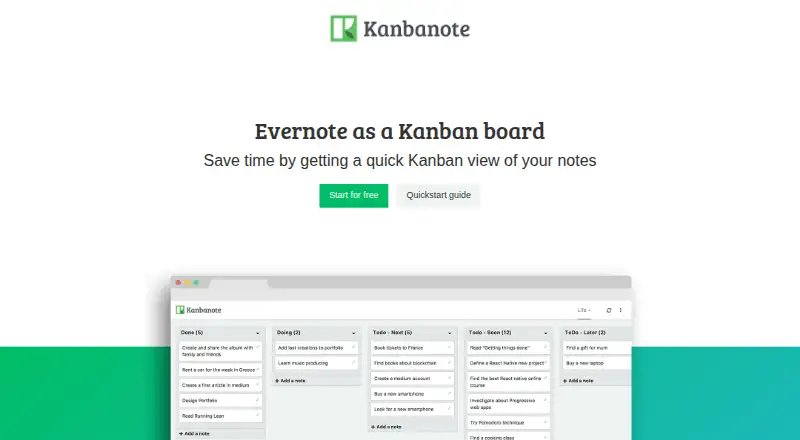
Kanbanote adds a Kanban view to Evernote for people who already organize tasks and notes there. Connect with Evernote credentials, then build lists from notebooks or tags and create, update, and drag notes between them. It is a focused fit for solo users and small teams who want to arrange existing Evernote content visually, rather than move into a separate project-management system. The vendor says it is optimized for Getting Things Done and The Secret Weapon method. It is available on the web and as a browser extension; Android support is described as a Progressive Web App.
The free plan includes one board, a maximum of one tag per list, and advertisements displayed on the board. Premium monthly costs $4.50 per month; Premium yearly costs $40 per year. Both paid plans provide unlimited boards, multi-tag support for lists, no advertisements, and priority on Kanbanote team support. This makes the free tier a narrow way to try a single-board workflow, while Premium is relevant if organizing across multiple boards or using several tags per list matters. Support is via email, with priority for Premium users.
The product's integrations extend the Evernote-centered workflow: Gmail snoozed email can be brought in through Snoozever, and Kanbanote integrates with IFTTT and Zapier. That gives users ways to connect the board with adjacent services, but the core remains managing Evernote notes. Choose it if Evernote is already where your tasks live and you want a draggable board view; look elsewhere if you need a broader Kanban tool with controls beyond organizing Evernote content.
Your product? Our editors can test Kanbanote in depth and publish a review, labelled as paid · from $149/mo →
Kanbanote pricing
All 3 Kanbanote plans and prices →
Kanbanote fact sheet
| Free plan | Yes |
|---|---|
| Paid from | $40/yr |
| WIP limits | Not verified |
| Automation rules | Not verified |
| Custom card fields | Not verified |
| Guest access | Not verified |
| Free board limit | 1 boards |
| Mobile apps | Android |
| Deployment | Cloud, Browser extension |
| Platforms | Web, Android |
| Support | |
| Built for | Solo, Small business (editorial estimate) |
| Integrations | 4 integrations: Evernote, Gmail (through Snoozever), IFTTT, Zapier |
| Pricing | Free plan (source) |
| Website | kanbanote.com |
| Facts checked | 23 Sep 2026 |
Kanbanote integrations
Kanbanote lists 4 integrations on its own site.
- Evernote
- Gmail (through Snoozever)
- IFTTT
- Zapier
Alternatives to Kanbanote
- TrelloA flexible Kanban workspace with automation, multiple views, and broad integrations.9.3
- Kanban ToolA Kanban-focused workspace with workflow controls, analytics, integrations, and self-hosted deployment.9.1
- KanbanFlowAffordable Kanban analytics with flexible workflows, but web-only access limits mobility.8.8


See all Kanbanote alternatives →
Used Kanbanote? Be the first to review it
The editor score above is our own research. What this page doesn't have yet is a reader's view — what you used Kanbanote for, what worked and what didn't. No stars are seeded and no review is paid for; an editor reads every one before it appears.
Write a reviewTwo minutes · verified accounts only · read by an editor before it appears
Featured on iTechGuides

Kanbanote is listed in our Kanban Software directory. Add the badge to your site — it links back to this page.
<a href="https://www.itechguides.com/products/kanbanote/"><img src="https://www.itechguides.com/best/badge/kanbanote.svg" alt="Featured on iTechGuides" width="230" height="46"></a>
Reviewed by iTechGuides Editors · Editorial team · Updated Oct 2026
Advertiser disclosure: iTechGuides is reader-supported. Vendors can pay for top positions in our rankings and for a place on other products' pages, and we may earn a commission when you click some links. Bought places stand at the number bought; this page and our disclosure say so. Paying vendors may get a fuller, more detailed review from our editors, and that review can change their score. How we rank.
Last updated · How we research and update