
KAGE Mastering
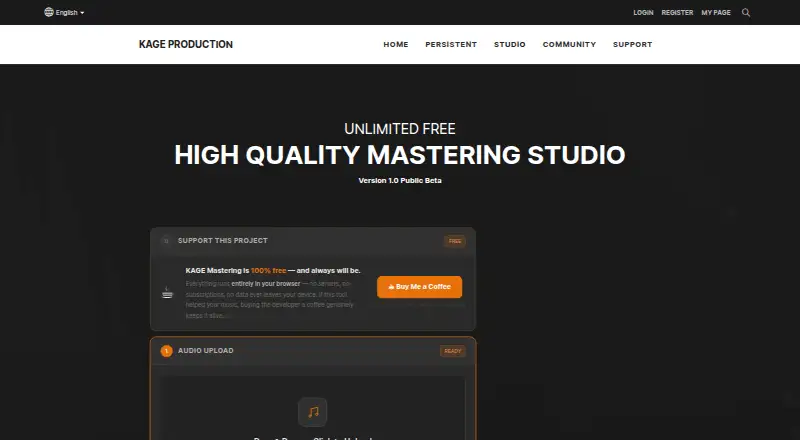
KAGE Mastering: A free local browser master with flexible controls and wide format support. Ranked #29 of 50 in AI Music Mastering Software by our editors (5.5/10); pricing: Free plan; best for free local mastering with many formats.
At a glance
- Editor score5.5 / 10
- PricingFree plan
- Best forFree local mastering with many formats
- Free planYes
- Paid fromFree
- Facts checked20 Sep 2026
Where it wins
- Unlimited free browser use with local device processing
- AI analysis, style presets, loudness targets, and manual controls
- Imports six formats and exports WAV, MP3, FLAC, or AIFF
Where it doesn't
- Web-only access with no desktop application
- No reference-track workflow or integrations
- Public beta status may not suit production-critical workflows
Our verdict on KAGE Mastering
KAGE Mastering is a browser-based AI mastering tool for musicians and music producers. Its processing happens locally in the browser, and the Free plan provides unlimited use without a subscription. Users can upload MP3, WAV, FLAC, AIFF, AAC, or OGG files, select a mastering style and intensity, choose loudness targets, and adjust EQ, compression, stereo width, and limiting. The tool also includes a post-mastering parametric EQ with up to 20 bands and exports to WAV, MP3, FLAC, or AIFF.
The strongest fit is for creators who want to master files without sending them to a server. KAGE Mastering states that files remain on the device during processing, which gives the workflow a clear local-processing focus. Its selectable loudness targets include streaming and broadcast presets, while AI audio analysis and style presets provide a starting point before manual adjustments. The combination of format support and detailed controls makes it suitable for users working across common production and delivery formats.
KAGE Mastering is less suitable for workflows built around reference tracks, integrations, or desktop software, since the listed platform is web only and those capabilities are not part of the product description. It is also identified as Version 1.0 Public Beta, so users with production-critical requirements may prefer a more established alternative. Pick KAGE Mastering for free, local, browser-based mastering with control over loudness, tone, dynamics, stereo width, and file format. Choose another tool if desktop coverage, connected workflows, or reference-based comparison is central to your process.
Your product? Our editors can test KAGE Mastering in depth and publish a review, labelled as paid · from $149/mo →
KAGE Mastering pricing
All 1 KAGE Mastering plans and prices →
KAGE Mastering fact sheet
| Free plan | Yes |
|---|---|
| Paid from | Free |
| Monthly masterings | Not verified |
| Reference track matching | Not verified |
| Stem mastering | Not verified |
| WAV export | Yes |
| Loudness targets | Yes |
| Input formats | MP3, WAV, FLAC, AIFF, AAC, OGG |
| Supported platforms | Web |
| Deployment | Cloud |
| Platforms | Web |
| Support | |
| Built for | Solo, Small business (editorial estimate) |
| Pricing | Free plan (source) |
| Website | kageproduction.com |
| Facts checked | 20 Sep 2026 |
Alternatives to KAGE Mastering
- iZotope OzoneA mature DAW mastering suite with broad control, references, and stem workflows.9.4
- Waves Online MasteringA focused web mastering service with reference matching, previews, and flexible credit plans.9.1
- MixeaA web mastering service for comparing many AI-generated master variations.9.0



See all KAGE Mastering alternatives →
Used KAGE Mastering? Be the first to review it
The editor score above is our own research. What this page doesn't have yet is a reader's view — what you used KAGE Mastering for, what worked and what didn't. No stars are seeded and no review is paid for; an editor reads every one before it appears.
Write a reviewTwo minutes · verified accounts only · read by an editor before it appears
Featured on iTechGuides

KAGE Mastering is listed in our AI Music Mastering Software directory. Add the badge to your site — it links back to this page.
<a href="https://www.itechguides.com/products/kage-mastering/"><img src="https://www.itechguides.com/best/badge/kage-mastering.svg" alt="Featured on iTechGuides" width="230" height="46"></a>
Reviewed by iTechGuides Editors · Editorial team · Updated Sep 2026
Advertiser disclosure: iTechGuides is reader-supported. Vendors can pay for top positions in our rankings and for a place on other products' pages, and we may earn a commission when you click some links. Bought places stand at the number bought; this page and our disclosure say so. Paying vendors may get a fuller, more detailed review from our editors, and that review can change their score. How we rank.
Last updated · How we research and update