
K3b
K3b: A broad Linux disc-burning suite with useful ISO creation and verification. Ranked #23 of 32 in ISO Creation Software by our editors (6.9/10); pricing: Free plan; best for linux optical-disc projects.
At a glance
- Editor score6.9 / 10
- PricingFree plan
- Best forLinux optical-disc projects
- Free planYes
- Paid fromFree
- Disc burningYes
- Founded1996
- Facts checked20 Sep 2026
Where it wins
- Burns CD, DVD, and Blu-ray projects across several formats
- Creates disc images and verifies written data after burning
- Free, open-source application distributed through Linux systems
Where it doesn't
- Available only on Linux
- ISO and CUE are the listed disc-image media types
- ISO creation is less developed than its broader disc-project features
Our verdict on K3b
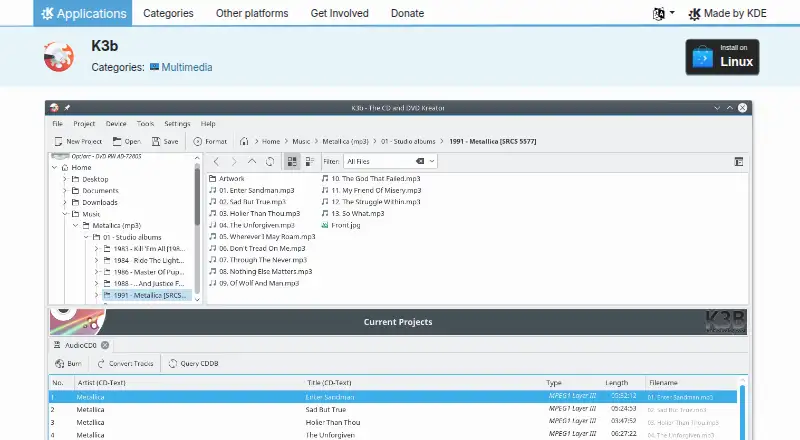
K3b is a free, open-source Linux desktop application for creating, burning, copying, and managing optical-disc projects. It supports CD, DVD, and Blu-ray media, with project types covering audio, data, video, multisession, and mixed-mode discs. It also serves users who need to erase rewritable media, format DVDs, rip audio CDs, add or remove files from data projects, create disc images for later burning, or verify written data after a burn. Its intended audience is Linux users working with physical optical media and related disc images.
Breadth is K3b's clearest strength. The application combines disc authoring, copying, rewritable-media management, audio-CD ripping, and written-data verification in one desktop tool. Its image workflow supports ISO and CUE media types, while its broader project support includes both standard and mixed-mode discs. That makes it a practical fit for Linux optical-disc projects that involve more than simply writing an existing image. Users focused on everyday CD, DVD, or Blu-ray workflows should find the feature coverage more relevant than a narrowly scoped ISO utility.
The trade-off is that K3b's strongest coverage is disc-project management rather than deep ISO manipulation. The published product positioning describes ISO creation, but the verified depth is more limited than the surrounding burning and authoring features. K3b is also Linux-only, so it suits Linux desktop environments rather than mixed-platform teams. Choose it for a free, open-source suite that handles varied optical media tasks and verifies written data; choose another category tool if the primary need is advanced image editing, format conversion, bootable-media creation, or checksum-focused workflows.
Your product? Our editors can test K3b in depth and publish a review, labelled as paid · from $99/mo →
K3b pricing
K3b fact sheet
| Free plan | Yes |
|---|---|
| Paid from | Free |
| Disc burning | Yes |
| Image editing | Not verified |
| Image conversion | Not verified |
| Bootable media | Not verified |
| Image formats | ISO, CUE |
| Operating systems | Linux |
| Checksum verification | Not verified |
| Deployment | Desktop |
| Platforms | Linux |
| Support | Community, Docs |
| Built for | Solo, Small business (editorial estimate) |
| Pricing | Free plan |
| Website | apps.kde.org |
| Facts checked | 20 Sep 2026 |
Alternatives to K3b
- Open Burning SuiteA broad, free toolkit for creating, converting, burning, and verifying disc images.9.4
- Disc StudioA broad free ISO utility for Windows users who need local image and boot-media control.9.2
- AnyBurnA broad free Windows toolkit for ISO creation, editing, conversion, and burning.9.0



Used K3b? Be the first to review it
The editor score above is our own research. What this page doesn't have yet is a reader's view — what you used K3b for, what worked and what didn't. No stars are seeded and no review is paid for; an editor reads every one before it appears.
Write a reviewTwo minutes · verified accounts only · read by an editor before it appears
Featured on iTechGuides

K3b is listed in our ISO Creation Software directory. Add the badge to your site — it links back to this page.
<a href="https://www.itechguides.com/products/k3b/"><img src="https://www.itechguides.com/best/badge/k3b.svg" alt="Featured on iTechGuides" width="230" height="46"></a>
Reviewed by iTechGuides Editors · Editorial team · Updated Oct 2026
Advertiser disclosure: iTechGuides is reader-supported. Vendors can pay for top positions in our rankings and for a place on other products' pages, and we may earn a commission when you click some links. Bought places stand at the number bought; this page and our disclosure say so. Paying vendors may get a fuller, more detailed review from our editors, and that review can change their score. How we rank.
Last updated · How we research and update