iWriteMusic
iWriteMusic: A mobile-first notation app for multi-part scores, with PDF, JPG, and MIDI export. Ranked #28 of 38 in Music Notation Software by our editors (6.4/10); pricing: Free plan; best for mobile users writing multi-part scores.
At a glance
- Editor score6.4 / 10
- PricingFree plan
- Best forMobile users writing multi-part scores
- Free planYes
- DeploymentDesktop
- Facts checked19 Sep 2026
Where it wins
- Writes multi-track, multi-voice scores with percussion, chords, and lyrics
- Automatically creates and manages parts; supports transposition
- Playback mixer and PDF, JPG, and Standard MIDI export
Where it doesn't
- No MusicXML export in the current documented version
- Free / SE limits song storage and omits Standard MIDI export
- Separate iPhone and iPad apps have different feature sets
Our verdict on iWriteMusic
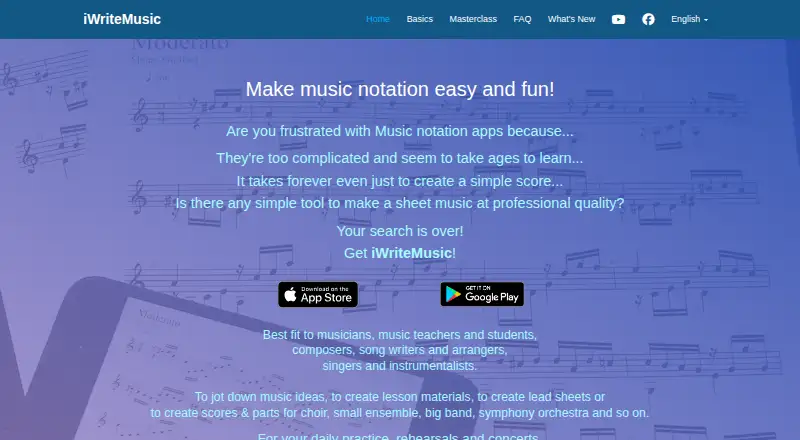
iWriteMusic is music notation software for musicians, teachers, students, composers, songwriters, arrangers, singers, and instrumentalists who want to write and hear scores on mobile devices. It supports multiple tracks and voices, percussion and drum notation, chord symbols, lyrics, and changes to time, key, clef, and tempo. Separate iPhone and iPad apps are available, along with an Android version; the iPad app can run on Apple Silicon Macs. Its mobile focus suits composing and arranging away from a traditional desktop workflow.
For multi-part writing, iWriteMusic can automatically create parts and manage them alongside the score. Song and partial transposition, layout controls, and AirPrint printing help with preparing notation for performance or teaching. A playback mixer offers solo, mute, voice selection, looping, and swing options. Exports include PDF and JPG sheet music and Standard MIDI files; GarageBand is the listed integration. This combination will appeal to users who need notation, playback, and shareable outputs within a mobile-oriented tool.
The free / SE version has feature limitations, limited song storage, and no Standard MIDI export. The paid editions differ by device: iWriteMusic is the iPhone app, while iWriteMusic Pro is the iPad app and includes automatically generated parts. Pricing varies by platform and region, and the published starting price is 9.99. The current documented version is 3.6.12 and does not include MusicXML export, so interoperability is a constraint for users moving notation between score-editing applications. Choose iWriteMusic for mobile multi-part work and MIDI/PDF/JPG output; consider another notation tool if MusicXML exchange is essential.
Your product? Our editors can test iWriteMusic in depth and publish a review, labelled as paid · from $149/mo →
iWriteMusic pricing
All 3 iWriteMusic plans and prices →
iWriteMusic fact sheet
| Free plan | Yes |
|---|---|
| Paid from | Not verified |
| Deployment | Desktop |
| MusicXML support | No |
| MIDI support | Yes |
| Parts extraction | Yes |
| Tablature support | Not verified |
| Collaboration features | Not verified |
| Deployment | Mobile, Desktop |
| Platforms | iOS, Android, macOS |
| Integrations | 1 integrations: GarageBand |
| Pricing | Free plan (source) |
| Website | iwritemusicapp.com |
| Facts checked | 19 Sep 2026 |
iWriteMusic integrations
iWriteMusic lists 1 integrations on its own site.
- GarageBand
Alternatives to iWriteMusic
- DoricoA full notation and engraving workflow, with free editions and a 60-day trial.9.3
- SibeliusSibelius combines detailed score creation with browser-based sharing and review.9.2
- MuseScore StudioA capable desktop notation editor with MusicXML, MIDI, parts, playback, and exports at no cost.9.1


See all iWriteMusic alternatives →
Used iWriteMusic? Be the first to review it
The editor score above is our own research. What this page doesn't have yet is a reader's view — what you used iWriteMusic for, what worked and what didn't. No stars are seeded and no review is paid for; an editor reads every one before it appears.
Write a reviewTwo minutes · verified accounts only · read by an editor before it appears
Featured on iTechGuides

iWriteMusic is listed in our Music Notation Software directory. Add the badge to your site — it links back to this page.
<a href="https://www.itechguides.com/products/iwritemusic/"><img src="https://www.itechguides.com/best/badge/iwritemusic.svg" alt="Featured on iTechGuides" width="230" height="46"></a>
Reviewed by iTechGuides Editors · Editorial team · Updated Oct 2026
Advertiser disclosure: iTechGuides is reader-supported. Vendors can pay for top positions in our rankings and for a place on other products' pages, and we may earn a commission when you click some links. Bought places stand at the number bought; this page and our disclosure say so. Paying vendors may get a fuller, more detailed review from our editors, and that review can change their score. How we rank.
Last updated · How we research and update