
InTrial
InTrial: A mobile-focused trial presentation suite for exhibits, video, transcripts, and annotations. Ranked #14 of 24 in Legal Trial Presentation Software by our editors (6.3/10); pricing: Pricing on request; best for mobile-first presentation teams.
At a glance
- Editor score6.3 / 10
- PricingPricing on request
- Best forMobile-first presentation teams
- Free planNo
- Video playbackYes
- Facts checked21 Sep 2026
Where it wins
- Combines exhibit presentation, annotation, video, and transcript tools
- Imports evidence from iPad storage, Dropbox, email, photos, and videos
- Supports dual-view presentation and Wi-Fi, Apple TV, or cable workflows
Where it doesn't
- Broader solution access requires a subscription and activation code
- Pricing requires contacting sales
- The workflow is centered on iPad alongside web and Windows tools
Our verdict on InTrial
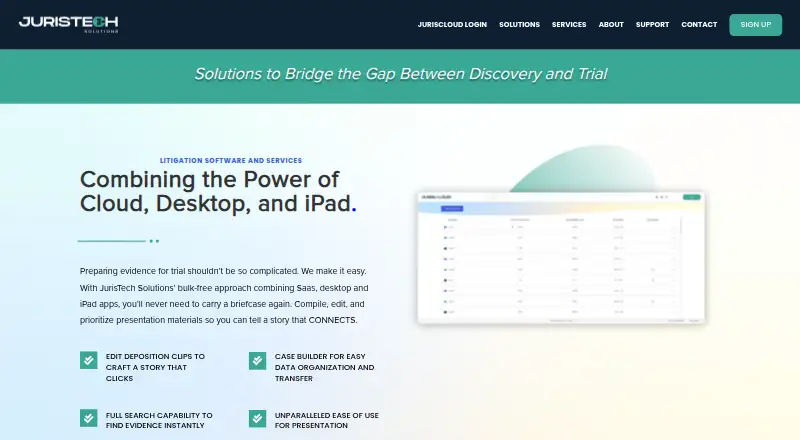
InTrial is litigation presentation software from JurisTech Solutions LLC for attorneys and litigation teams. It runs on iPad and works with JurisCloud and Windows-based JurisTools to organize, transfer, search, and present trial materials. Teams can manage exhibits, documents, photos, videos, and deposition transcripts, then highlight, redact, annotate, and present selected evidence. Side-by-side and dual-view presentation options support courtroom display workflows.
According to the vendor’s pricing information, InTrial uses a contact-sales model rather than published plan pricing. InTrial Pro is listed as a free iPad app, while access to the broader solution requires a subscription and activation code. The published product details describe the wider offering as part of a subscription-based suite that includes web and Windows applications. For teams evaluating fit, the important consideration is how the iPad app, JurisCloud, and JurisTools align with existing case-management and presentation workflows.
The product’s strongest focus is evidence presentation across formats and sources. Users can import files from iPad storage, flash drives, Dropbox, photos, videos, and email; synchronize deposition transcripts with video; create and restore cases; and present modified video clips. Screen sharing is available through Wi-Fi, Apple TV, or cable-connected workflows. InTrial suits legal teams that want a mobile-centered tool covering exhibits, video, transcripts, and annotations in one workflow. Teams seeking a standalone free solution or published plan comparisons should consider the subscription and activation requirements before choosing it.
InTrial pricing
InTrial fact sheet
| Free plan | No |
|---|---|
| Paid from | Not verified |
| Exhibit management | Yes |
| Video playback | Yes |
| Evidence annotation | Yes |
| Transcript support | Yes |
| Offline access | Not verified |
| Supported platforms | Multi-platform |
| Deployment | Cloud, Desktop, Mobile |
| Platforms | Web, Windows, iOS |
| Support | Email, Docs |
| Built for | Small business, Mid-market, Enterprise (editorial estimate) |
| Integrations | 2 integrations: Dropbox, Apple TV |
| Pricing | Pricing on request |
| Website | juristechsolutions.com |
| Facts checked | 21 Sep 2026 |
InTrial integrations
InTrial lists 2 integrations on its own site.
- Dropbox
- Apple TV
Alternatives to InTrial
- eTrialToolkitA full-service trial platform for evidence, transcripts, exhibits, and virtual hearings.9.6
- TrialPadA full-featured iPad and Mac trial presentation suite for courtroom and remote work.9.0
- Case CrafterA deep case-preparation suite for teams that need courtroom presentation and offline access.8.3


See all InTrial alternatives →
Used InTrial? Be the first to review it
The editor score above is our own research. What this page doesn't have yet is a reader's view — what you used InTrial for, what worked and what didn't. No stars are seeded and no review is paid for; an editor reads every one before it appears.
Write a reviewTwo minutes · verified accounts only · read by an editor before it appears
Featured on iTechGuides

InTrial is listed in our Legal Trial Presentation Software directory. Add the badge to your site — it links back to this page.
<a href="https://www.itechguides.com/products/intrial/"><img src="https://www.itechguides.com/best/badge/intrial.svg" alt="Featured on iTechGuides" width="230" height="46"></a>
Reviewed by iTechGuides Editors · Editorial team · Updated Sep 2026
Advertiser disclosure: iTechGuides is reader-supported. We may earn a commission when you click some links. How we rank.
Last updated · How we research and update