
Interior AI
Interior AI: A broad AI rendering toolkit for professionals who need high-volume visual concepts. Ranked #12 of 26 in AI Interior Design Generators by our editors (6.6/10); pricing: From $29/mo (annual); best for high-volume professional AI rendering.
At a glance
- Editor score6.6 / 10
- PricingFrom $29/mo (annual)
- Best forHigh-volume professional AI rendering
- Free planNo
- Paid from$29/mo
- Photo uploadYes
- Facts checked20 Sep 2026
Where it wins
- Supports room redesign, virtual staging, and selective edits
- Includes Sketch2Image, SketchUp rendering, videos, and outdoor redesign
- Offers Google Lens and SketchUp integrations
Where it doesn't
- No free plan for initial evaluation
- Monthly plans range from $49 to $199
- The stated generation limit is 1,000
Our verdict on Interior AI
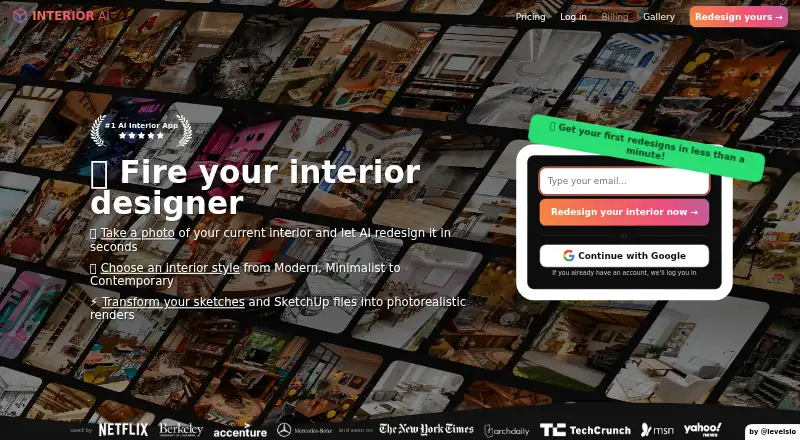
Interior AI is a web-based AI interior design tool for homeowners, designers, and real-estate professionals. It turns uploaded room photos into redesigned interiors using written design prompts and supports virtual staging for vacant properties. Its scope extends beyond room concepts to wall painting, lighting changes, outdoor and garden redesign, Sketch2Image rendering, SketchUp-to-photorealistic rendering, 3D walkthroughs, and flythrough videos. Commercial-use licensing is included with the plans.
Pricing is divided into Pro, Premium, and Ultra tiers, with monthly and annual billing. Pro costs $49 per month or $349 per year and includes the Flux model, low-quality renders, room photo uploads, design prompts, and up to four rooms in parallel. Premium costs $99 per month or $599 per year, adding the Hyper Realism model, medium-quality renders, design editing, virtual staging, and interior upscaling. Ultra costs $199 per month or $1,199 per year, with ultra-quality renders, unlimited render storage, priority rendering, and a dedicated rendering server. The published plans show different rendering-quality levels rather than a single uniform output tier.
The product’s strongest distinction is breadth. A user can move from a room photo or written prompt to selective edits, staging, SketchUp rendering, outdoor concepts, or presentation-oriented walkthrough videos. Google Lens and SketchUp integrations also support a wider design workflow than a tool focused only on room restyling. That range suits professionals producing many visual options across interiors, property marketing, and early design communication. It is less suitable for buyers who want a free starting tier, a narrowly focused room editor, or a simple low-cost subscription. The web-only platform and stated 1,000-generation limit are also important considerations for teams planning sustained high-volume production.
Interior AI pricing
All 3 Interior AI plans and prices →
Interior AI fact sheet
| Free plan | No |
|---|---|
| Paid from | $29/mo |
| Photo upload | Yes |
| Text prompting | Yes |
| Virtual staging | Yes |
| Room editing tools | Yes |
| Output resolution | Not verified |
| Generation limit | 1000 /mo |
| Deployment | Cloud |
| Platforms | Web |
| Support | Docs |
| Built for | Solo, Small business, Mid-market (editorial estimate) |
| Integrations | 2 integrations: Google Lens, SketchUp |
| Pricing | From $29/mo (annual) (source) |
| Website | interiorai.com |
| Facts checked | 20 Sep 2026 |
Interior AI integrations
Interior AI lists 2 integrations on its own site.
- Google Lens
- SketchUp
Alternatives to Interior AI
- HomestylerA broad home-design workspace combining AI visualization, planning, rendering, and virtual tours.9.0
- Spacely AIA broad AI workspace for turning interior concepts into editable, presentation-ready visuals.8.5
- Planner 5DA cross-platform planner that combines AI layouts with detailed 2D and 3D design tools.8.4


See all Interior AI alternatives →
Used Interior AI? Be the first to review it
The editor score above is our own research. What this page doesn't have yet is a reader's view — what you used Interior AI for, what worked and what didn't. No stars are seeded and no review is paid for; an editor reads every one before it appears.
Write a reviewTwo minutes · verified accounts only · read by an editor before it appears
Featured on iTechGuides

Interior AI is listed in our AI Interior Design Generators directory. Add the badge to your site — it links back to this page.
<a href="https://www.itechguides.com/products/interior-ai/"><img src="https://www.itechguides.com/best/badge/interior-ai.svg" alt="Featured on iTechGuides" width="230" height="46"></a>
Reviewed by iTechGuides Editors · Editorial team · Updated Sep 2026
Advertiser disclosure: iTechGuides is reader-supported. We may earn a commission when you click some links. How we rank.
Last updated · How we research and update