
InqScribe
InqScribe: A focused desktop tool for transcript-linked notes, captions, and frame-accurate review. Ranked #30 of 34 in Video Annotation Software by our editors (6.0/10); pricing: Free plan · 7-day trial; best for transcription-linked video notes.
At a glance
- Editor score6.0 / 10
- PricingFree plan · 7-day trial
- Best forTranscription-linked video notes
- Free planYes
- Paid from$10 one-time
- Frame-accurate markingYes
- Founded2001 · Chicago, Illinois, United States
- Facts checked20 Sep 2026
Where it wins
- Time-coded notes with clickable navigation and frame-by-frame playback
- Local AI transcription with unlimited use on the perpetual license
- Exports to HTML, XML, SRT, SCC, STL, and WebVTT
Where it doesn't
- Desktop-only support for Windows and macOS
- Focused on transcription and annotation rather than collaborative review
- The 10-day license limits access to a short usage period
Our verdict on InqScribe
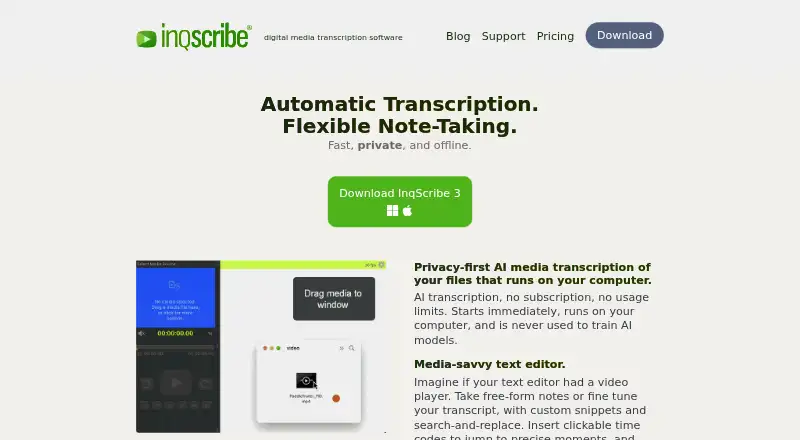
InqScribe is desktop software for reviewing, annotating, transcribing, and captioning digital audio and video. It is designed for researchers, translators, filmmakers, journalists, transcriptionists, educators, and other professionals who need notes linked to specific moments in media. Time-coded transcripts, clickable timecodes, frame-by-frame playback, keyboard shortcuts, customizable snippets, and USB foot-pedal control support detailed review workflows on Windows and macOS.
Pricing centers on one-time licenses. The Perpetual License costs $79 and includes no expiration, free updates for two years, and unlimited AI speech-to-text transcription. The 10-Day License costs $10, supports use for 10 days, and does not renew. A 7-Day Trial is available through the app, with one trial per user. The Free Viewer allows users to view InqScribe transcripts and other caption formats. This structure suits occasional projects as well as professionals who want a longer-term desktop license without recurring access charges.
Its strongest distinction is the connection between media playback, transcription, and export. Automatic local AI speech-to-text transcription keeps that workflow centered on the desktop, while exports cover HTML, plain text, XML, SRT, SCC, STL, and WebVTT. Support for common audio and video formats, plus foot-pedal playback control, adds practical flexibility for transcription and captioning work. InqScribe is a good fit when precise, time-coded notes and transcript output are the priority. Teams seeking a broader collaborative video-review or machine-learning video-labeling platform should consider a more specialized alternative.
Your product? Our editors can test InqScribe in depth and publish a review, labelled as paid · from $149/mo →
InqScribe pricing
All 4 InqScribe plans and prices →
InqScribe fact sheet
| Free plan | Yes |
|---|---|
| Paid from | $10 one-time |
| Frame-accurate marking | Yes |
| Drawing annotations | Not verified |
| Custom labels or fields | Not verified |
| Review workflow | Not verified |
| Dataset export | Yes |
| Video length limit | Not verified |
| Free trial | 7 days |
| Deployment | Desktop |
| Platforms | Windows, macOS |
| Support | Tickets, Docs |
| Built for | Solo, Small business, Mid-market, Enterprise (editorial estimate) |
| Pricing | Free plan · 7-day trial (source) |
| Website | inqscribe.com |
| Facts checked | 20 Sep 2026 |
Alternatives to InqScribe
- Frame.ioFrame-accurate review, approvals, version comparison, and production-tool integrations.9.3
- KollaborateA mature review hub with strong editing-app integrations and low-cost entry pricing.9.1
- FrameQueryA strong choice for AI-assisted footage search, precise review, and editing exports.9.0



See all InqScribe alternatives →
Also Ranked In
InqScribe is ranked in 2 of our directories.
Used InqScribe? Be the first to review it
The editor score above is our own research. What this page doesn't have yet is a reader's view — what you used InqScribe for, what worked and what didn't. No stars are seeded and no review is paid for; an editor reads every one before it appears.
Write a reviewTwo minutes · verified accounts only · read by an editor before it appears
Featured on iTechGuides

InqScribe is listed in our Video Annotation Software directory. Add the badge to your site — it links back to this page.
<a href="https://www.itechguides.com/products/inqscribe/"><img src="https://www.itechguides.com/best/badge/inqscribe.svg" alt="Featured on iTechGuides" width="230" height="46"></a>
Reviewed by iTechGuides Editors · Editorial team · Updated Oct 2026
Advertiser disclosure: iTechGuides is reader-supported. Vendors can pay for top positions in our rankings and for a place on other products' pages, and we may earn a commission when you click some links. Bought places stand at the number bought; this page and our disclosure say so. Paying vendors may get a fuller, more detailed review from our editors, and that review can change their score. How we rank.
Last updated · How we research and update