ImgBurn
ImgBurn: A free choice for creating, burning, verifying, and queueing optical-disc images. Ranked #9 of 32 in ISO Creation Software by our editors (8.3/10); pricing: Free plan; best for free optical-disc image workflows.
At a glance
- Editor score8.3 / 10
- PricingFree plan
- Best forFree optical-disc image workflows
- Free planYes
- Paid fromFree
- Disc burningYes
- Facts checked20 Sep 2026
Where it wins
- Creates, writes, verifies, and compares optical-disc images
- Supports bootable media and DVD, HD DVD, and Blu-ray Video discs
- Queues multiple burns and logs MD5 hash values
Where it doesn't
- Does not directly edit ISO files
- Does not provide direct image-format conversion
- Linux support runs through Wine
Our verdict on ImgBurn
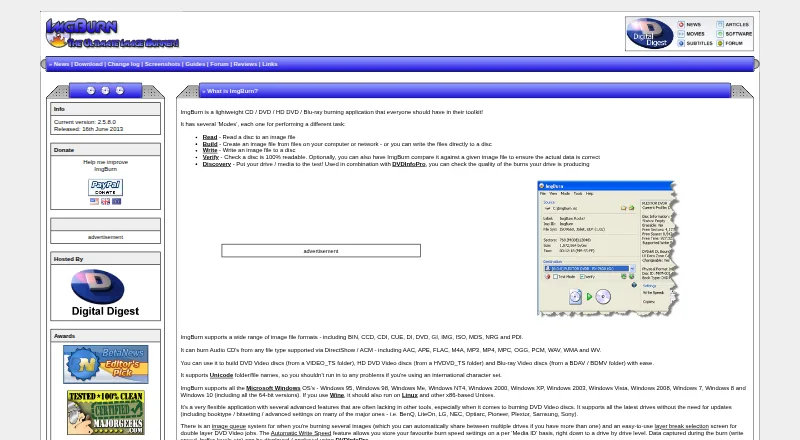
ImgBurn is free optical-disc image software from LIGHTNING UK! for users who need to read discs into image files, build images from local or network files and folders, write images to optical media, and verify the result. Its workflows cover CD, DVD, HD DVD, and Blu-ray, with support for formats including BIN, CCD, CDI, CUE, DI, DVD, GI, IMG, ISO, MDS, NRG, and PDI. It is suited to optical-media creation, backup, bootable-disc preparation, and video-disc authoring rather than general image management.
The published offering is freeware, so there are no paid tiers to compare. Its feature set centers on the complete disc workflow: image creation, disc writing, readability verification, comparison of burned media with an image, bootable discs, DVD Video, HD DVD Video, and Blu-ray Video discs. Users can queue multiple images for burning, calculate and log MD5 hash values, and configure layer breaks for dual-layer DVD video jobs. That breadth makes ImgBurn a practical fit for focused optical-disc work without a subscription plan.
Platform fit is more limited than the format support. ImgBurn runs on Windows, while Linux and other x86 Unix systems are supported through Wine; DVDInfoPro and Wine are listed integrations. The vendor’s website lists version 2.5.8.0, released in June 2013. ImgBurn does not directly edit ISO files or provide image-format conversion, so users who need to modify existing images or convert between formats should choose a tool built for those tasks instead. Pick ImgBurn for free creation, burning, verification, and bootable-media workflows; avoid it when editing or conversion is central.
Your product? Our editors can test ImgBurn in depth and publish a review, labelled as paid · from $149/mo →
ImgBurn pricing
ImgBurn fact sheet
| Free plan | Yes |
|---|---|
| Paid from | Free |
| Disc burning | Yes |
| Image editing | No |
| Image conversion | No |
| Bootable media | Yes |
| Image formats | BIN, CCD, CDI, CUE, DI, DVD, GI, IMG, ISO, MDS, NRG, PDI |
| Operating systems | Cross-platform |
| Checksum verification | Yes |
| Deployment | Desktop |
| Platforms | Windows, Linux |
| Support | Community |
| Built for | Solo, Small business (editorial estimate) |
| Integrations | 2 integrations: DVDInfoPro, Wine |
| Pricing | Free plan |
| Website | imgburn.com |
| Facts checked | 20 Sep 2026 |
ImgBurn integrations
ImgBurn lists 2 integrations on its own site.
- DVDInfoPro
- Wine
Alternatives to ImgBurn
- Open Burning SuiteA broad, free toolkit for creating, converting, burning, and verifying disc images.9.4
- Disc StudioA broad free ISO utility for Windows users who need local image and boot-media control.9.2
- AnyBurnA broad free Windows toolkit for ISO creation, editing, conversion, and burning.9.0


See all ImgBurn alternatives →
Also Ranked In
ImgBurn is ranked in 2 of our directories.
Used ImgBurn? Be the first to review it
The editor score above is our own research. What this page doesn't have yet is a reader's view — what you used ImgBurn for, what worked and what didn't. No stars are seeded and no review is paid for; an editor reads every one before it appears.
Write a reviewTwo minutes · verified accounts only · read by an editor before it appears
Featured on iTechGuides

ImgBurn is listed in our ISO Creation Software directory. Add the badge to your site — it links back to this page.
<a href="https://www.itechguides.com/products/imgburn/"><img src="https://www.itechguides.com/best/badge/imgburn.svg" alt="Featured on iTechGuides" width="230" height="46"></a>
Reviewed by iTechGuides Editors · Editorial team · Updated Oct 2026
Advertiser disclosure: iTechGuides is reader-supported. Vendors can pay for top positions in our rankings and for a place on other products' pages, and we may earn a commission when you click some links. Bought places stand at the number bought; this page and our disclosure say so. Paying vendors may get a fuller, more detailed review from our editors, and that review can change their score. How we rank.
Last updated · How we research and update