
Image2Pixel Minecraft Converter
Image2Pixel Minecraft Converter: A free Java blueprint generator with precise palettes, coordinates, and schematic export. Ranked #13 of 22 in Minecraft Pixel Art Generators by our editors (6.0/10); pricing: Free plan; best for compact Java blueprints.
At a glance
- Editor score6.0 / 10
- PricingFree plan
- Best forCompact Java blueprints
- Free planYes
- Paid fromNone
- Minecraft editionsJava
- Facts checked20 Sep 2026
Where it wins
- CIELAB color matching and twelve selectable block palettes
- Coordinate grids, zoomable blueprints, and material exports
- WorldEdit .schem export with Minecraft version filtering
Where it doesn't
- Build sizes are limited to 32×128 blocks
- Supports Java-oriented workflows rather than Bedrock editions
- No native .litematic export or 3D preview
Our verdict on Image2Pixel Minecraft Converter
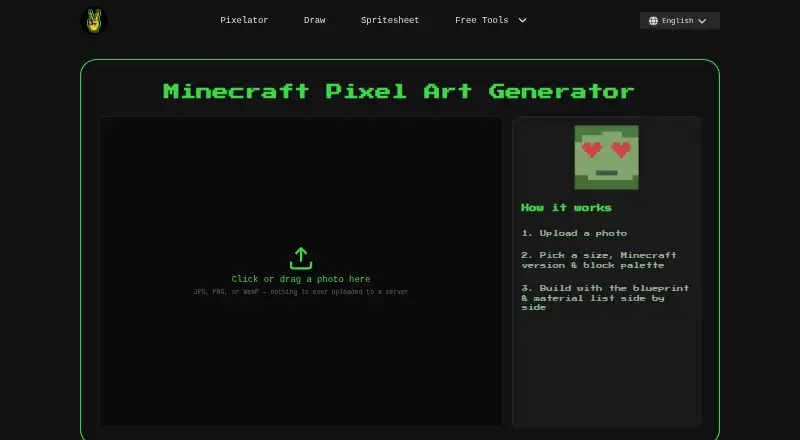
Image2Pixel Minecraft Converter turns JPG, PNG, and WebP uploads into Minecraft pixel-art build plans in a web browser. It is aimed at Java Edition players who want compact, image-based blueprints rather than a full 3D building environment. Users select a build size, Minecraft version, and block palette, then receive a map-art PNG, blueprint PNG, material list, material spreadsheet, and schematic output. The service is free, requires no signup, and processes images client-side without uploading them to a server.
The strongest part of the workflow is its control over color and materials. CIELAB-based color matching supports more deliberate image conversion, while twelve palettes include Survival-Friendly and single-material options. Minecraft version filtering helps narrow the available blocks, and the zoomable blueprint includes gridlines and coordinates for following the plan. Material information can be copied or exported in TXT and CSV formats, giving builders a practical reference alongside the visual blueprint.
Its fit is narrower when projects require larger builds, 3D inspection, or broader edition support. Selectable sizes run from 32 to 128×128 blocks, so it suits compact Java map-art and pixel-art plans better than large murals. WorldEdit .schem export and the Litematica converter integration support Java-oriented workflows, but native .litematic export is not available. Choose Image2Pixel for a focused, free browser converter with fixed palette control and detailed material outputs; choose another tool if you need a 3D preview, larger dimensions, or a native Litematica file.
Image2Pixel Minecraft Converter pricing
Image2Pixel Minecraft Converter fact sheet
| Free plan | Yes |
|---|---|
| Paid from | None |
| Input type | Image |
| Minecraft editions | Java |
| Output type | Schematic |
| Palette control | Fixed |
| Maximum resolution | Not verified |
| 3D build preview | No |
| Export formats | PNG, CSV, TXT, SCHEM |
| Deployment | Cloud |
| Platforms | Web |
| Support | Docs |
| Built for | Solo, Small business (editorial estimate) |
| Integrations | 2 integrations: WorldEdit, Litematica converter |
| Pricing | Free plan |
| Website | image2pixel.com |
| Facts checked | 20 Sep 2026 |
Image2Pixel Minecraft Converter integrations
Image2Pixel Minecraft Converter lists 2 integrations on its own site.
- WorldEdit
- Litematica converter
Alternatives to Image2Pixel Minecraft Converter
- Minecraft Pixel Art GeneratorA free browser tool that combines AI layouts, editing, guides, calculations, and exports.9.0
- MinecraftArtA free web converter with editing, 3D previews, and WorldEdit-friendly exports.8.2
- MC Build Tools Pixel Art GeneratorA free browser generator with deep editing and export support for Java and Bedrock.7.7



See all Image2Pixel Minecraft Converter alternatives →
Used Image2Pixel Minecraft Converter? Be the first to review it
The editor score above is our own research. What this page doesn't have yet is a reader's view — what you used Image2Pixel Minecraft Converter for, what worked and what didn't. No stars are seeded and no review is paid for; an editor reads every one before it appears.
Write a reviewTwo minutes · verified accounts only · read by an editor before it appears
Featured on iTechGuides

Image2Pixel Minecraft Converter is listed in our Minecraft Pixel Art Generators directory. Add the badge to your site — it links back to this page.
<a href="https://www.itechguides.com/products/image2pixel-minecraft-converter/"><img src="https://www.itechguides.com/best/badge/image2pixel-minecraft-converter.svg" alt="Featured on iTechGuides" width="230" height="46"></a>
Reviewed by iTechGuides Editors · Editorial team · Updated Sep 2026
Advertiser disclosure: iTechGuides is reader-supported. We may earn a commission when you click some links. How we rank.
Last updated · How we research and update