
IK Multimedia ReSing
IK Multimedia ReSing: A flexible local voice-conversion tool for producers working inside compatible DAWs. Ranked #13 of 29 in AI Voice Conversion Software by our editors (7.9/10); pricing: Free plan; best for vocal transformation inside compatible DAWs.
At a glance
- Editor score7.9 / 10
- PricingFree plan
- Best forVocal transformation inside compatible DAWs
- Free planYes
- Voice cloningYes
- Founded1996 · Modena, Italy
- Facts checked20 Sep 2026
Where it wins
- Creates custom voice models locally on the computer
- Supports timbre, phonetic, expression, transpose and stacking controls
- Works standalone or as a plug-in with five named DAWs
Where it doesn't
- Supports only Windows and macOS
- Advanced tiers have model and import limits
- The listed paid plans cost $129.99 one-time
Our verdict on IK Multimedia ReSing
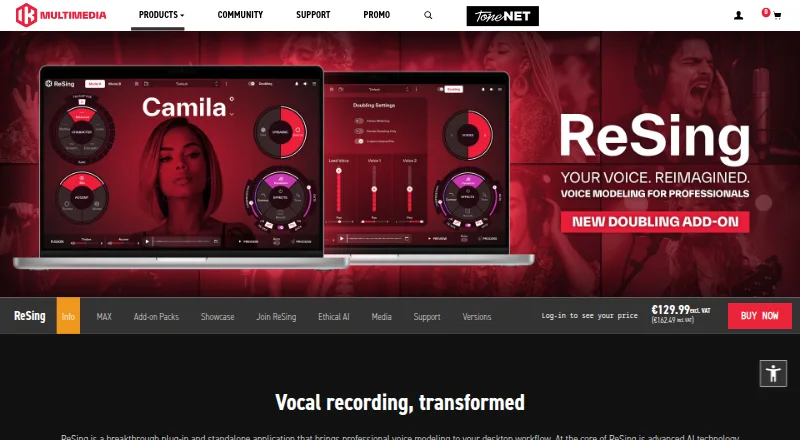
IK Multimedia ReSing is desktop AI voice and instrument conversion software for music producers and creators. It runs as a standalone application or plug-in, transforming vocal and instrumental performances through voice and instrument models. Its tools cover vocal timbre and phonetic-feature replacement, expression adjustments, transposition, model blending, automatic vocal doubling and vocal-stack generation. Custom voice-model creation happens locally on the computer, making ReSing a fit for studio workflows that need local processing rather than cloud-based conversion.
The free plan includes the full ReSing workflow, two vocal models, two instrument models and one RVC model import. ReSing SE includes two voices, two instruments, two model generations and limited imports. The ReSing plan lists 10 voices, 10 instruments, 10 model generations and limited imports for a $129.99 one-time price. ReSing MAX lists 25 voices, 25 instruments, 25 model generations and unlimited imports, also at a listed $129.99 one-time price. The standout difference across the plans is model capacity and import access, while the free tier gives buyers a way to explore the core workflow.
ReSing connects with compatible DAWs through ARA and supports Cubase, Logic Pro X, Studio One, Nuendo and Reaper. Standard plug-in operation adds flexibility beyond ARA workflows, while built-in reverb, tuning, dynamics and contour effects keep several production controls inside the software. The main fit is for Windows and macOS users who want vocal transformation, custom local models and instrument-model work in a desktop production environment. It is less suitable for creators who need a browser-based service, broader platform coverage or a narrowly focused vocal tool without model and import tiers.
Your product? Our editors can test IK Multimedia ReSing in depth and publish a review, labelled as paid · from $149/mo →
IK Multimedia ReSing pricing
All 4 IK Multimedia ReSing plans and prices →
IK Multimedia ReSing fact sheet
| Free plan | Yes |
|---|---|
| Paid from | Not verified |
| Voice cloning | Yes |
| Supported languages | 3 languages |
| Audio upload formats | Not verified |
| Export formats | Not verified |
| API access | Not verified |
| Conversion limit | Not verified |
| Deployment | Desktop |
| Platforms | Windows, macOS |
| Support | Tickets, Docs |
| Built for | Solo, Small business, Mid-market (editorial estimate) |
| Integrations | 5 integrations: Cubase, Logic Pro X, Studio One, Nuendo, Reaper |
| Pricing | Free plan (source) |
| Website | ikmultimedia.com |
| Facts checked | 20 Sep 2026 |
IK Multimedia ReSing integrations
IK Multimedia ReSing lists 5 integrations on its own site.
- Cubase
- Logic Pro X
- Studio One
- Nuendo
- Reaper
Alternatives to IK Multimedia ReSing
- Altered StudioA cross-platform voice studio for real-time transformation, cloning, and audio production.9.4
- ApplioA free, cross-platform voice conversion suite for creators and developers.9.2
- RVC WebUIA deep, local RVC toolkit for technical users who want control over voice conversion.9.0


See all IK Multimedia ReSing alternatives →
Used IK Multimedia ReSing? Be the first to review it
The editor score above is our own research. What this page doesn't have yet is a reader's view — what you used IK Multimedia ReSing for, what worked and what didn't. No stars are seeded and no review is paid for; an editor reads every one before it appears.
Write a reviewTwo minutes · verified accounts only · read by an editor before it appears
Featured on iTechGuides

IK Multimedia ReSing is listed in our AI Voice Conversion Software directory. Add the badge to your site — it links back to this page.
<a href="https://www.itechguides.com/products/ik-multimedia-resing/"><img src="https://www.itechguides.com/best/badge/ik-multimedia-resing.svg" alt="Featured on iTechGuides" width="230" height="46"></a>
Reviewed by iTechGuides Editors · Editorial team · Updated Oct 2026
Advertiser disclosure: iTechGuides is reader-supported. Vendors can pay for top positions in our rankings and for a place on other products' pages, and we may earn a commission when you click some links. Bought places stand at the number bought; this page and our disclosure say so. Paying vendors may get a fuller, more detailed review from our editors, and that review can change their score. How we rank.
Last updated · How we research and update