RVC WebUI
RVC WebUI: A feature-rich local toolkit for training voice models and converting audio. Ranked #6 of 45 in Voice Changer Software by our editors (8.4/10); pricing: Free plan; best for open-source RVC training and conversion.
At a glance
- Editor score8.4 / 10
- PricingFree plan
- Best forOpen-source RVC training and conversion
- Free planYes
- Paid fromFree
- Real-time changingYes
- Facts checked19 Sep 2026
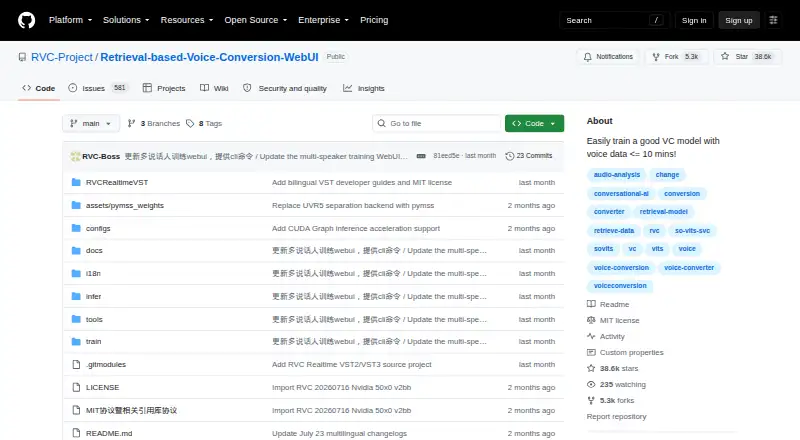
Where it wins
- Converts audio live or from files, with batch processing for directories
- Trains and fuses voice models, with pitch and retrieval controls
- Exports audio as WAV, FLAC, MP3, or M4A
Where it doesn't
- Targets local installation on Windows and Ubuntu
- Hardware-specific dependencies vary across CPU and GPU systems
- No verified virtual-microphone feature for routing changed audio
Our verdict on RVC WebUI
RVC WebUI is an open-source framework for training and running retrieval-based voice-conversion models. It is aimed at people who want local control over model training, real-time voice changing, or offline audio conversion rather than a simple preset-based changer. The project includes a WebUI for training and offline inference alongside a separate real-time voice-changing GUI, with support for single- and multi-speaker models.
Its feature set reaches beyond basic timbre conversion: users can adjust pitch and pitch extraction, apply Top-1 retrieval to reduce tone leakage, fuse models to change timbre, and separate vocals and instrumentals through PyMSS/MSST models. Batch processing covers files and directories, and exports include WAV, FLAC, MP3, and M4A. The surrounding tools include FFmpeg, Gradio, RMVPE, and HuBERT. That makes RVC WebUI a fit for workflows involving model training and audio-file processing, as well as live conversion. Users seeking character presets should note that the project documents user-provided and multi-speaker models instead.
The project targets local installation on Windows and Ubuntu, with hardware-specific dependencies for CPU, AMD, Intel, and NVIDIA systems. Buyers should account for that setup and hardware variation when considering it; it is not presented as a broadly hosted or cross-platform service. Real-time input and output audio devices are supported, but a virtual-microphone feature is not verified, so users who need direct virtual-mic routing should consider a tool that explicitly offers it. Choose RVC WebUI for configurable, open-source training and conversion; look elsewhere for a simpler preset experience or verified virtual-microphone support.
Your product? Our editors can test RVC WebUI in depth and publish a review, labelled as paid · from $149/mo →
RVC WebUI pricing
RVC WebUI fact sheet
| Free plan | Yes |
|---|---|
| Paid from | Free |
| Real-time changing | Yes |
| Recorded-audio changing | Yes |
| Virtual microphone | Not verified |
| Character voices | Not verified |
| Audio export | Yes |
| Platform support | Desktop |
| Deployment | Self-hosted |
| Integrations | 5 integrations: FFmpeg, Gradio, PyMSS/MSST, RMVPE, HuBERT |
| Pricing | Free plan |
| Website | github.com |
| Facts checked | 19 Sep 2026 |
RVC WebUI integrations
RVC WebUI lists 5 integrations on its own site.
- FFmpeg
- Gradio
- PyMSS/MSST
- RMVPE
- HuBERT
Alternatives to RVC WebUI
- EaseUS VoiceWaveA flexible Windows voice changer with recording and exports, but a costly monthly entry plan.9.2
- Voice.aiReal-time and recorded voice tools across desktop, mobile, and API offerings.8.9
- Altered StudioA broad voice-production suite, with monthly morphing limits on its paid individual plans.8.7



See all RVC WebUI alternatives →
RVC WebUI vs the competition
- RVC WebUI vs EaseUS VoiceWave
- RVC WebUI vs Voice.ai
- RVC WebUI vs Altered Studio
- RVC WebUI vs iMyFone MagicMic
- RVC WebUI vs W-Okada Voice Changer
- RVC WebUI vs Voxal Voice Changer

Compare RVC WebUI with any tool side by side →
Also Ranked In
RVC WebUI is ranked in 4 of our directories.
Used RVC WebUI? Be the first to review it
The editor score above is our own research. What this page doesn't have yet is a reader's view — what you used RVC WebUI for, what worked and what didn't. No stars are seeded and no review is paid for; an editor reads every one before it appears.
Write a reviewTwo minutes · verified accounts only · read by an editor before it appears
Featured on iTechGuides

RVC WebUI is listed in our Voice Changer Software directory. Add the badge to your site — it links back to this page.
<a href="https://www.itechguides.com/products/rvc-webui/"><img src="https://www.itechguides.com/best/badge/rvc-webui.svg" alt="Featured on iTechGuides" width="230" height="46"></a>
Reviewed by iTechGuides Editors · Editorial team · Updated Oct 2026
Advertiser disclosure: iTechGuides is reader-supported. Vendors can pay for top positions in our rankings and for a place on other products' pages, and we may earn a commission when you click some links. Bought places stand at the number bought; this page and our disclosure say so. Paying vendors may get a fuller, more detailed review from our editors, and that review can change their score. How we rank.
Last updated · How we research and update