iGetter
iGetter: A focused download manager with scheduling, queue controls and a one-time registration purchase. Ranked #34 of 58 in Download Manager Software by our editors (5.8/10); pricing: Paid; best for users prioritizing scheduled file transfers.
At a glance
- Editor score5.8 / 10
- PricingPaid
- Best forUsers prioritizing scheduled file transfers
- Free planNo
- Paid from$15 one-time
- Video downloadingNo
- Founded1993 · Bulgaria
- Facts checked23 Sep 2026
Where it wins
- Schedules downloads and can shut down or sleep when queues finish
- Resumes interrupted transfers and accelerates them with segmentation
- Finds site and FTP files, with browser link capture and queue filters
Where it doesn't
- No free plan; registration is a one-time paid purchase
- macOS and Linux availability relies on Wine or Crossover
- No video downloader or remote control
Our verdict on iGetter
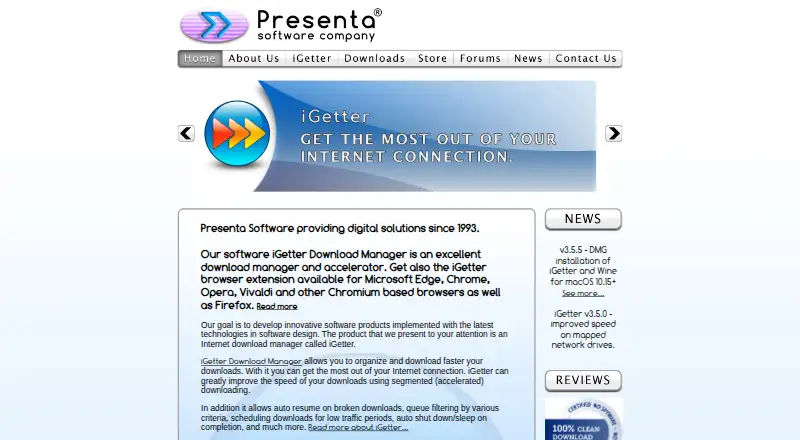
iGetter is a desktop download manager for people who want more control over file transfers than a browser’s basic download list provides. It organizes links into queues, can resume paused or interrupted downloads, and uses segmented downloading to accelerate transfers. Scheduling lets users choose download times, including quieter periods; speed limits and automatic shutdown or sleep after completion add practical controls. Its focus is utility rather than video capture or remote management, making it a better fit for solo users and small setups than buyers seeking those functions.
The standout depth is in handling and organizing transfers. Site Explorer can locate downloadable files on websites and FTP sites, while queue filters, search and download history help manage activity. Browser extensions can send links from supported browsers, including Chrome, Edge, Firefox, Opera and Vivaldi, as well as Chromium-based browsers. Checksum calculation and integrity checking add a way to verify files. Together, these features suit users with recurring or sizable transfer queues; someone who only downloads occasionally may find this degree of queue control unnecessary.
According to the vendor’s pricing page, iGetter Download Manager is a single product registration purchase for $15 USD, one-time. The vendor describes the software as shareware that users can evaluate before registration. Support is offered by email. Windows is listed as a platform, while macOS and Linux use Wine or Crossover rather than native builds, a consideration for buyers who prioritize native installation. Choose iGetter for scheduled transfers, resume support and browser-assisted link capture; consider another tool if you need video downloading, remote control or native macOS/Linux software.
Your product? Our editors can test iGetter in depth and publish a review, labelled as paid · from $149/mo →
iGetter pricing
All 1 iGetter plans and prices →
iGetter fact sheet
| Free plan | No |
|---|---|
| Paid from | $15 one-time |
| Supported platforms | Windows, macOS (via Wine), Linux (via Wine) |
| Browser integration | Yes |
| Video downloading | No |
| Download scheduling | Yes |
| Concurrent downloads | Not verified |
| Remote control | No |
| Portable version | Not verified |
| Deployment | Desktop, Browser extension |
| Platforms | Windows, macOS, Linux, Chrome extension |
| Support | |
| Built for | Solo, Small business (editorial estimate) |
| Integrations | 6 integrations: Microsoft Edge, Google Chrome, Firefox, Opera, Vivaldi, Chromium-based browsers |
| Pricing | Paid (source) |
| Website | igetter.net |
| Facts checked | 23 Sep 2026 |
iGetter integrations
iGetter lists 6 integrations on its own site.
- Microsoft Edge
- Google Chrome
- Firefox
- Opera
- Vivaldi
- Chromium-based browsers
Alternatives to iGetter
- Free Download ManagerA broad free manager with acceleration, torrents, scheduling, and multi-platform support.9.3
- JDownloaderA broad free download manager for queues, plugins, archives, streams, and remote control.9.2
- Internet Download ManagerA capable paid Windows manager for organized, resumable and scheduled downloads.9.1


See all iGetter alternatives →
Used iGetter? Be the first to review it
The editor score above is our own research. What this page doesn't have yet is a reader's view — what you used iGetter for, what worked and what didn't. No stars are seeded and no review is paid for; an editor reads every one before it appears.
Write a reviewTwo minutes · verified accounts only · read by an editor before it appears
Featured on iTechGuides

iGetter is listed in our Download Manager Software directory. Add the badge to your site — it links back to this page.
<a href="https://www.itechguides.com/products/igetter/"><img src="https://www.itechguides.com/best/badge/igetter.svg" alt="Featured on iTechGuides" width="230" height="46"></a>
Reviewed by iTechGuides Editors · Editorial team · Updated Oct 2026
Advertiser disclosure: iTechGuides is reader-supported. Vendors can pay for top positions in our rankings and for a place on other products' pages, and we may earn a commission when you click some links. Bought places stand at the number bought; this page and our disclosure say so. Paying vendors may get a fuller, more detailed review from our editors, and that review can change their score. How we rank.
Last updated · How we research and update