
IE NetRenderer
IE NetRenderer: A focused free tool for pixel-accurate Internet Explorer rendering comparisons. Ranked #26 of 27 in Cross-Browser Testing Software by our editors (6.1/10); pricing: Free plan; best for legacy Internet Explorer rendering checks.
At a glance
- Editor score6.1 / 10
- PricingFree plan
- Best forLegacy Internet Explorer rendering checks
- Free planYes
- Paid fromFree
- Facts checked20 Sep 2026
Where it wins
- Covers Internet Explorer 5.5 through 11
- Runs multiple rendering jobs in parallel and in real time
- Offers overlay and difference views for pixel-level comparisons
Where it doesn't
- Coverage is limited to legacy Internet Explorer
- Rendering runs remotely from Germany
- Not designed for modern cross-browser coverage
Our verdict on IE NetRenderer
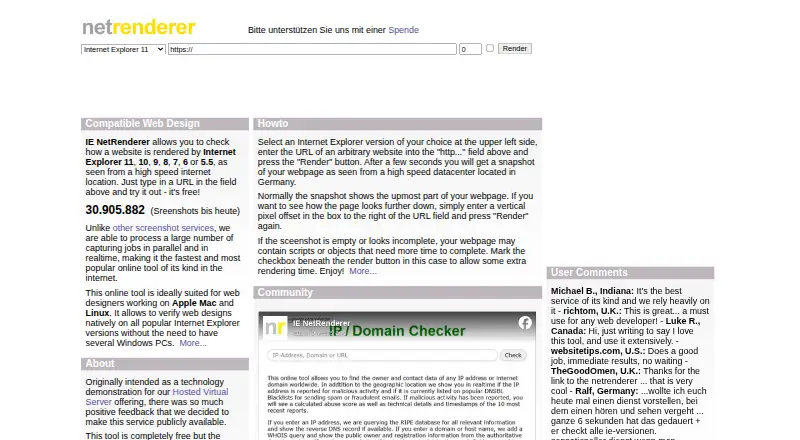
IE NetRenderer is a web-based compatibility testing tool for web designers and developers who need to inspect legacy Internet Explorer rendering. Enter a webpage URL to receive screenshots rendered in remote Windows environments running Internet Explorer 5.5, 6, 7, 8, 9, 10 and 11. The service is free and focused on visual checks rather than broad browser testing, making it most suitable for maintaining older websites or investigating version-specific layout differences.
Its strongest feature is the comparison workflow. IE NetRenderer produces screenshots at the original size with pixel-level accuracy, then provides mixed overlay and difference modes for comparing renders across Internet Explorer versions. Multiple rendering jobs can run in parallel and in real time. Vertical pixel offsets make it possible to inspect lower sections of a page, while extra rendering time supports pages that depend on delayed JavaScript or external content. These controls give developers more practical coverage than a simple above-the-fold screenshot service.
The trade-off is scope. IE NetRenderer concentrates on desktop Internet Explorer versions and does not provide the broader modern browser coverage expected from a general cross-browser testing platform. Rendering is performed remotely from a high-speed location in Germany, so it fits URL-based compatibility checks rather than a local browser environment. The service is a sensible choice when legacy IE support is the specific requirement; teams assessing current browsers, wider operating-system coverage or a larger testing ecosystem should choose a broader tool instead.
Your product? Our editors can test IE NetRenderer in depth and publish a review, labelled as paid · from $149/mo →
IE NetRenderer pricing
IE NetRenderer fact sheet
| Free plan | Yes |
|---|---|
| Paid from | Free |
| Browser coverage | Desktop |
| Operating systems | Windows |
| Concurrent sessions | Not verified |
| Real device testing | Not verified |
| Local testing | Yes |
| Automated testing | Not verified |
| Visual comparison | Yes |
| Deployment | Cloud |
| Platforms | Web |
| Support | |
| Built for | Solo, Small business (editorial estimate) |
| Pricing | Free plan |
| Website | netrenderer.com |
| Facts checked | 20 Sep 2026 |
Alternatives to IE NetRenderer
- TestMu AIBroad browser and device coverage with live, automated, visual, and AI-assisted testing.9.4
- pCloudyAffordable browser-cloud testing with live sessions, automation, real devices, and CI/CD coverage.9.2
- TestMu AI Web Automation (formerly LambdaTest Web Automation)A flexible automation platform with a free entry point and broad browser coverage.8.8



See all IE NetRenderer alternatives →
Used IE NetRenderer? Be the first to review it
The editor score above is our own research. What this page doesn't have yet is a reader's view — what you used IE NetRenderer for, what worked and what didn't. No stars are seeded and no review is paid for; an editor reads every one before it appears.
Write a reviewTwo minutes · verified accounts only · read by an editor before it appears
Featured on iTechGuides

IE NetRenderer is listed in our Cross-Browser Testing Software directory. Add the badge to your site — it links back to this page.
<a href="https://www.itechguides.com/products/ie-netrenderer/"><img src="https://www.itechguides.com/best/badge/ie-netrenderer.svg" alt="Featured on iTechGuides" width="230" height="46"></a>
Reviewed by iTechGuides Editors · Editorial team · Updated Oct 2026
Advertiser disclosure: iTechGuides is reader-supported. Vendors can pay for top positions in our rankings and for a place on other products' pages, and we may earn a commission when you click some links. Bought places stand at the number bought; this page and our disclosure say so. Paying vendors may get a fuller, more detailed review from our editors, and that review can change their score. How we rank.
Last updated · How we research and update