iDOS 3
iDOS 3: A feature-rich DOSBox-based emulator for Apple devices, sold as a paid app. Ranked #12 of 26 in MS-DOS Emulators by our editors (6.2/10); pricing: Paid; best for apple-device users wanting a polished DOS app.
At a glance
- Editor score6.2 / 10
- PricingPaid
- Best forApple-device users wanting a polished DOS app
- Free planNo
- Supported host platformsiOS, iPadOS, macOS
- Facts checked20 Sep 2026
Where it wins
- Customizable keyboard, gamepad, joystick, and mouse controls
- Supports MIDI, MT-32 emulation, and cue-sheet CD audio
- Runs on iPhone, iPad, and compatible Apple-silicon Macs
Where it doesn't
- No free plan is available
- Focused on Apple platforms rather than cross-platform use
- Requires DOS-compatible software or game packages to provide content
Our verdict on iDOS 3
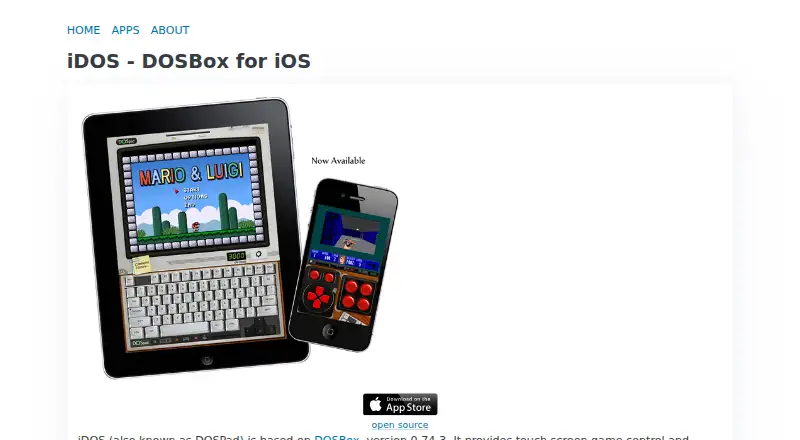
iDOS 3 is a DOSBox-based emulator for running classic DOS games and other DOS software on iPhone, iPad, and compatible Apple-silicon Macs. It suits Apple-device users who want a dedicated way to access DOS-compatible software with touch controls alongside external input options. The app is distributed through the Apple App Store and is sold as a paid product rather than offered with a free plan.
Its strongest area is input flexibility. A configurable on-screen PC keyboard supports text entry and keyboard-driven software, while the virtual gamepad offers customizable bindings. Users can also switch to an eight-axis D-pad and joystick mode, use mouse controls with an on-screen pointer and buttons, or connect Bluetooth keyboards, mice, and external game controllers. That combination gives iDOS 3 broader control coverage than a touch-only emulator, particularly for software designed around keyboard, mouse, or gamepad input.
Audio and package support add useful depth for older games. iDOS 3 supports MIDI sound fonts, MT-32 emulation, and cue-sheet CD images with OGG, MP3, or FLAC audio tracks. It also supports iDOS game packages and a mounted Documents folder for managing compatible content. Choose it if you want DOS emulation centered on Apple devices and value configurable controls, external accessories, and period-oriented audio features. It is less suitable if you need a free option or want an emulator designed for platforms beyond Apple's ecosystem.
iDOS 3 pricing
All 1 iDOS 3 plans and prices →
iDOS 3 fact sheet
| Free plan | No |
|---|---|
| Paid from | Not verified |
| Supported host platforms | iOS, iPadOS, macOS |
| DOS target versions | Dos-compatible |
| Disk image formats | cue-sheet CD images |
| Gamepad support | Yes |
| Save states | Not verified |
| Audio CD support | Yes |
| Source available | Yes |
| Deployment | Mobile, Desktop |
| Platforms | iOS, macOS |
| Support | |
| Built for | Solo, Small business (editorial estimate) |
| Pricing | Paid (source) |
| Website | litchie.com |
| Facts checked | 20 Sep 2026 |
Alternatives to iDOS 3
- DOSBox StagingA capable free emulator for DOS software, games, and Windows 3.1 environments.9.0
- DOSBox PureA focused, free DOS emulator with convenient archive loading and Libretro support.8.8
- DOSBox-XA free, highly configurable choice for advanced DOS and legacy Windows emulation.7.7


Used iDOS 3? Be the first to review it
The editor score above is our own research. What this page doesn't have yet is a reader's view — what you used iDOS 3 for, what worked and what didn't. No stars are seeded and no review is paid for; an editor reads every one before it appears.
Write a reviewTwo minutes · verified accounts only · read by an editor before it appears
Featured on iTechGuides

iDOS 3 is listed in our MS-DOS Emulators directory. Add the badge to your site — it links back to this page.
<a href="https://www.itechguides.com/products/idos-3/"><img src="https://www.itechguides.com/best/badge/idos-3.svg" alt="Featured on iTechGuides" width="230" height="46"></a>
Reviewed by iTechGuides Editors · Editorial team · Updated Sep 2026
Advertiser disclosure: iTechGuides is reader-supported. We may earn a commission when you click some links. How we rank.
Last updated · How we research and update