
Humla
Humla: Affordable Mac transcription with local processing and optional team sync. Ranked #40 of 81 in AI Meeting Assistants by our editors (6.0/10); pricing: Free plan · 14-day trial; best for mac users wanting affordable private transcription.
At a glance
- Editor score6.0 / 10
- PricingFree plan · 14-day trial
- Best forMac users wanting affordable private transcription
- Free planYes
- Paid from$5/user/mo
- TranscriptionYes
- Facts checked20 Sep 2026
Where it wins
- On-device Whisper transcription and speaker identification
- Free local use with optional free self-hosting
- Offline cited chat, custom summaries, and shared workspaces
Where it doesn't
- Runs on Apple Silicon Macs with macOS 13 or later
- Hosted synchronization costs $5 per user per month
- Integration choices focus on AI and self-hosting services
Our verdict on Humla
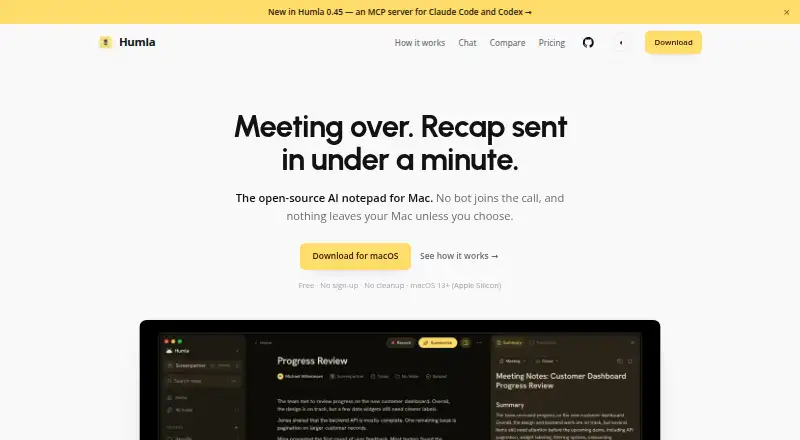
Humla is an open-source meeting-notes application for Apple Silicon Macs running macOS 13 or later. It records microphone and system audio directly from the Mac without joining meetings as a bot, then produces live transcripts, speaker identification, summaries, and action-item formats. It suits individuals and teams that want local transcription, custom recap workflows, and control over where meeting data is processed or stored.
The pricing structure is straightforward. The Local plan is free and includes microphone and system-audio recording, on-device Whisper transcription, speaker identification, summary presets, custom prompts, and an MIT-licensed application. Humla Cloud costs $5 per user per month, billed monthly, and adds hosted team synchronization, shared workspaces and folders, cross-device sync, and managed hosting. Self-host is free and provides every team feature without a subscription through a PocketBase server, with data kept in the team’s own region and storage. A 14-day free trial is also available.
Humla’s main distinction is its narrow, privacy-oriented desktop approach. Transcription and summaries can run on-device with Whisper, while users can bring keys for OpenAI, Deepgram, or Groq, or connect Ollama. Full-text search covers notes, transcripts, and folders, and offline chat can cite meeting history. Teams can synchronize through Humla Cloud or self-host with PocketBase. The trade-off is platform scope: Humla is Mac-only, and its listed ecosystem centers on AI providers and synchronization rather than a broad set of meeting-platform integrations. Choose it for Mac-based local capture and affordable team sharing; choose another assistant if you need wider device coverage or a larger integration ecosystem.
Your product? Our editors can test Humla in depth and publish a review, labelled as paid · from $149/mo →
Humla pricing
All 3 Humla plans and prices →
Humla fact sheet
| Free plan | Yes |
|---|---|
| Paid from | $5/user/mo |
| Transcription | Yes |
| Summaries and action items | Yes |
| Meeting capture | Desktop |
| Meeting platforms | Zoom, Google Meet, Microsoft Teams, Webex |
| Transcription languages | 99 languages |
| Calendar integrations | Not verified |
| Free trial | 14 days |
| Deployment | Cloud, Desktop, Self-hosted |
| Platforms | macOS |
| Support | Docs |
| Built for | Solo, Small business, Mid-market (editorial estimate) |
| Integrations | 5 integrations: OpenAI, Deepgram, Groq, Ollama, PocketBase |
| Pricing | Free plan · 14-day trial (source) |
| Website | humla.team |
| Facts checked | 20 Sep 2026 |
Humla integrations
Humla lists 5 integrations on its own site.
- OpenAI
- Deepgram
- Groq
- Ollama
- PocketBase
Alternatives to Humla
- FellowA broad meeting assistant combining capture, search, action items, governance, and integrations.9.4
- Fireflies.aiA broad AI meeting assistant for multilingual teams and conversation analysis.9.3
- MeetGeekA broad meeting workspace with a useful free tier and flexible paid plans.9.1



Used Humla? Be the first to review it
The editor score above is our own research. What this page doesn't have yet is a reader's view — what you used Humla for, what worked and what didn't. No stars are seeded and no review is paid for; an editor reads every one before it appears.
Write a reviewTwo minutes · verified accounts only · read by an editor before it appears
Featured on iTechGuides

Humla is listed in our AI Meeting Assistants directory. Add the badge to your site — it links back to this page.
<a href="https://www.itechguides.com/products/humla/"><img src="https://www.itechguides.com/best/badge/humla.svg" alt="Featured on iTechGuides" width="230" height="46"></a>
Reviewed by iTechGuides Editors · Editorial team · Updated Oct 2026
Advertiser disclosure: iTechGuides is reader-supported. Vendors can pay for top positions in our rankings and for a place on other products' pages, and we may earn a commission when you click some links. Bought places stand at the number bought; this page and our disclosure say so. Paying vendors may get a fuller, more detailed review from our editors, and that review can change their score. How we rank.
Last updated · How we research and update