
Hubs
Hubs: A flexible open-source meeting space for teams that need persistent 3D rooms. Ranked #7 of 22 in Virtual Meeting Room Software by our editors (8.5/10); pricing: Open source; best for open-source teams needing broad platform support.
At a glance
- Editor score8.5 / 10
- PricingOpen source
- Best forOpen-source teams needing broad platform support
- Paid fromFree
- Persistent roomsYes
- Facts checked20 Sep 2026
Where it wins
- Persistent 3D rooms with spatialized audio and text chat
- Shares screens, cameras, documents, media, and 3D models
- Self-hosting with custom branding, domains, and access controls
Where it doesn't
- Room capacity is limited to 25 people
- Requires comfort with 3D spaces and spatial audio
- Community Edition is the self-hosted deployment path
Our verdict on Hubs
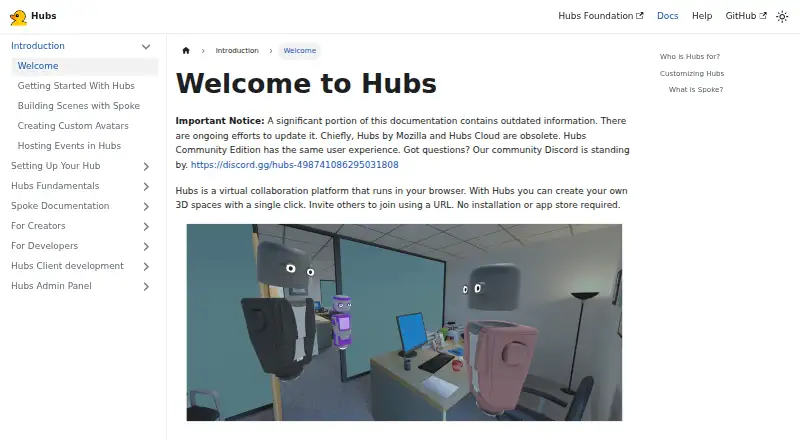
Hubs is an open-source virtual collaboration platform built around shared 3D rooms in a browser. Teams can join by URL, choose avatars, communicate through spatialized audio and text chat, and share screens, desktops, webcams, phone cameras, and other media. Persistent rooms remain accessible until explicitly closed, making Hubs a fit for teams that want an ongoing virtual space rather than a standard meeting link. It supports web, Windows, macOS, Linux, iOS, Android, self-hosting, and compatible VR devices.
Its strongest differentiator is the breadth of content that can live inside a room. Users can import and display images, videos, PDFs, audio, and 3D models, while the Spoke editor supports custom scenes. Integrations with Discord, Sketchfab, YouTube, Vimeo, and Twitch extend the content and community workflow. Moderation, visitor permissions, lobby participation, and invite-only or shared-link access provide practical controls for hosted sessions. The 25-person room capacity suits focused workshops, events, and collaboration groups, but it is a constraint for larger meetings.
Community Edition adds a self-hosted route with custom branding, domains, access restrictions, and administrative controls. That makes Hubs a strong choice for open-source teams that need ownership of deployment and a broad platform footprint. It is less suitable for organizations seeking a conventional video-conferencing experience, native mobile apps, or capacity beyond 25 people. Teams choosing Hubs should value spatial collaboration, rich media, and configurable rooms more than a simple, familiar meeting interface.
Your product? Our editors can test Hubs in depth and publish a review, labelled as paid · from $149/mo →
Hubs pricing
Hubs fact sheet
| Free plan | Not verified |
|---|---|
| Paid from | Free |
| Persistent rooms | Yes |
| Spatial audio | Yes |
| Room capacity | 25 participants |
| Guest access | Yes |
| Screen sharing | Yes |
| Mobile apps | None |
| Access controls | Invite_only |
| Deployment | Cloud, Self-hosted, Browser extension |
| Platforms | Web, Windows, macOS, Linux, iOS, Android |
| Support | Community, Docs |
| Built for | Solo, Small business, Mid-market, Enterprise (editorial estimate) |
| Integrations | 5 integrations: Discord, Sketchfab, YouTube, Vimeo, Twitch |
| Pricing | Open source |
| Website | docs.hubsfoundation.org |
| Facts checked | 20 Sep 2026 |
Hubs integrations
Hubs lists 5 integrations on its own site.
- Discord
- Sketchfab
- YouTube
- Vimeo
- Twitch
Alternatives to Hubs
- TopiaA flexible virtual meeting space with spatial interaction, event tools, and broad integrations.9.3
- WorkAdventureA flexible virtual office and event space with strong collaboration integrations.9.2
- BAWES UniverseAn open-source virtual world for teams that need persistent, programmable meeting spaces.8.9



Hubs vs the competition
- Hubs vs Topia
- Hubs vs WorkAdventure
- Hubs vs BAWES Universe
- Hubs vs Frame
- Hubs vs Unyted.World
- Hubs vs Arthur

Compare Hubs with any tool side by side →
Used Hubs? Be the first to review it
The editor score above is our own research. What this page doesn't have yet is a reader's view — what you used Hubs for, what worked and what didn't. No stars are seeded and no review is paid for; an editor reads every one before it appears.
Write a reviewTwo minutes · verified accounts only · read by an editor before it appears
Featured on iTechGuides

Hubs is listed in our Virtual Meeting Room Software directory. Add the badge to your site — it links back to this page.
<a href="https://www.itechguides.com/products/hubs/"><img src="https://www.itechguides.com/best/badge/hubs.svg" alt="Featured on iTechGuides" width="230" height="46"></a>
Reviewed by iTechGuides Editors · Editorial team · Updated Oct 2026
Advertiser disclosure: iTechGuides is reader-supported. Vendors can pay for top positions in our rankings and for a place on other products' pages, and we may earn a commission when you click some links. Bought places stand at the number bought; this page and our disclosure say so. Paying vendors may get a fuller, more detailed review from our editors, and that review can change their score. How we rank.
Last updated · How we research and update