
HTTrack
HTTrack: A focused website mirroring tool for building and updating offline copies. Ranked #23 of 58 in Download Manager Software by our editors (7.0/10); pricing: Free plan; best for users mirroring websites for offline browsing.
At a glance
- Editor score7.0 / 10
- PricingFree plan
- Best forUsers mirroring websites for offline browsing
- Free planYes
- Paid fromFree
- Facts checked21 Sep 2026
Where it wins
- Recursively mirrors websites while preserving relative offline links
- Resumes downloads and updates existing mirrors
- Supports filters, proxies, scheduling, scripting, and multiple connections
Where it doesn't
- Focused on website mirroring rather than general download management
- Recursive projects may be more than needed for single-file downloads
- Advanced control is centered on filters, limits, and command-line options
Our verdict on HTTrack
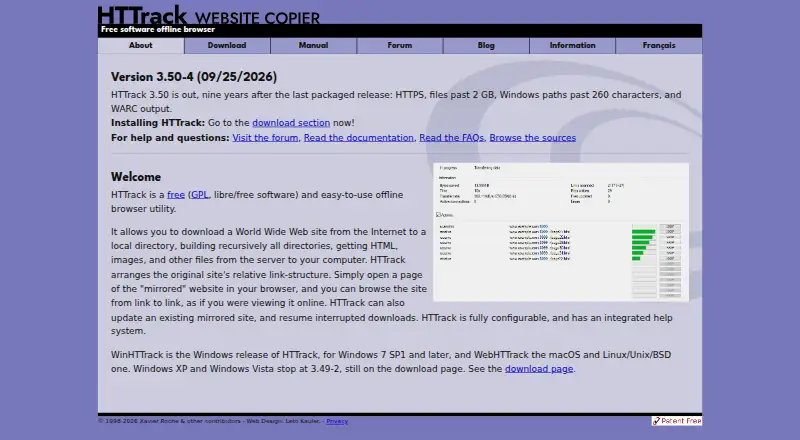
HTTrack is a free, GPL-licensed offline browser and website copier for users who need local copies of websites. It recursively downloads HTML, images, and other files into a local directory, then preserves relative link structure for offline browsing. Its strongest fit is website mirroring: researchers, archivists, developers, and other users who need to browse a saved site without an active connection can work from an existing mirror rather than a collection of unrelated downloads.
The standout capability is control over recursive copying. HTTrack can update existing mirrors and resume interrupted downloads, while configurable filters cover file types, links, depth, size, and sites. Proxy support includes optional authentication, and multiple-connection downloading can support larger mirror sessions. Scheduling, command-line operation, and scripting support add options for repeatable or automated mirror work. Portable Windows builds without an installer are also available, alongside graphical interfaces and command-line operation.
HTTrack is open source and free, with no paid tiers to compare. Official builds cover Windows, macOS, Linux/Unix/BSD, and Android, giving it broad platform coverage for a narrowly defined job. Choose it when the goal is to copy a website, preserve its local navigation, refresh that copy, or manage mirror sessions with filters and scripts. Choose another download manager when the main need is ordinary file-by-file downloading rather than recursive website mirroring.
Your product? Our editors can test HTTrack in depth and publish a review, labelled as paid · from $149/mo →
HTTrack pricing
HTTrack fact sheet
| Free plan | Yes |
|---|---|
| Paid from | Free |
| Supported platforms | Windows, macOS, Linux, Android |
| Browser integration | Not verified |
| Video downloading | Not verified |
| Download scheduling | Yes |
| Concurrent downloads | Not verified |
| Remote control | Not verified |
| Portable version | Yes |
| Deployment | Desktop, Mobile |
| Platforms | Windows, macOS, Linux, Android |
| Support | Community, Docs |
| Built for | Solo, Small business (editorial estimate) |
| Pricing | Free plan |
| Website | httrack.com |
| Facts checked | 21 Sep 2026 |
Alternatives to HTTrack
- Free Download ManagerA broad free manager with acceleration, torrents, scheduling, and multi-platform support.9.3
- JDownloaderA broad free download manager for queues, plugins, archives, streams, and remote control.9.2
- Internet Download ManagerA capable paid Windows manager for organized, resumable and scheduled downloads.9.1


See all HTTrack alternatives →
Used HTTrack? Be the first to review it
The editor score above is our own research. What this page doesn't have yet is a reader's view — what you used HTTrack for, what worked and what didn't. No stars are seeded and no review is paid for; an editor reads every one before it appears.
Write a reviewTwo minutes · verified accounts only · read by an editor before it appears
Featured on iTechGuides

HTTrack is listed in our Download Manager Software directory. Add the badge to your site — it links back to this page.
<a href="https://www.itechguides.com/products/httrack/"><img src="https://www.itechguides.com/best/badge/httrack.svg" alt="Featured on iTechGuides" width="230" height="46"></a>
Reviewed by iTechGuides Editors · Editorial team · Updated Oct 2026
Advertiser disclosure: iTechGuides is reader-supported. Vendors can pay for top positions in our rankings and for a place on other products' pages, and we may earn a commission when you click some links. Bought places stand at the number bought; this page and our disclosure say so. Paying vendors may get a fuller, more detailed review from our editors, and that review can change their score. How we rank.
Last updated · How we research and update