HP Image Assistant
HP Image Assistant: A free, specialized updater for managing HP business PC images, drivers, firmware, and BIOS. Ranked #7 of 28 in Driver Updater Software by our editors (8.6/10); pricing: Free plan; best for managed HP fleet imaging and updates.
At a glance
- Editor score8.6 / 10
- PricingFree plan
- Best forManaged HP fleet imaging and updates
- Free planYes
- Paid fromFree
- Facts checked20 Sep 2026
Where it wins
- Analyzes target and reference HP system images
- Creates driver packs in ZIP, ISO, or WIM formats
- Supports command-line automation and offline repositories
Where it doesn't
- Designed for supported HP systems rather than mixed-vendor fleets
- Supports Windows 10 and Windows 11 only
- Its update catalog centers on HP SoftPaq packages
Our verdict on HP Image Assistant
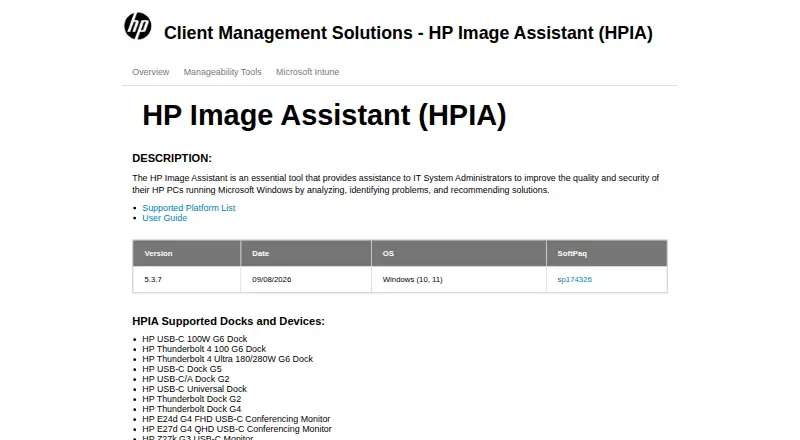
HP Image Assistant is a free Windows utility for IT system administrators managing supported HP desktops, notebooks, and workstations. It analyzes target and reference system images, compares hardware, software, drivers, and updates, and identifies applicable driver, software, firmware, BIOS, and security updates. The tool is intended for organizations standardizing and maintaining HP business PC deployments rather than for general-purpose updating across multiple hardware vendors.
For fleet imaging, its strongest capabilities are the creation of custom driver packs in ZIP, ISO, or WIM formats and the ability to download and install HP SoftPaq updates. Administrators can export available SoftPaq information to CSV, compare configurations, and use command-line analysis with automated update installation. These functions support repeatable image maintenance and update workflows when HP systems are the primary hardware platform.
Offline analysis through an offline repository adds an option for environments that need to work without direct online analysis at the time of review. HP lists support for Windows 10 and Windows 11, keeping the platform scope clear. Choose HP Image Assistant when the priority is centralized analysis, packaging, and updating across supported HP business PCs. Organizations managing mixed-vendor hardware or seeking a vendor-neutral driver updater should choose a different category fit.
Your product? Our editors can test HP Image Assistant in depth and publish a review, labelled as paid · from $149/mo →
HP Image Assistant pricing
HP Image Assistant fact sheet
| Free plan | Yes |
|---|---|
| Paid from | Free |
| Driver backup | Not verified |
| Driver rollback | Not verified |
| Scheduled scans | Not verified |
| Offline scanning | Yes |
| Device limit | Not verified |
| Windows support | Windows 10 and Windows 11 |
| Deployment | Desktop |
| Platforms | Windows |
| Support | Docs |
| Built for | Mid-market, Enterprise (editorial estimate) |
| Pricing | Free plan |
| Website | ftp.ext.hp.com |
| Facts checked | 20 Sep 2026 |
Alternatives to HP Image Assistant
- DriversCloudA free driver manager with detection, recovery tools, offline scanning, and hardware monitoring.9.4
- Driver BoosterA Windows-focused updater with offline tools, recovery features, and a free plan.9.2
- Driver GeniusA broad Windows driver toolkit with unusually capable free backup and recovery features.9.0
See all HP Image Assistant alternatives →
HP Image Assistant vs the competition
- HP Image Assistant vs DriversCloud
- HP Image Assistant vs Driver Booster
- HP Image Assistant vs Driver Genius
- HP Image Assistant vs Snappy Driver Installer Origin
- HP Image Assistant vs Driver Easy
- HP Image Assistant vs Dell Command | Update


Compare HP Image Assistant with any tool side by side →
Used HP Image Assistant? Be the first to review it
The editor score above is our own research. What this page doesn't have yet is a reader's view — what you used HP Image Assistant for, what worked and what didn't. No stars are seeded and no review is paid for; an editor reads every one before it appears.
Write a reviewTwo minutes · verified accounts only · read by an editor before it appears
Featured on iTechGuides

HP Image Assistant is listed in our Driver Updater Software directory. Add the badge to your site — it links back to this page.
<a href="https://www.itechguides.com/products/hp-image-assistant/"><img src="https://www.itechguides.com/best/badge/hp-image-assistant.svg" alt="Featured on iTechGuides" width="230" height="46"></a>
Reviewed by iTechGuides Editors · Editorial team · Updated Oct 2026
Advertiser disclosure: iTechGuides is reader-supported. Vendors can pay for top positions in our rankings and for a place on other products' pages, and we may earn a commission when you click some links. Bought places stand at the number bought; this page and our disclosure say so. Paying vendors may get a fuller, more detailed review from our editors, and that review can change their score. How we rank.
Last updated · How we research and update