
HomeBoard
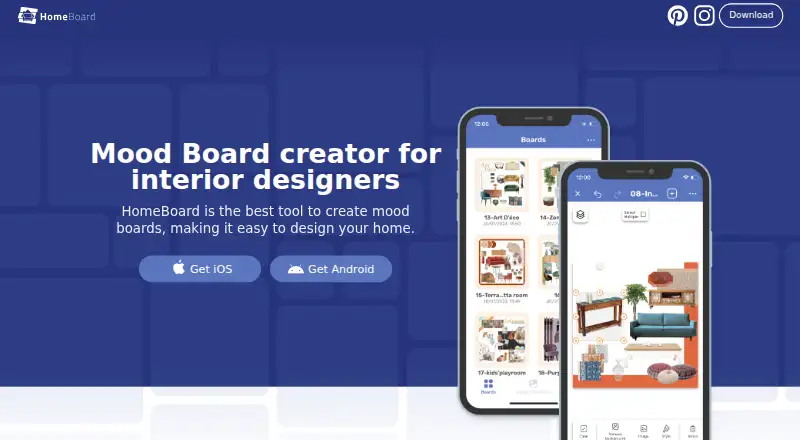
HomeBoard: A focused interior-planning board app with AI renders, imports, and shopping tools. Ranked #15 of 24 in Mood Board Software by our editors (6.1/10); pricing: 7-day trial; best for home design boards on Apple devices.
At a glance
- Editor score6.1 / 10
- Pricing7-day trial
- Best forHome design boards on Apple devices
- Collaboration levelComments
- Facts checked22 Sep 2026
Where it wins
- Combines furniture, décor, colors, notes, and project folders
- Adds AI room renders and image background removal
- Creates color references and cut sheets for shopping plans
Where it doesn't
- Collaboration is limited to comments
- Its focus is interior design rather than general-purpose boards
- Listed Pro tiers do not show distinct feature differences
Our verdict on HomeBoard
HomeBoard is a mood-board and interior-design planning app for homeowners, amateur designers, interior designers, and Airbnb hosts. It brings furniture, décor, colors, and other visual references into organized boards, with folders for projects and notes for boards or individual items. The app is available on iOS, Android, and macOS, making it a fit for people planning rooms across Apple devices and other supported platforms.
Its strongest area is the connection between visual planning and practical room decisions. Users can import images from Pinterest, Unsplash, browsers, and camera roll, then remove backgrounds to create cleaner compositions. AI-assisted interior renders and room visualization extend the boards beyond static references. Color catalogs from Behr, Sherwin-Williams, and Benjamin Moore add a useful paint-planning layer, while cut sheets turn selected items into shopping lists. Pinterest and Unsplash are also listed as integrations.
HomeBoard follows a freemium model with a seven-day free trial. The listed paid entries use the HomeBoard Pro name and describe access as unlocking all features, without separate feature distinctions between those entries. Collaboration is centered on comments, so the app is better suited to individual planning or lightweight feedback than to broader team workflows. Choose HomeBoard if you want interior-focused boards that connect inspiration, AI visualization, color selection, and shopping preparation. Consider another tool if general-purpose mood boards or more extensive collaboration are the priority.
HomeBoard pricing
All 1 HomeBoard plans and prices →
HomeBoard fact sheet
| Free plan | Not verified |
|---|---|
| Paid from | Not verified |
| Collaboration level | Comments |
| Guest access | Not verified |
| Brand kit | Not verified |
| Presentation mode | Yes |
| Export formats | Not verified |
| Supported platforms | iOS, Android, macOS |
| Free trial | 7 days |
| Deployment | Mobile |
| Platforms | iOS, Android, macOS |
| Compliance & security | GDPR |
| Support | |
| Built for | Solo, Small business, Mid-market (editorial estimate) |
| Integrations | 2 integrations: Pinterest, Unsplash |
| Pricing | 7-day trial (source) |
| Website | homeboardapp.com |
| Facts checked | 22 Sep 2026 |
HomeBoard integrations
HomeBoard lists 2 integrations on its own site.
- Unsplash
Alternatives to HomeBoard
- MilanoteA flexible, collaborative canvas for building rich mood boards across devices.9.1
- RayonA focused workspace for mood boards, CAD assets, presentations, and design collaboration.9.0
- MattoboardA focused web workspace for 3D interiors, materials, AI concepts, and client-ready specifications.8.1


See all HomeBoard alternatives →
Used HomeBoard? Be the first to review it
The editor score above is our own research. What this page doesn't have yet is a reader's view — what you used HomeBoard for, what worked and what didn't. No stars are seeded and no review is paid for; an editor reads every one before it appears.
Write a reviewTwo minutes · verified accounts only · read by an editor before it appears
Featured on iTechGuides

HomeBoard is listed in our Mood Board Software directory. Add the badge to your site — it links back to this page.
<a href="https://www.itechguides.com/products/homeboard/"><img src="https://www.itechguides.com/best/badge/homeboard.svg" alt="Featured on iTechGuides" width="230" height="46"></a>
Reviewed by iTechGuides Editors · Editorial team · Updated Sep 2026
Advertiser disclosure: iTechGuides is reader-supported. We may earn a commission when you click some links. How we rank.
Last updated · How we research and update