
Havi
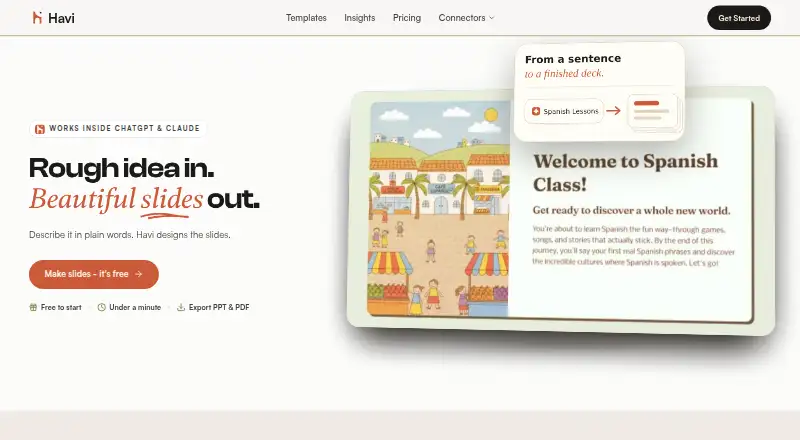
Havi: Havi turns prompts and PDFs into editable presentations through a browser or API. Ranked #85 of 109 in AI Presentation Makers by our editors (3.0/10); pricing: Free plan; best for chat-based deck creation from prompts and PDFs.
At a glance
- Editor score3.0 / 10
- PricingFree plan
- Best forChat-based deck creation from prompts and PDFs
- Free planYes
- Document-to-deck generationYes
- Facts checked22 Sep 2026
Where it wins
- Turns prompts or rough ideas into structured, styled slide decks
- Converts PDFs, including scanned files via OCR, into editable PPTX
- Exports to PowerPoint and PDF with templates and generated visuals
Where it doesn't
- Native desktop apps are outside its stated web and API deployment
- Support is provided through email
- Large-enterprise workflows fall outside its stated company-size fit
Our verdict on Havi
Havi is a browser-based AI presentation maker for students, teachers, founders, professionals, and other users who want to create slides without starting from a blank canvas. A text prompt, topic, or rough notes can become a structured deck with a running order, slide content, layouts, typography, colors, and visuals. Users can then edit the presentation and export it to PowerPoint/PPTX or PDF. Editable templates cover lessons, explainers, pitches, business plans, and other project types, making Havi suitable for solo users and small to mid-market teams.
The product’s document workflow is a notable strength. Havi converts PDF files into editable PPTX decks and supports OCR for scanned PDFs, extending its use beyond prompt-based creation. Its AI workflow is also available through ChatGPT, Claude, and MCP, while deployment is provided through the web and an API. This combination suits people who want to generate decks inside conversational tools or incorporate presentation creation into broader software workflows. The resulting files remain editable in PowerPoint, which supports further refinement after generation.
Havi uses a freemium model with a free plan, so users can access its core presentation workflows without an upfront paid commitment. The product is a sensible pick for prompt-led deck creation, PDF conversion, and quick exports to PPTX or PDF. It is less suitable for organizations seeking native desktop applications, extensive team collaboration, or enterprise-oriented workflows. Users who primarily need a browser or API tool for turning ideas and documents into editable slides should find the feature set aligned with that focus.
Your product? Our editors can test Havi in depth and publish a review, labelled as paid · from $149/mo →
Havi pricing
Havi fact sheet
| Free plan | Yes |
|---|---|
| Paid from | Not verified |
| Prompt-to-deck generation | Yes |
| Document-to-deck generation | Yes |
| PPTX export | Yes |
| PDF export | Yes |
| Brand controls | Not verified |
| Collaboration level | Not verified |
| Maximum slides | Not verified |
| Money-back guarantee | 3 days |
| Deployment | Cloud, Browser extension |
| Platforms | Web |
| Support | |
| Built for | Solo, Small business, Mid-market (editorial estimate) |
| Integrations | 3 integrations: ChatGPT, Claude, MCP |
| Pricing | Free plan (source) |
| Website | havi.ai |
| Facts checked | 22 Sep 2026 |
Havi integrations
Havi lists 3 integrations on its own site.
- ChatGPT
- Claude
- MCP
Alternatives to Havi
- GammaA free, collaborative AI creator with broad exports, publishing, and automation options.9.3
- PitchA flexible presentation workspace for teams that need AI, brand control, and collaboration.8.8
- OpenChartsA freemium deck builder with presenter coaching, collaboration, and flexible exports.8.7



Used Havi? Be the first to review it
The editor score above is our own research. What this page doesn't have yet is a reader's view — what you used Havi for, what worked and what didn't. No stars are seeded and no review is paid for; an editor reads every one before it appears.
Write a reviewTwo minutes · verified accounts only · read by an editor before it appears
Featured on iTechGuides

Havi is listed in our AI Presentation Makers directory. Add the badge to your site — it links back to this page.
<a href="https://www.itechguides.com/products/havi/"><img src="https://www.itechguides.com/best/badge/havi.svg" alt="Featured on iTechGuides" width="230" height="46"></a>
Reviewed by iTechGuides Editors · Editorial team · Updated Oct 2026
Advertiser disclosure: iTechGuides is reader-supported. Vendors can pay for top positions in our rankings and for a place on other products' pages, and we may earn a commission when you click some links. Bought places stand at the number bought; this page and our disclosure say so. Paying vendors may get a fuller, more detailed review from our editors, and that review can change their score. How we rank.
Last updated · How we research and update