Hardware Busters GPU Test Suite
Hardware Busters GPU Test Suite: A focused Windows toolkit for automated GPU benchmarks, cooling tests, and HTML reporting. Ranked #14 of 21 in Game Benchmark Software by our editors (7.5/10); pricing: Free plan; best for open-source automated game benchmark labs.
At a glance
- Editor score7.5 / 10
- PricingFree plan
- Best forOpen-source automated game benchmark labs
- Free planYes
- Paid fromFree
- Workload typeBoth
- Facts checked20 Sep 2026
Where it wins
- Automates launches, navigation, capture, repeats, validation, and reporting
- Includes authoring tools plus 12 Hardware Busters Verified game profiles
- Integrates with PresentMon, RTSS, FFmpeg, and supported capture hardware
Where it doesn't
- Windows-only platform support limits cross-platform benchmark labs
- Full workflow requires locally installed games and supported hardware
- The framework is specialized rather than a general benchmark dashboard
Our verdict on Hardware Busters GPU Test Suite
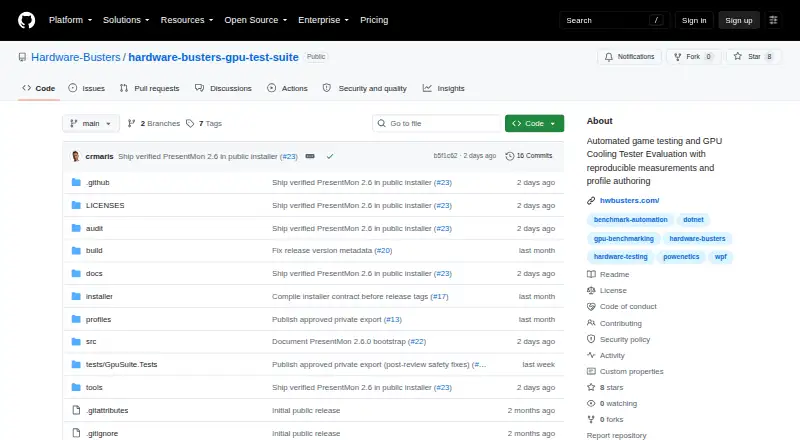
Hardware Busters GPU Test Suite is an open-source .NET framework for automating GPU game benchmarks and GPU cooler evaluations. It is aimed at reviewers, hardware testers, contributors, and enthusiasts running Windows systems with locally installed games. The workflow covers profile-driven game launches, menu navigation, capture, repeat handling, measurement, validation, cooling evaluation, and report generation. Its curated pack includes 12 Hardware Busters Verified game profiles, while authoring tools support benchmark packs, profiles, bots, routes, and assets.
Its strongest fit is an automated lab that needs repeatable execution and traceable outputs. The suite generates self-contained HTML reports and includes measurement provenance and runtime validation, giving benchmark workflows a defined reporting layer. PresentMon and RTSS support frame and frametime measurement, while FFmpeg, Elgato Game Capture 4K Pro, and Powenetics extend the surrounding capture and measurement setup. These integrations make the product more useful when the lab already works with compatible Windows-based hardware and software.
The main trade-off is its focused environment. Windows is the supported platform, and the full supported automated game-benchmark workflow depends on locally installed games, PresentMon, and an Elgato Game Capture 4K Pro. That makes it a strong choice for users building repeatable GPU and cooler evaluations around this toolchain, especially those who value open-source access and custom workload authoring. Teams seeking a cross-platform system or a broader benchmarking environment should consider a different category fit.
Questions about Hardware Busters GPU Test Suite
What does Hardware Busters GPU Test Suite run on? Windows. It runs as a desktop app.
What does Hardware Busters GPU Test Suite integrate with? 5 integrations: PresentMon, RTSS, FFmpeg, Elgato Game Capture 4K Pro and Powenetics.
Who is Hardware Busters GPU Test Suite built for? Solo users, small businesses and mid-market companies (our editorial estimate).
Your product? Our editors can test Hardware Busters GPU Test Suite in depth and publish a review, labelled as paid · from $149/mo →
Hardware Busters GPU Test Suite pricing
Hardware Busters GPU Test Suite fact sheet
| Free plan | Yes |
|---|---|
| Paid from | Free |
| Workload type | Both |
| Platform support | Windows |
| Custom workloads | Yes |
| Result comparison | Not verified |
| Online result database | Not verified |
| Result export | Not verified |
| Benchmark presets | 12 |
| Deployment | Desktop |
| Platforms | Windows |
| Support | Tickets, Community |
| Built for | Solo, Small business, Mid-market (editorial estimate) |
| Integrations | 5 integrations: PresentMon, RTSS, FFmpeg, Elgato Game Capture 4K Pro, Powenetics |
| Pricing | Free plan |
| Website | github.com |
| Facts checked | 20 Sep 2026 |
Hardware Busters GPU Test Suite integrations
Hardware Busters GPU Test Suite lists 5 integrations on its own site.
- PresentMon
- RTSS
- FFmpeg
- Elgato Game Capture 4K Pro
- Powenetics
Alternatives to Hardware Busters GPU Test Suite
- 3DMarkA broad benchmark suite for comparing gaming performance across desktop and mobile hardware.8.9
- GameBenchA broad toolkit for automated, comparative performance testing across Android and iOS.8.8
- UNIGINE Superposition BenchmarkA focused GPU and hardware stability benchmark for Windows and Linux, with VR and stress-testing modes.8.6



See all Hardware Busters GPU Test Suite alternatives →
Used Hardware Busters GPU Test Suite? Be the first to review it
The editor score above is our own research. What this page doesn't have yet is a reader's view — what you used Hardware Busters GPU Test Suite for, what worked and what didn't. No stars are seeded and no review is paid for; an editor reads every one before it appears.
Write a reviewTwo minutes · verified accounts only · read by an editor before it appears
Featured on iTechGuides

Hardware Busters GPU Test Suite is listed in our Game Benchmark Software directory. Add the badge to your site — it links back to this page.
<a href="https://www.itechguides.com/products/hardware-busters-gpu-test-suite/"><img src="https://www.itechguides.com/best/badge/hardware-busters-gpu-test-suite.svg" alt="Featured on iTechGuides" width="230" height="46"></a>
Reviewed by iTechGuides Editors · Editorial team · Updated Nov 2026
Advertiser disclosure: iTechGuides is reader-supported. Vendors can pay for top positions in our rankings and for a place on other products' pages, and we may earn a commission when you click some links. Bought places stand at the number bought; this page and our disclosure say so. Paying vendors may get a fuller, more detailed review from our editors, and that review can change their score. How we rank.
Last updated · How we research and update