
Gwenview
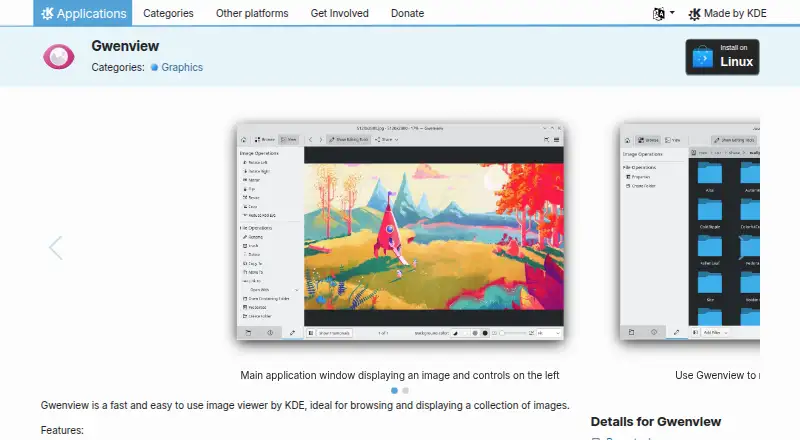
Gwenview: A capable open-source Linux viewer with annotation, comparison, and collection tools. Ranked #7 of 33 in Photo Viewer Software by our editors (8.4/10); pricing: Free plan; best for linux users wanting viewing and annotation.
At a glance
- Editor score8.4 / 10
- PricingFree plan
- Best forLinux users wanting viewing and annotation
- Free planYes
- Paid fromFree
- Side-by-side compareYes
- Facts checked20 Sep 2026
Where it wins
- Side-by-side viewing, thumbnails, filtering, and full-screen slideshows
- Annotations include arrows, shapes, text boxes, and stamps
- Color-profile handling plus JPEG EXIF comment viewing and editing
Where it doesn't
- Available for Linux rather than multiple desktop platforms
- Editing tools focus on basic crop, rotate, resize, mirror, and flip actions
- Metadata editing is limited to JPEG comments
Our verdict on Gwenview
Gwenview is KDE’s desktop image and video viewer for Linux, built for browsing and displaying image collections. Its Browse and View modes support thumbnail navigation, folder-based discovery, filtering by filename, date, tag, or rating, and full-screen slideshows with loop and random playback. It suits Linux users who want a practical viewer with light organization, comparison, annotation, and file-management features rather than a full image-editing suite.
For reviewing images, Gwenview combines side-by-side viewing with embedded color-profile and display-profile handling. That makes it a useful fit for comparing multiple images and viewing collections where color display matters. Its annotation tools add arrows, shapes, text boxes, and stamps, while basic editing covers crop, rotate, resize, mirror, and flip. File-management actions such as copy, move, and delete keep routine collection work inside the application. The Free plan includes image viewing, basic image editing, and image annotations, and the application is open source under the GPL-2.0-or-later license.
Gwenview’s main boundary is scope. It is designed for viewing, light editing, annotation, and collection management, with EXIF comment viewing and editing for JPEG images rather than broad metadata editing. Its Linux-only availability also makes platform fit an important consideration. Choose Gwenview if you want a free KDE application with comparison, slideshow, filtering, color-profile support, and annotation tools in one desktop viewer. Choose another product if your workflow depends on broader metadata editing, advanced image manipulation, or support beyond Linux.
Your product? Our editors can test Gwenview in depth and publish a review, labelled as paid · from $149/mo →
Gwenview pricing
All 1 Gwenview plans and prices →
Gwenview fact sheet
| Free plan | Yes |
|---|---|
| Paid from | Free |
| Supported platforms | Linux |
| RAW image support | Not verified |
| Side-by-side compare | Yes |
| Contact sheets | Not verified |
| Color management | Yes |
| Metadata viewer | Yes |
| Deployment | Desktop |
| Platforms | Linux |
| Support | Community, Docs |
| Built for | Solo, Small business (editorial estimate) |
| Pricing | Free plan (source) |
| Website | apps.kde.org |
| Facts checked | 20 Sep 2026 |
Alternatives to Gwenview
- XnView MPA format-rich desktop viewer with serious cataloging, metadata, and batch tools.9.3
- FastStone Image ViewerA free Windows viewer with RAW support, comparison, batch tools, editing, and scanning.9.1
- IrfanViewA practical Windows viewer for batch conversion, resizing, renaming, and RAW support.9.0


See all Gwenview alternatives →
Gwenview vs the competition
- Gwenview vs XnView MP
- Gwenview vs FastStone Image Viewer
- Gwenview vs IrfanView
- Gwenview vs Geeqie
- Gwenview vs Photo Mechanic
- Gwenview vs gThumb

Compare Gwenview with any tool side by side →
Used Gwenview? Be the first to review it
The editor score above is our own research. What this page doesn't have yet is a reader's view — what you used Gwenview for, what worked and what didn't. No stars are seeded and no review is paid for; an editor reads every one before it appears.
Write a reviewTwo minutes · verified accounts only · read by an editor before it appears
Featured on iTechGuides

Gwenview is listed in our Photo Viewer Software directory. Add the badge to your site — it links back to this page.
<a href="https://www.itechguides.com/products/gwenview/"><img src="https://www.itechguides.com/best/badge/gwenview.svg" alt="Featured on iTechGuides" width="230" height="46"></a>
Reviewed by iTechGuides Editors · Editorial team · Updated Oct 2026
Advertiser disclosure: iTechGuides is reader-supported. Vendors can pay for top positions in our rankings and for a place on other products' pages, and we may earn a commission when you click some links. Bought places stand at the number bought; this page and our disclosure say so. Paying vendors may get a fuller, more detailed review from our editors, and that review can change their score. How we rank.
Last updated · How we research and update