GitHub Skill Recorder
GitHub Skill Recorder: A focused, open-source recorder for turning developer sessions into reusable procedures. Ranked #20 of 39 in AI Screen Recorders by our editors (6.9/10); pricing: Free plan; best for developers generating reusable procedures.
At a glance
- Editor score6.9 / 10
- PricingFree plan
- Best forDevelopers generating reusable procedures
- Free planYes
- Paid fromFree
- AI transcriptionYes
- Founded1975 · Redmond, Washington, USA
- Facts checked20 Sep 2026
Where it wins
- Records screens, app switches, terminals, URLs, and optional narration
- Reconstructs intent and ordered steps with GitHub Copilot CLI
- Generates SKILL.md procedures and scheduled automations
Where it doesn't
- AI analysis requires a GitHub account with Copilot access
- Selected session data is sent to GitHub’s cloud for analysis
- Focused on developer workflows rather than general screen recording
Our verdict on GitHub Skill Recorder
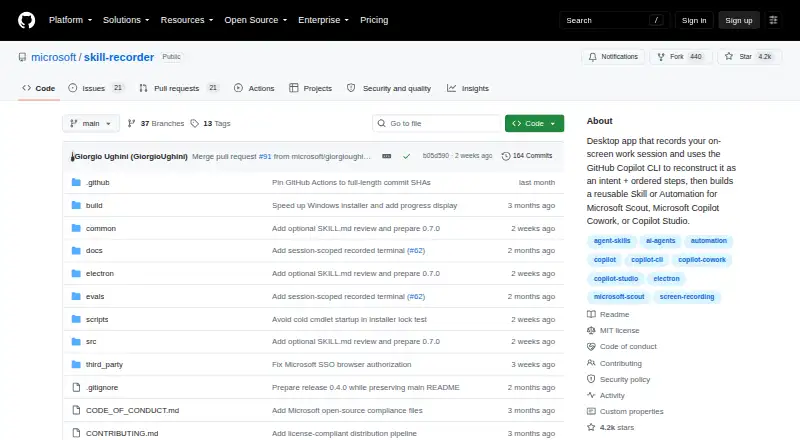
GitHub Skill Recorder is an open-source desktop application from Microsoft for developers who want to turn recorded work sessions into reusable procedures. It captures screen activity, application and window switches, browser URLs on macOS, optional microphone narration, clipboard previews, and terminal commands with their output. The resulting workflow is aimed at repeatable developer tasks, especially when the output needs to become an AI-agent skill or scheduled automation rather than a conventional demonstration video.
Its standout capability is the path from session capture to structured documentation. Using GitHub Copilot CLI, Skill Recorder reconstructs the session’s intent and ordered steps, then generates reusable SKILL.md procedures or scheduled automations. Optional narration can be transcribed on-device, while local scanning checks terminal data for secrets and personally identifiable information. The broader ecosystem includes GitHub Copilot CLI, Microsoft Scout, Microsoft Copilot Cowork, and Copilot Studio, giving the product a clear fit for teams already working with those tools.
Skill Recorder is source-released under the MIT license and has a free open-source model rather than conventional paid product tiers. Recording and transcription occur locally, but AI analysis sends selected session data to GitHub’s cloud, and AI analysis requires a GitHub account with Copilot access. The application primarily targets macOS and also supports Windows 11 and Ubuntu. Developers who need procedure generation, terminal-aware capture, and AI-agent documentation should consider it; users seeking a general-purpose screen recorder or a workflow that avoids cloud analysis should choose an alternative.
Your product? Our editors can test GitHub Skill Recorder in depth and publish a review, labelled as paid · from $149/mo →
GitHub Skill Recorder pricing
GitHub Skill Recorder fact sheet
| Free plan | Yes |
|---|---|
| Paid from | Free |
| AI transcription | Yes |
| AI summaries | Not verified |
| Documentation output | Yes |
| Speaker identification | Not verified |
| Recording limit | Not verified |
| Platform support | Desktop |
| Export formats | Not verified |
| Deployment | Desktop, Cloud |
| Platforms | Windows, macOS, Linux |
| Support | Community, Docs |
| Built for | Solo, Enterprise (editorial estimate) |
| Integrations | 4 integrations: GitHub Copilot CLI, Microsoft Scout, Microsoft Copilot Cowork, Copilot Studio |
| Pricing | Free plan |
| Website | github.com |
| Facts checked | 20 Sep 2026 |
GitHub Skill Recorder integrations
GitHub Skill Recorder lists 4 integrations on its own site.
- GitHub Copilot CLI
- Microsoft Scout
- Microsoft Copilot Cowork
- Copilot Studio
Alternatives to GitHub Skill Recorder
- LoomA polished screen recorder with broad integrations, AI options, and a higher paid entry point.9.2
- ZightA broad AI capture and administration tool with a useful free tier.9.0
- ScreenPalA feature-rich freemium recorder with 4K capture, AI tools, and broad device coverage.8.8



See all GitHub Skill Recorder alternatives →
Used GitHub Skill Recorder? Be the first to review it
The editor score above is our own research. What this page doesn't have yet is a reader's view — what you used GitHub Skill Recorder for, what worked and what didn't. No stars are seeded and no review is paid for; an editor reads every one before it appears.
Write a reviewTwo minutes · verified accounts only · read by an editor before it appears
Featured on iTechGuides

GitHub Skill Recorder is listed in our AI Screen Recorders directory. Add the badge to your site — it links back to this page.
<a href="https://www.itechguides.com/products/github-skill-recorder/"><img src="https://www.itechguides.com/best/badge/github-skill-recorder.svg" alt="Featured on iTechGuides" width="230" height="46"></a>
Reviewed by iTechGuides Editors · Editorial team · Updated Oct 2026
Advertiser disclosure: iTechGuides is reader-supported. Vendors can pay for top positions in our rankings and for a place on other products' pages, and we may earn a commission when you click some links. Bought places stand at the number bought; this page and our disclosure say so. Paying vendors may get a fuller, more detailed review from our editors, and that review can change their score. How we rank.
Last updated · How we research and update