gitg
gitg: A free, open-source Git GUI focused on visual history and everyday repository tasks. Ranked #29 of 32 in Git GUI Clients by our editors (6.3/10); pricing: Free plan; best for users needing a lightweight history-focused GUI.
At a glance
- Editor score6.3 / 10
- PricingFree plan
- Best forUsers needing a lightweight history-focused GUI
- Free planYes
- Paid fromFree
- Supported platformslinux, windows
- Facts checked20 Sep 2026
Where it wins
- Visualizes repository history and displays commit details and diffs
- Supports cloning, repository browsing, staging, and commits
- Free, open-source desktop client for Linux and Windows
Where it doesn't
- No stated support for Git LFS or submodules
- Does not include interactive rebase or conflict editing
- Focused on common workflows rather than broader Git tooling
Our verdict on gitg
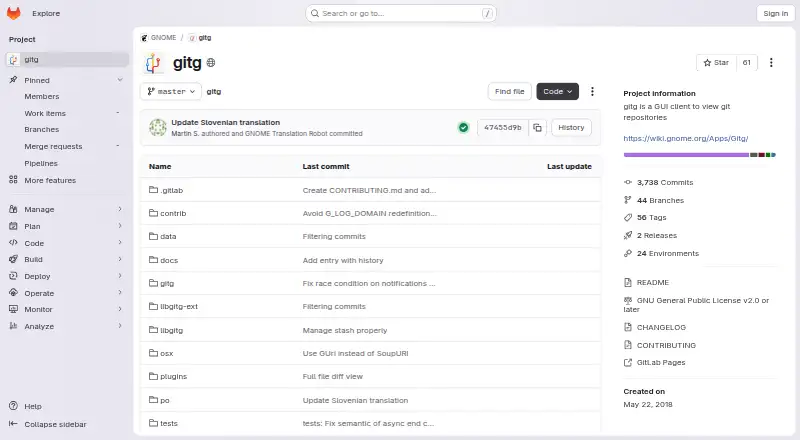
gitg is a free, open-source desktop graphical interface for browsing and managing Git repositories. Developed for the GNOME ecosystem, it is aimed at developers who prefer a visual interface for local Git workflows. Its core feature set covers repository history visualization, file browsing, cloning local and remote repositories, adding existing repositories, staging changes, creating commits, viewing commit details and diffs, and retrieving patches from commits. It runs on Linux and Windows, with source installation instructions and Windows binaries identified in official project materials.
For day-to-day repository work, gitg keeps its scope focused. The history view is the central strength, while repository browsing and commit inspection provide context around changes. Staging and commit creation extend the application beyond a read-only history viewer, and patch retrieval adds a useful option for working with individual commits. This makes it a practical fit for developers who want a lightweight desktop companion for common Git tasks without moving every operation into a terminal.
The trade-off is narrower coverage for advanced workflows. gitg does not include stated support for Git LFS, submodules, interactive rebase, or conflict editing, so teams that depend on those capabilities may need another Git client or additional tools. It is best suited to users prioritizing history visualization, browsing, staging, commits, diffs, and patches on Linux or Windows. Choose an alternative when advanced repository management or dedicated conflict-resolution features are central to the workflow.
Your product? Our editors can test gitg in depth and publish a review, labelled as paid · from $149/mo →
gitg pricing
gitg fact sheet
| Free plan | Yes |
|---|---|
| Paid from | Free |
| Supported platforms | linux, windows |
| Offline mode | Not verified |
| Git LFS support | Not verified |
| Git submodules | Not verified |
| Interactive rebase | Not verified |
| Conflict editor | Not verified |
| Deployment | Desktop |
| Platforms | Linux, Windows |
| Support | Community |
| Built for | Solo, Small business (editorial estimate) |
| Pricing | Free plan |
| Website | gitlab.gnome.org |
| Facts checked | 20 Sep 2026 |
Alternatives to gitg
- GitemberA broad, free Git desktop client with history, review, LFS, submodules, and local AI.9.4
- platypusgitDeep Git control across macOS, Windows, and Linux without accounts or telemetry.9.3
- GitKraken DesktopA mature Git GUI with deep repository workflows, hosting integrations, and team tiers.9.1



Also Ranked In
gitg is ranked in 3 of our directories.
Used gitg? Be the first to review it
The editor score above is our own research. What this page doesn't have yet is a reader's view — what you used gitg for, what worked and what didn't. No stars are seeded and no review is paid for; an editor reads every one before it appears.
Write a reviewTwo minutes · verified accounts only · read by an editor before it appears
Featured on iTechGuides

gitg is listed in our Git GUI Clients directory. Add the badge to your site — it links back to this page.
<a href="https://www.itechguides.com/products/gitg/"><img src="https://www.itechguides.com/best/badge/gitg.svg" alt="Featured on iTechGuides" width="230" height="46"></a>
Reviewed by iTechGuides Editors · Editorial team · Updated Oct 2026
Advertiser disclosure: iTechGuides is reader-supported. Vendors can pay for top positions in our rankings and for a place on other products' pages, and we may earn a commission when you click some links. Bought places stand at the number bought; this page and our disclosure say so. Paying vendors may get a fuller, more detailed review from our editors, and that review can change their score. How we rank.
Last updated · How we research and update