GenFavicon
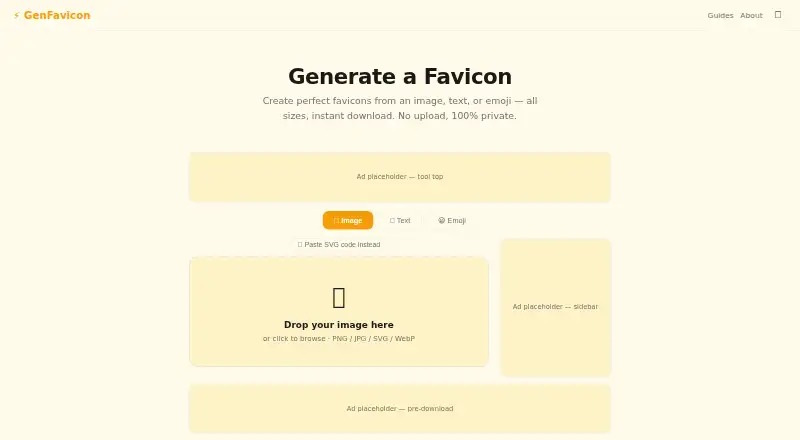
GenFavicon: A private, free favicon tool that turns images, text, emoji, or SVG into web icon assets. Ranked #14 of 29 in Favicon Generators by our editors (6.5/10); pricing: Free plan; best for brand-color-aware favicon creation.
At a glance
- Editor score6.5 / 10
- PricingFree plan
- Best forBrand-color-aware favicon creation
- Free planYes
- Paid fromNone
- ICO exportYes
- Facts checked21 Sep 2026
Where it wins
- Creates ICO, PNG, Apple touch, and Android/PWA icon sizes
- Accepts images, text, emoji, and pasted SVG code
- Processes files locally with no upload, signup, or watermark
Where it doesn't
- No batch processing for generating multiple sets at once
- Web-only workflow requires a browser
- Installation guidance is provided, but manifest creation is not described
Our verdict on GenFavicon
GenFavicon is a free, browser-based favicon generator for website owners, designers, and developers who need a website icon set without an account or file upload. It accepts PNG, JPG, SVG, and WebP images, as well as text, emoji, and pasted SVG code. The output includes favicon.ico, multiple PNG sizes, Apple touch icon sizes, and Android/PWA-related icon sizes. A brand-color extraction feature adds a useful visual reference when building icons around an existing image. Because processing happens locally in the browser, it suits users who prefer to keep source images on their device.
The main strength is breadth within a focused task. GenFavicon covers standard favicon output while also addressing mobile and progressive web app use cases through Apple touch and Android/PWA icon sizes. It provides installation guidance for adding the generated files to a website, which helps bridge the gap between asset creation and implementation. The published feature set includes ICO export, PNG export, an app icon set, and manifest support, while batch processing is not part of the tool's category capabilities. That makes it a practical choice for creating one icon set at a time rather than managing a large asset pipeline.
GenFavicon is a good fit for independent site owners, designers, and developers who want a quick, browser-based workflow with broad input support and local processing. It is especially suitable when brand color matters or when a project needs both traditional favicon files and mobile-oriented icon sizes. Choose another workflow if you need batch generation, a native desktop application, or a documented process for producing a complete web manifest file. Its value is straightforward: focused favicon creation with no signup, no upload, and no watermark.
GenFavicon pricing
All 1 GenFavicon plans and prices →
GenFavicon fact sheet
| Free plan | Yes |
|---|---|
| Paid from | None |
| ICO export | Yes |
| PNG export | Yes |
| SVG export | Not verified |
| App icon set | Yes |
| Web manifest support | Yes |
| Batch processing | No |
| Deployment | Cloud |
| Platforms | Web |
| Support | Email, Docs |
| Built for | Solo, Small business, Mid-market, Enterprise (editorial estimate) |
| Pricing | Free plan (source) |
| Website | genfavicon.org |
| Facts checked | 21 Sep 2026 |
Alternatives to GenFavicon
- favicon.ggA free browser toolkit for complete favicon, PWA, and app-icon packages.9.0
- Favicon.nowA free favicon package generator with previews, validation, and API automation.8.2
- Favicon MakerA free, private browser tool for generating complete favicon and web app icon packages.7.7



See all GenFavicon alternatives →
Used GenFavicon? Be the first to review it
The editor score above is our own research. What this page doesn't have yet is a reader's view — what you used GenFavicon for, what worked and what didn't. No stars are seeded and no review is paid for; an editor reads every one before it appears.
Write a reviewTwo minutes · verified accounts only · read by an editor before it appears
Featured on iTechGuides

GenFavicon is listed in our Favicon Generators directory. Add the badge to your site — it links back to this page.
<a href="https://www.itechguides.com/products/genfavicon/"><img src="https://www.itechguides.com/best/badge/genfavicon.svg" alt="Featured on iTechGuides" width="230" height="46"></a>
Guides on favicon generators
Reviewed by iTechGuides Editors · Editorial team · Updated Sep 2026
Advertiser disclosure: iTechGuides is reader-supported. We may earn a commission when you click some links. How we rank.
Last updated · How we research and update