
Gendo
Gendo: A shared browser canvas for turning sketches, exports, and prompts into architectural visuals. Ranked #8 of 23 in AI Architectural Rendering Software by our editors (7.3/10); pricing: Free plan; best for collaborative architectural visualization teams.
At a glance
- Editor score7.3 / 10
- PricingFree plan
- Best forCollaborative architectural visualization teams
- Free planYes
- Workflow modeMixed
- Facts checked20 Sep 2026
Where it wins
- Renders from sketches, screenshots, exports, photographs, and text
- Shared canvases include comments, annotations, and decision history
- Supports variations, scene editing, upscaling, video, and eight integrations
Where it doesn't
- The Free plan limits teams to one active canvas and one collaborator
- Direct CAD/BIM file import is not supported
- Watermarked exports apply to the Free plan
Our verdict on Gendo
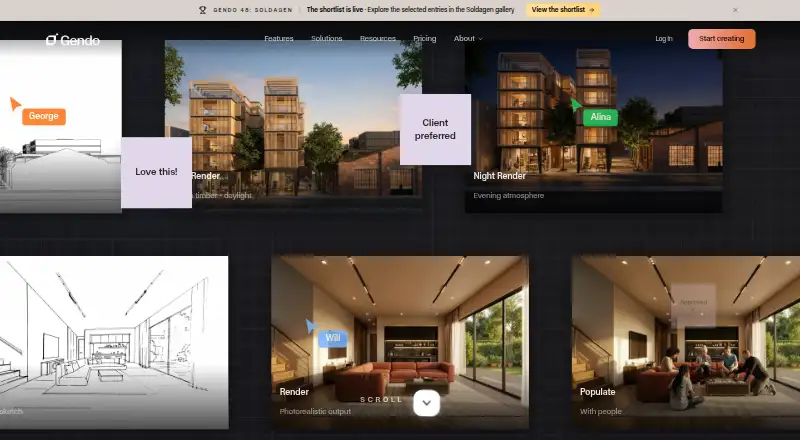
Gendo is a browser-based AI rendering and design canvas for architects, interior designers, and studios. It turns hand sketches, CAD screenshots, model and viewport exports, renders, photographs, reference images, and text descriptions into architectural visualisations. Users can explore materials and styles, edit scenes with natural-language prompts, add people, furniture, and landscaping, and compare different directions in a shared workspace.
Collaboration is a central strength. Team members can work on shared design canvases with comments, annotations, and decision history, giving visual exploration a place alongside project discussion. The tool also supports parallel rendering of variations, 2x and 4x image upscaling, and video generation for cinematic sequences. Its integration list covers SketchUp, Revit, Rhino, ArchiCAD, Vectorworks, Enscape, Blender, and 3ds Max, making it suitable for workflows that already produce viewport captures or model exports.
The plan structure ranges from a Free plan with unlimited generations, one active project canvas, up to 50 assets per canvas, watermarked exports, and one collaborator to paid tiers with unlimited projects, commercial licensing, watermark-free exports, parallel rendering, team seats, video generation, analytics, onboarding, and priority support. Enterprise adds SSO, user provisioning, dedicated account support, SLA, custom models, and a custom catalogue. Students and educators have a separate free plan with multiple canvases, no watermarks, full AI tooling, and 15 free video seconds. Gendo suits teams making frequent visual decisions together; teams needing direct CAD/BIM import should choose a workflow built around native file import instead.
Your product? Our editors can test Gendo in depth and publish a review, labelled as paid · from $149/mo →
Gendo pricing
All 5 Gendo plans and prices →
Gendo fact sheet
| Free plan | Yes |
|---|---|
| Paid from | Not verified |
| Workflow mode | Mixed |
| Supported inputs | text descriptions, hand sketches, CAD screenshots, SketchUp/Revit/Rhino/ArchiCAD/Vectorworks/Blender/3ds Max exports, renders, photographs, reference images |
| Maximum output resolution | Not verified |
| Commercial use rights | Yes |
| CAD/BIM import | No |
| Monthly credits | Not verified |
| API access | Not verified |
| Deployment | Cloud |
| Platforms | Web |
| Compliance & security | GDPR, SSO/SAML, 2FA |
| Support | Email, Docs |
| Built for | Small business, Mid-market, Enterprise (editorial estimate) |
| Integrations | 8 integrations: SketchUp, Revit, Rhino, ArchiCAD, Vectorworks, Enscape … |
| Pricing | Free plan (source) |
| Website | gendo.ai |
| Facts checked | 20 Sep 2026 |
Gendo integrations
Gendo lists 8 integrations on its own site.
- SketchUp
- Revit
- Rhino
- ArchiCAD
- Vectorworks
- Enscape
- Blender
- 3ds Max
Alternatives to Gendo
- HarthA web-based rendering workspace for BIM teams with broad model imports and credit-based plans.7.9
- Luw.ai StudioA broad browser-based workspace for architectural planning, modeling, furnishing, and rendering.7.8
- TreformA broad AI architecture workspace for early-stage modeling, massing, and site studies.7.7



Gendo vs the competition
- Gendo vs Harth
- Gendo vs Luw.ai Studio
- Gendo vs Treform
- Gendo vs mnml.ai
- Gendo vs Massing Labs
- Gendo vs Veras


Compare Gendo with any tool side by side →
Also Ranked In
Gendo is ranked in 2 of our directories.
Used Gendo? Be the first to review it
The editor score above is our own research. What this page doesn't have yet is a reader's view — what you used Gendo for, what worked and what didn't. No stars are seeded and no review is paid for; an editor reads every one before it appears.
Write a reviewTwo minutes · verified accounts only · read by an editor before it appears
Featured on iTechGuides

Gendo is listed in our AI Architectural Rendering Software directory. Add the badge to your site — it links back to this page.
<a href="https://www.itechguides.com/products/gendo/"><img src="https://www.itechguides.com/best/badge/gendo.svg" alt="Featured on iTechGuides" width="230" height="46"></a>
Reviewed by iTechGuides Editors · Editorial team · Updated Oct 2026
Advertiser disclosure: iTechGuides is reader-supported. Vendors can pay for top positions in our rankings and for a place on other products' pages, and we may earn a commission when you click some links. Bought places stand at the number bought; this page and our disclosure say so. Paying vendors may get a fuller, more detailed review from our editors, and that review can change their score. How we rank.
Last updated · How we research and update