Gamepad Mapper
Gamepad Mapper: A flexible macOS mapper with free basics and paid controller-specific add-ons. Ranked #15 of 29 in Controller Mapping Software by our editors (7.7/10); pricing: Free plan · paid from $2.99/mo; best for mac users wanting freemium mapping combinations.
At a glance
- Editor score7.7 / 10
- PricingFree plan · paid from $2.99/mo
- Best forMac users wanting freemium mapping combinations
- Free planYes
- Paid from$2.99/mo
- Facts checked20 Sep 2026
Where it wins
- Maps inputs to keyboard, mouse, scrolling, dragging, and clicks
- Supports USB and Bluetooth gamepads, with configurable dead zones
- Combines multiple commands and can activate the last configuration automatically
Where it doesn't
- Available only for macOS 12.0 or later
- Several controller drivers and mapping features cost extra
- Does not provide virtual-controller output
Our verdict on Gamepad Mapper
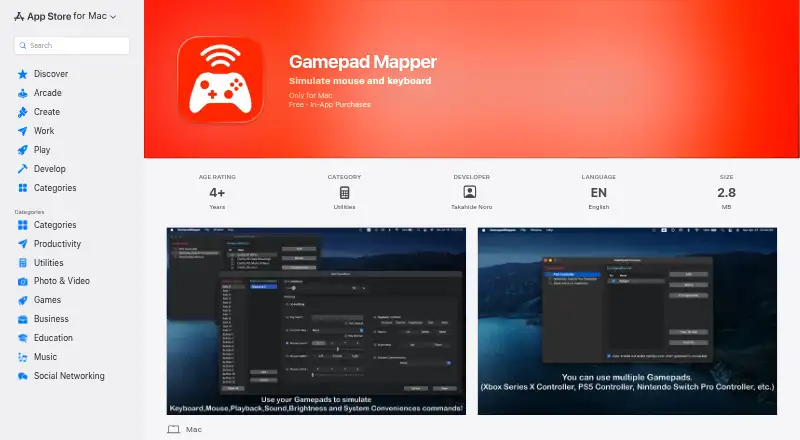
Gamepad Mapper is a macOS utility for controlling a Mac and applications with a gamepad or joystick. It maps controller inputs to keyboard keys, mouse movement and buttons, scrolling, dragging, double-clicking, playback, volume, brightness, and other Mac system controls. It is suited to Mac users who want to repurpose a controller for desktop actions, application commands, or game-related input, with support for USB and Bluetooth gamepads.
The published plans show a freemium structure. The free app provides a starting point, while All Access costs $2.99 per month and unlocks all listed features. Individual one-time add-ons include the Xbox Series X Controller Driver, PS5 Controller Driver, Auto Enable Configuration, Mappings Combination Function, and Nintendo Switch Pro Controller Driver at $3.99 each. Function Key and System Conveniences cost $2.99 each as one-time purchases. This gives buyers a choice between selected capabilities and the monthly All Access plan, depending on how many features they need.
Mapping combinations are a standout capability: one gamepad button can trigger multiple commands simultaneously. The app also includes axis dead-zone adjustment, system controls, light and dark modes, and automatic activation of the last active configuration when a gamepad connects. Its platform fit is focused rather than broad, since it is available for macOS and requires macOS 12.0 or later. Gamepad Mapper is a good fit for Mac users who want keyboard, mouse, and system-control mapping with combination support. Users needing virtual-controller output or a non-Mac platform should choose a different type of tool.
Your product? Our editors can test Gamepad Mapper in depth and publish a review, labelled as paid · from $99/mo →
Gamepad Mapper pricing
All 10 Gamepad Mapper plans and prices →
Gamepad Mapper fact sheet
| Free plan | Yes |
|---|---|
| Paid from | $2.99/mo |
| Supported platforms | macos |
| Per-app profiles | Not verified |
| Profile switching | Not verified |
| Macro support | Yes |
| Keyboard and mouse remap | Yes |
| Virtual controller output | No |
| Simultaneous devices | Not verified |
| Deployment | Desktop |
| Platforms | macOS |
| Built for | Solo, Small business (editorial estimate) |
| Pricing | Free plan · paid from $2.99/mo (source) |
| Website | apps.apple.com |
| Facts checked | 20 Sep 2026 |
Alternatives to Gamepad Mapper
- Steam InputA free, flexible mapping system for Steam players across Windows, macOS, and Linux.9.4
- JoyShockMapperA powerful free mapper for players who want advanced gyro and layered controller configurations.9.2
- DS4WindowsA capable free mapper for Windows users who need profiles, emulation, and advanced input controls.9.0


See all Gamepad Mapper alternatives →
Used Gamepad Mapper? Be the first to review it
The editor score above is our own research. What this page doesn't have yet is a reader's view — what you used Gamepad Mapper for, what worked and what didn't. No stars are seeded and no review is paid for; an editor reads every one before it appears.
Write a reviewTwo minutes · verified accounts only · read by an editor before it appears
Featured on iTechGuides

Gamepad Mapper is listed in our Controller Mapping Software directory. Add the badge to your site — it links back to this page.
<a href="https://www.itechguides.com/products/gamepad-mapper/"><img src="https://www.itechguides.com/best/badge/gamepad-mapper.svg" alt="Featured on iTechGuides" width="230" height="46"></a>
Reviewed by iTechGuides Editors · Editorial team · Updated Oct 2026
Advertiser disclosure: iTechGuides is reader-supported. Vendors can pay for top positions in our rankings and for a place on other products' pages, and we may earn a commission when you click some links. How we rank.
Last updated · How we research and update