
Gamelabs Studio
Gamelabs Studio: A practical AI asset generator for 2D game prototypes and sprite workflows. Ranked #21 of 32 in Game Animation Software by our editors (6.9/10); pricing: Free plan; best for AI-generated game sprites and quick prototypes.
At a glance
- Editor score6.9 / 10
- PricingFree plan
- Best forAI-generated game sprites and quick prototypes
- Free planYes
- Paid from$10/mo
- Animation type2d
- Facts checked21 Sep 2026
Where it wins
- Generates artwork, animations, spritesheets, tiles, props, backgrounds, and maps
- Exports PNG, MP4, WebM, and JSON for game production workflows
- Connects with Unity, Godot, Unreal Engine, GameMaker, and Construct
Where it doesn't
- More focused on asset generation than animation authoring
- Usage is credit-based across the available plans
- The service is limited to web and API access
Our verdict on Gamelabs Studio
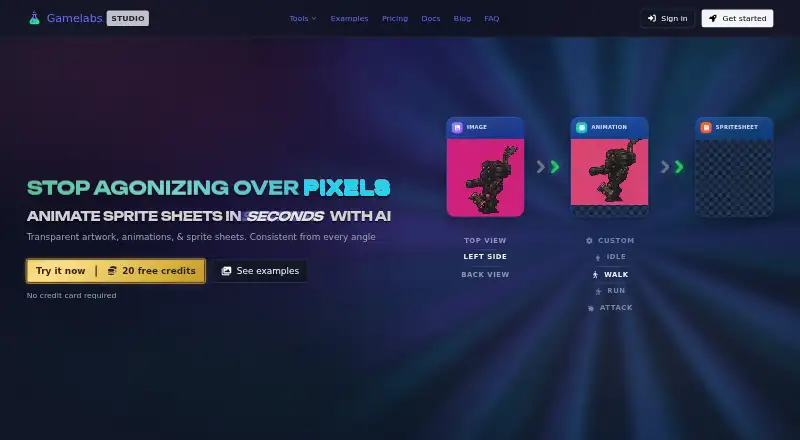
Gamelabs Studio is a web-based AI workspace for game developers creating 2D artwork, animations, sprite sheets, tiles, props, backgrounds, and maps. It accepts text prompts, reference images, imported assets, and sketches, then supports image refinement, animation generation, sprite-sheet configuration, and game-ready exports. Its audience is developers and small teams that want to create visual assets and prototype game content without relying on a separate asset-generation workflow.
The pricing structure is straightforward. Free Trial costs $0 forever and includes all features, 20 free credits, and no credit card requirement. Indie costs $10 per month and adds 120 credits per month, Studio, MCP, and API access, full commercial rights, and tech support. Pro costs $20 per month with 250 credits per month, while Studio costs $50 per month with 650 credits per month; both include the same access, rights, and support benefits listed for Indie. This makes the free plan useful for initial exploration, while the paid tiers primarily increase monthly capacity and provide commercial-use and support benefits.
Its strongest fit is an AI-led sprite and asset pipeline. Sprite sheets support configurable rows, columns, padding, and FPS, with transparent PNG export. Map projects can produce tileset PNG, map JSON, and flattened image exports, while the REST API and MCP integration support automated workflows and AI coding assistants such as Cursor and Claude. Integrations with Unity, Godot, Unreal Engine, GameMaker, and Construct broaden its engine fit. Choose Gamelabs Studio for fast AI-generated assets and prototypes; choose another tool if your priority is a deeper, dedicated animation-authoring environment.
Your product? Our editors can test Gamelabs Studio in depth and publish a review, labelled as paid · from $149/mo →
Gamelabs Studio pricing
All 4 Gamelabs Studio plans and prices →
Gamelabs Studio fact sheet
| Free plan | Yes |
|---|---|
| Paid from | $10/mo |
| Animation type | 2d |
| Rigging tools | Not verified |
| Sprite-sheet export | Yes |
| Game engine integration | Yes |
| Export formats | PNG, MP4, WebM, JSON |
| Supported platforms | web, API |
| Deployment | Cloud |
| Platforms | Web |
| Support | Email, Docs |
| Built for | Solo, Small business, Mid-market (editorial estimate) |
| Integrations | 7 integrations: Unity, Godot, Unreal Engine, GameMaker, Construct, Cursor … |
| Pricing | Free plan (source) |
| Website | gamelabstudio.co |
| Facts checked | 21 Sep 2026 |
Gamelabs Studio integrations
Gamelabs Studio lists 7 integrations on its own site.
- Unity
- Godot
- Unreal Engine
- GameMaker
- Construct
- Cursor
- Claude
Alternatives to Gamelabs Studio
- CascadeurA capable character animation suite for game teams working across major 3D pipelines.9.4
- CreatureA broad game-animation toolkit with strong export options and a $50 one-time entry tier.9.2
- RiveA cross-platform toolkit for interactive 2D animation, state machines, and runtime delivery.9.0


See all Gamelabs Studio alternatives →
Used Gamelabs Studio? Be the first to review it
The editor score above is our own research. What this page doesn't have yet is a reader's view — what you used Gamelabs Studio for, what worked and what didn't. No stars are seeded and no review is paid for; an editor reads every one before it appears.
Write a reviewTwo minutes · verified accounts only · read by an editor before it appears
Featured on iTechGuides

Gamelabs Studio is listed in our Game Animation Software directory. Add the badge to your site — it links back to this page.
<a href="https://www.itechguides.com/products/gamelabs-studio/"><img src="https://www.itechguides.com/best/badge/gamelabs-studio.svg" alt="Featured on iTechGuides" width="230" height="46"></a>
Reviewed by iTechGuides Editors · Editorial team · Updated Oct 2026
Advertiser disclosure: iTechGuides is reader-supported. Vendors can pay for top positions in our rankings and for a place on other products' pages, and we may earn a commission when you click some links. Bought places stand at the number bought; this page and our disclosure say so. Paying vendors may get a fuller, more detailed review from our editors, and that review can change their score. How we rank.
Last updated · How we research and update