
G-Helper
G-Helper: A free, open-source ASUS tuning utility with broad laptop controls. Ranked #10 of 31 in PC Overclocking Software by our editors (7.6/10); pricing: Free plan; best for free ASUS laptop performance tuning.
At a glance
- Editor score7.6 / 10
- PricingFree plan
- Best forFree ASUS laptop performance tuning
- Free planYes
- Paid fromNone
- CPU tuningYes
- Facts checked20 Sep 2026
Where it wins
- Free and open source with a portable single-executable design
- Detailed fan, power, turbo, GPU, and undervolting controls
- Monitoring, overlays, battery limits, and update checks in one utility
Where it doesn't
- Windows-only, with no official Linux build
- Compatibility and controls vary by ASUS model and hardware
- Its verified tuning scope is focused on laptops and handhelds
Our verdict on G-Helper
G-Helper is a free, open-source Windows utility for supported ASUS laptops and handhelds. It is aimed at owners who want direct control over performance modes, cooling, power behavior, GPU settings, display options, and battery charging without a conventional installation. The portable single-executable format keeps its role focused: it is a hardware control utility for compatible ASUS systems rather than a general-purpose overclocking suite.
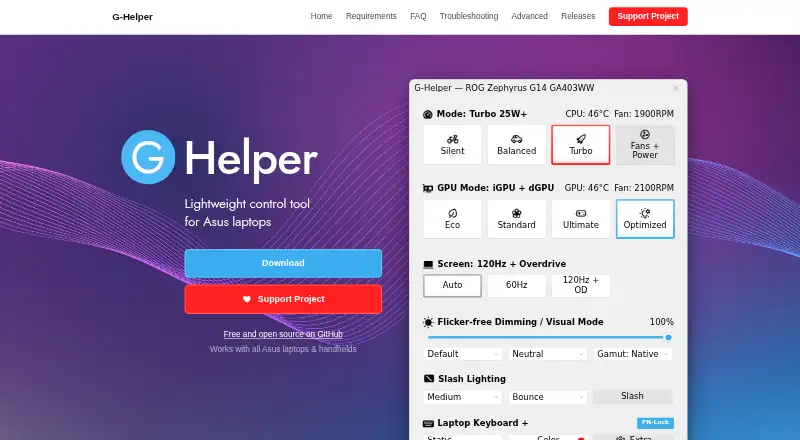
Its strongest area is the breadth of laptop tuning controls. Silent, Balanced, and Turbo modes provide distinct performance profiles, while custom fan curves, power limits, and turbo boost settings allow more specific adjustments. GPU controls include Eco, Standard, Ultimate, and Optimized modes, plus NVIDIA clock offsets, overclocking, and undervolting. AMD CPU undervolting and temperature limits add platform-specific control. G-Helper also covers refresh rates, display overdrive, RGB lighting, hotkeys, battery charge limiting, and CPU/GPU monitoring, with an in-game metrics overlay for live information.
The utility is a strong fit for ASUS laptop and handheld owners who want free control over thermals, power, graphics behavior, and battery charging in one lightweight application. BIOS and driver update checking adds a practical maintenance function, but the tuning experience depends on the specific ASUS model and supported hardware. Users should also account for the Windows-only platform scope and the lack of an official Linux build. Those seeking a tool for non-ASUS systems, broad desktop hardware coverage, or a platform beyond Windows should choose an alternative. For compatible ASUS hardware, G-Helper’s narrow focus is also its clearest advantage: it concentrates a substantial set of performance and device controls in one portable utility.
Your product? Our editors can test G-Helper in depth and publish a review, labelled as paid · from $99/mo →
G-Helper pricing
G-Helper fact sheet
| Free plan | Yes |
|---|---|
| Paid from | None |
| CPU tuning | Yes |
| Memory tuning | Not verified |
| Motherboard controls | Not verified |
| Automatic overclocking | Not verified |
| Supported platforms | Windows |
| Hardware scope | Multi-vendor |
| Deployment | Desktop |
| Platforms | Windows |
| Support | Community, Docs |
| Built for | Solo, Small business (editorial estimate) |
| Pricing | Free plan |
| Website | g-helper.com |
| Facts checked | 20 Sep 2026 |
Alternatives to G-Helper
- Saku OverclockA free, open-source AMD tuning suite with broad controls and a focused hardware scope.9.4
- HYDRAA Windows toolkit for tuning CPU, GPU, and DDR4/DDR5 memory.9.2
- HypertuneA cross-vendor Windows optimizer with CPU, GPU, RAM, and automated tuning tools.8.6



See all G-Helper alternatives →
Used G-Helper? Be the first to review it
The editor score above is our own research. What this page doesn't have yet is a reader's view — what you used G-Helper for, what worked and what didn't. No stars are seeded and no review is paid for; an editor reads every one before it appears.
Write a reviewTwo minutes · verified accounts only · read by an editor before it appears
Featured on iTechGuides

G-Helper is listed in our PC Overclocking Software directory. Add the badge to your site — it links back to this page.
<a href="https://www.itechguides.com/products/g-helper/"><img src="https://www.itechguides.com/best/badge/g-helper.svg" alt="Featured on iTechGuides" width="230" height="46"></a>
Reviewed by iTechGuides Editors · Editorial team · Updated Oct 2026
Advertiser disclosure: iTechGuides is reader-supported. Vendors can pay for top positions in our rankings and for a place on other products' pages, and we may earn a commission when you click some links. How we rank.
Last updated · How we research and update