
FS PDF Compressor
FS PDF Compressor: A privacy-focused, open-source desktop compressor with batch workflows and three quality profiles. Ranked #4 of 36 in PDF Compression Software by our editors (8.9/10); pricing: Free plan; best for privacy-focused users wanting free desktop compression.
At a glance
- Editor score8.9 / 10
- PricingFree plan
- Best forPrivacy-focused users wanting free desktop compression
- Free planYes
- Paid fromFree
- Compression modesBalanced
- Facts checked19 Sep 2026
Where it wins
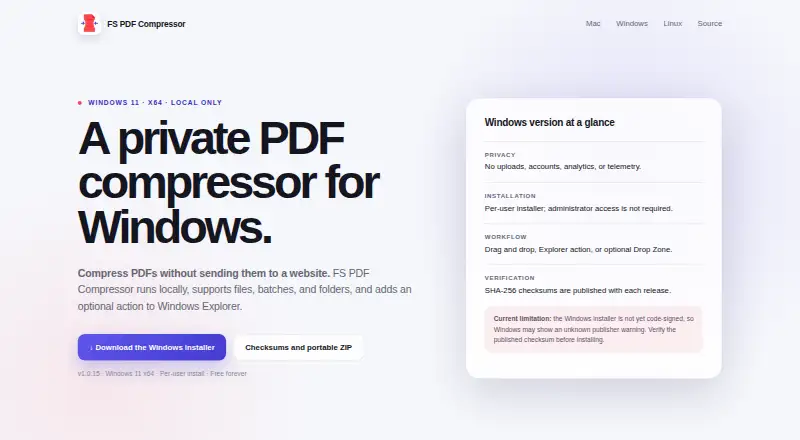
- Local processing without uploads, accounts, analytics, or telemetry
- Batch compression for multiple PDFs and folders
- Native integrations across macOS, Windows, and Linux file managers
Where it doesn't
- Desktop-only workflow across macOS, Windows, and Linux
- Three profiles provide less granular quality control
- Compression depends on the bundled Ghostscript runtime
Our verdict on FS PDF Compressor
FS PDF Compressor is a free, open-source desktop utility for reducing PDF file sizes locally. It is suited to privacy-focused users, individuals handling documents on their own computers, and teams that need batch compression without sending files to an online service. Drag-and-drop workflows support one or more PDFs, while folder-based discovery can process documents in a broader directory. The app runs on macOS, Windows, and Linux and is licensed under AGPL-3.0-or-later.
The Free plan includes local PDF compression and desktop builds for all three supported operating systems. Its workflow connects with Finder, Windows Explorer, GNOME Files, and KDE Dolphin, so compression can start from familiar file-management environments. Users can also enable the optional Drop Zone workflow. The Keep original mode provides a preservation option, while the application replaces an original only when the compressed result is smaller. This makes the product a practical fit for routine document handling rather than a service built around accounts, cloud storage, or platform subscriptions.
Compression control centers on three quality profiles: Preserve quality, Balanced, and Maximum compression. That gives users a straightforward choice between visual fidelity and smaller output, while the file-size safeguard helps avoid replacing a PDF with a larger result. The trade-off is a narrower control set than specialist workflows may require, and the product is designed for desktop use rather than browser-based access or broader automation. Choose FS PDF Compressor for free, local, open-source compression across major desktop platforms; consider another tool if you need a web service, mobile workflow, or more detailed compression controls.
Your product? Our editors can test FS PDF Compressor in depth and publish a review, labelled as paid · from $149/mo →
FS PDF Compressor pricing
All 1 FS PDF Compressor plans and prices →
FS PDF Compressor fact sheet
| Free plan | Yes |
|---|---|
| Paid from | Free |
| Compression modes | Balanced |
| Maximum file size | Not verified |
| Batch compression | Yes |
| Offline desktop app | Yes |
| API access | Not verified |
| Supported platforms | macos, windows, linux |
| Deployment | Desktop |
| Platforms | macOS, Windows, Linux |
| Integrations | 4 integrations: Finder, Windows Explorer, GNOME Files, KDE Dolphin |
| Pricing | Free plan (source) |
| Website | gitlares.github.io |
| Facts checked | 19 Sep 2026 |
FS PDF Compressor integrations
FS PDF Compressor lists 4 integrations on its own site.
- Finder
- Windows Explorer
- GNOME Files
- KDE Dolphin
Alternatives to FS PDF Compressor
- BentoPDF Hyper CompressA flexible compression engine with private processing and developer-focused interfaces.9.3
- iText pdfOptimizerA developer-focused PDF optimizer with detailed controls, automation, and flexible licensing.9.1
- PDFOptimA flexible PDF compressor with previews, batch processing, and cross-platform coverage.9.0



See all FS PDF Compressor alternatives →
FS PDF Compressor vs the competition
- FS PDF Compressor vs BentoPDF Hyper Compress
- FS PDF Compressor vs iText pdfOptimizer
- FS PDF Compressor vs PDFOptim
- FS PDF Compressor vs PDF.co
- FS PDF Compressor vs PDF2Go
- FS PDF Compressor vs Xodo Compress PDF



Compare FS PDF Compressor with any tool side by side →
Used FS PDF Compressor? Be the first to review it
The editor score above is our own research. What this page doesn't have yet is a reader's view — what you used FS PDF Compressor for, what worked and what didn't. No stars are seeded and no review is paid for; an editor reads every one before it appears.
Write a reviewTwo minutes · verified accounts only · read by an editor before it appears
Featured on iTechGuides

FS PDF Compressor is listed in our PDF Compression Software directory. Add the badge to your site — it links back to this page.
<a href="https://www.itechguides.com/products/fs-pdf-compressor/"><img src="https://www.itechguides.com/best/badge/fs-pdf-compressor.svg" alt="Featured on iTechGuides" width="230" height="46"></a>
Reviewed by iTechGuides Editors · Editorial team · Updated Oct 2026
Advertiser disclosure: iTechGuides is reader-supported. Vendors can pay for top positions in our rankings and for a place on other products' pages, and we may earn a commission when you click some links. Bought places stand at the number bought; this page and our disclosure say so. Paying vendors may get a fuller, more detailed review from our editors, and that review can change their score. How we rank.
Last updated · How we research and update