
Frescobaldi
Frescobaldi: A free, open-source editing environment for LilyPond-centered notation workflows. Ranked #25 of 38 in Music Notation Software by our editors (6.7/10); pricing: Free plan; best for lilyPond users who want an editing environment.
At a glance
- Editor score6.7 / 10
- PricingFree plan
- Best forLilyPond users who want an editing environment
- Free planYes
- Paid fromFree
- DeploymentDesktop
- Facts checked19 Sep 2026
Where it wins
- Syntax highlighting and completion support LilyPond text editing.
- Two-way navigation links score locations with the editor.
- MIDI playback, capture, and multiple LilyPond versions are supported.
Where it doesn't
- Its workflow is centered on LilyPond rather than graphical notation editing.
- MusicXML export is experimental.
- It is a desktop application, not a web application.
Our verdict on Frescobaldi
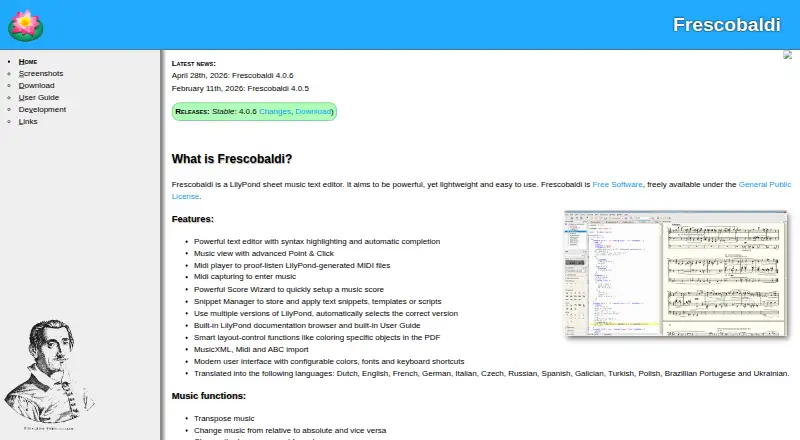
Frescobaldi is a free, open-source desktop application for editing LilyPond music files. It is aimed at people who create and engrave scores with LilyPond and want an editing environment around that text-based workflow, rather than a primarily graphical notation editor. Its text editor offers syntax highlighting and automatic completion, while a PDF music view provides two-way point-and-click navigation between score and source. The feature set also includes a score setup wizard, snippet management, built-in documentation and help, and tools for transposition and rhythm manipulation.
The central strength is the combination of source editing and score navigation. MIDI playback and capture add ways to work with a score, and support for multiple LilyPond versions includes automatic selection. ABC, MIDI, and MusicXML import broaden the formats that can enter the workflow; however, MusicXML export is explicitly experimental. That makes Frescobaldi a more natural fit for users already committed to LilyPond than for musicians looking for a notation editor organized around visual score entry. Its LilyPond integration is core to the product, not one option among a broad notation ecosystem.
Frescobaldi is free and open source, and runs on Linux, macOS, and Windows. Its deployment is desktop, despite web appearing among the listed platforms; it is described as a desktop application rather than a web application. Choose it if text-based LilyPond editing, score navigation, MIDI tools, and version support are the priorities. If a primarily graphical notation workflow or dependable MusicXML export is essential, a different notation application is likely a better fit.
Your product? Our editors can test Frescobaldi in depth and publish a review, labelled as paid · from $149/mo →
Frescobaldi pricing
Frescobaldi fact sheet
| Free plan | Yes |
|---|---|
| Paid from | Free |
| Deployment | Desktop |
| MusicXML support | Yes |
| MIDI support | Yes |
| Parts extraction | Yes |
| Tablature support | Not verified |
| Collaboration features | Not verified |
| Deployment | Cloud, Desktop |
| Platforms | Web, Windows, macOS, Linux |
| Integrations | 1 integrations: LilyPond |
| Pricing | Free plan |
| Website | frescobaldi.org |
| Facts checked | 19 Sep 2026 |
Frescobaldi integrations
Frescobaldi lists 1 integrations on its own site.
- LilyPond
Alternatives to Frescobaldi
- DoricoA full notation and engraving workflow, with free editions and a 60-day trial.9.3
- SibeliusSibelius combines detailed score creation with browser-based sharing and review.9.2
- MuseScore StudioA capable desktop notation editor with MusicXML, MIDI, parts, playback, and exports at no cost.9.1


See all Frescobaldi alternatives →
Used Frescobaldi? Be the first to review it
The editor score above is our own research. What this page doesn't have yet is a reader's view — what you used Frescobaldi for, what worked and what didn't. No stars are seeded and no review is paid for; an editor reads every one before it appears.
Write a reviewTwo minutes · verified accounts only · read by an editor before it appears
Featured on iTechGuides

Frescobaldi is listed in our Music Notation Software directory. Add the badge to your site — it links back to this page.
<a href="https://www.itechguides.com/products/frescobaldi/"><img src="https://www.itechguides.com/best/badge/frescobaldi.svg" alt="Featured on iTechGuides" width="230" height="46"></a>
Reviewed by iTechGuides Editors · Editorial team · Updated Oct 2026
Advertiser disclosure: iTechGuides is reader-supported. Vendors can pay for top positions in our rankings and for a place on other products' pages, and we may earn a commission when you click some links. Bought places stand at the number bought; this page and our disclosure say so. Paying vendors may get a fuller, more detailed review from our editors, and that review can change their score. How we rank.
Last updated · How we research and update