
Fresco
Fresco: A free, open-source Linux wallpaper app with broad live-wallpaper and monitor controls. Ranked #6 of 34 in Desktop Wallpaper Software by our editors (8.8/10); pricing: Free plan; best for linux users wanting a complete live-wallpaper app.
At a glance
- Editor score8.8 / 10
- PricingFree plan
- Best forLinux users wanting a complete live-wallpaper app
- Free planYes
- Paid fromFree
- Platform coverageLinux
- Facts checked20 Sep 2026
Where it wins
- Supports video, GIF, image, slideshow, and playlist wallpapers
- Per-monitor settings, scheduling, fullscreen pause, and battery-aware pausing
- Free and open source with VA-API or NVDEC playback acceleration
Where it doesn't
- Desktop support is focused on Linux
- Wayland support covers selected compositors
- The browser companion is provided as a Chrome extension
Our verdict on Fresco
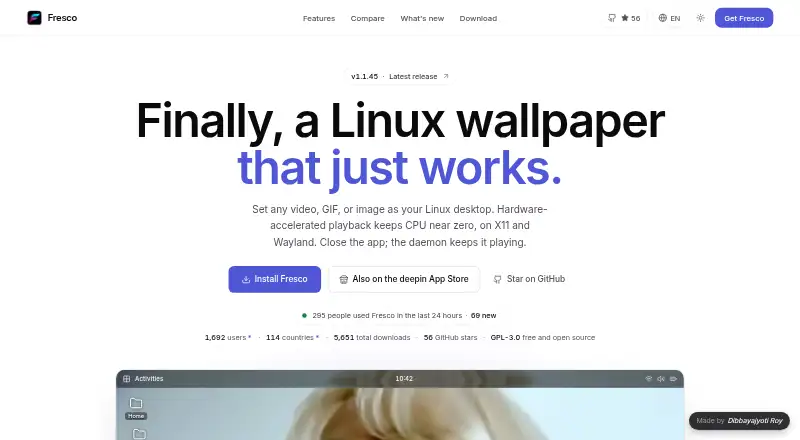
Fresco is a free, open-source desktop wallpaper application for Linux users who want more than a static background. It supports video, GIF, image, slideshow, and playlist wallpapers, with per-monitor configuration for multi-display setups. The GTK interface works with X11 and selected Wayland compositors, including COSMIC, Hyprland, Sway, and KDE Plasma 6. A Chrome extension adds a browser new-tab companion alongside the desktop application.
Its strongest area is control over playback and wallpaper behavior. Fresco can use hardware-accelerated playback through VA-API or NVDEC, while fullscreen and battery-aware auto-pause provide ways to reduce unnecessary playback. Automatic day and night schedules, wallpaper restoration on login, and per-monitor settings make it suitable for varied desktop routines. The crop and rotate editor, built-in wallpaper catalog, and playlist support add useful management features without narrowing the app to a single wallpaper format.
Fresco also extends wallpapers with optional synchronized lyrics, a clock, an audio visualizer, and album-art widgets. MPRIS and LRCLIB integrations support its media-related features, giving the app a stronger connection to music playback than a basic wallpaper utility. It is a good fit for Linux users who want a complete live-wallpaper application with scheduling, multi-monitor support, performance controls, and media widgets. Users seeking broad operating-system coverage or Wayland compatibility beyond the listed compositors should consider a different wallpaper application.
Your product? Our editors can test Fresco in depth and publish a review, labelled as paid · from $149/mo →
Fresco pricing
Fresco fact sheet
| Free plan | Yes |
|---|---|
| Paid from | Free |
| Platform coverage | Linux |
| Live wallpapers | Yes |
| Automatic rotation | Yes |
| Multi-monitor support | Yes |
| Video wallpapers | Yes |
| Interactive wallpapers | Not verified |
| Performance controls | Yes |
| Deployment | Desktop, Browser extension |
| Platforms | Linux, Chrome extension |
| Support | Community, Docs |
| Built for | Solo, Small business (editorial estimate) |
| Integrations | 2 integrations: MPRIS, LRCLIB |
| Pricing | Free plan |
| Website | fresco.dibbayajyoti.com |
| Facts checked | 20 Sep 2026 |
Fresco integrations
Fresco lists 2 integrations on its own site.
- MPRIS
- LRCLIB
Alternatives to Fresco
- Lively WallpaperA feature-rich free wallpaper app for Windows users who want animated, interactive desktops.9.3
- DesktopHutA capable free choice for Windows users who want flexible live wallpapers.9.2
- Wallpaper EngineA broad wallpaper platform for power users who want creation tools and control.9.1



Fresco vs the competition
- Fresco vs Lively Wallpaper
- Fresco vs DesktopHut
- Fresco vs Wallpaper Engine
- Fresco vs Vivid Walls
- Fresco vs Palace
- Fresco vs Waywallen


Compare Fresco with any tool side by side →
Used Fresco? Be the first to review it
The editor score above is our own research. What this page doesn't have yet is a reader's view — what you used Fresco for, what worked and what didn't. No stars are seeded and no review is paid for; an editor reads every one before it appears.
Write a reviewTwo minutes · verified accounts only · read by an editor before it appears
Featured on iTechGuides

Fresco is listed in our Desktop Wallpaper Software directory. Add the badge to your site — it links back to this page.
<a href="https://www.itechguides.com/products/fresco/"><img src="https://www.itechguides.com/best/badge/fresco.svg" alt="Featured on iTechGuides" width="230" height="46"></a>
Reviewed by iTechGuides Editors · Editorial team · Updated Oct 2026
Advertiser disclosure: iTechGuides is reader-supported. Vendors can pay for top positions in our rankings and for a place on other products' pages, and we may earn a commission when you click some links. Bought places stand at the number bought; this page and our disclosure say so. Paying vendors may get a fuller, more detailed review from our editors, and that review can change their score. How we rank.
Last updated · How we research and update