
Freeter
Freeter: A flexible desktop command center, but not a full work-management suite. Ranked #46 of 49 in Work Management Software by our editors (4.9/10); pricing: Free plan; best for desktop users organizing projects and workflows.
At a glance
- Editor score4.9 / 10
- PricingFree plan
- Best forDesktop users organizing projects and workflows
- Free planYes
- Paid fromFree
- Facts checked20 Sep 2026
Where it wins
- Free and open source across Windows, macOS, and Linux
- Custom dashboards combine web apps, files, notes, and to-dos
- Separate embedded-app sessions support project-focused workflows
Where it doesn't
- No listed support for task dependencies or time tracking
- No listed automation features for recurring work
- The current v2.8.0-beta may not suit users seeking a stable release
Our verdict on Freeter
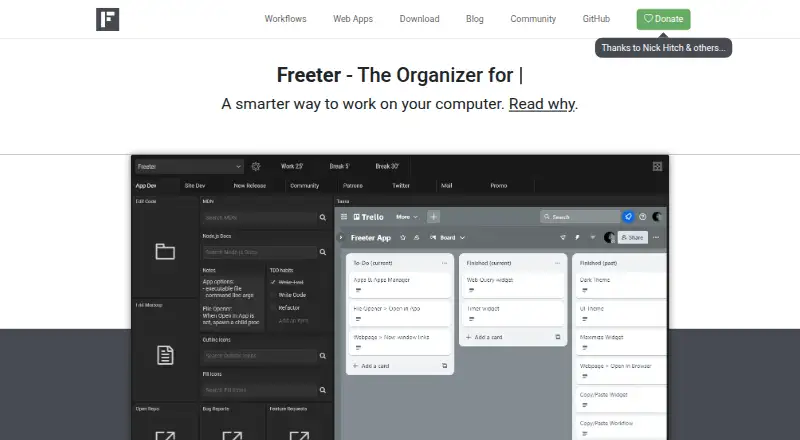
Freeter is a free, open-source desktop productivity application for people who organize projects through personal workflows rather than centralized team-management features. It runs on Windows, macOS, and Linux, grouping projects and workflows into customizable dashboards. Widgets can hold webpages, files, folders, templated web searches, to-do lists, notes, countdowns, and command-line actions. Workflow tabs, project switching, and a shared Shelf help keep recurring resources in reach.
Its strongest fit is desktop-based work that spans several tools. Freeter can embed web applications with separate sessions and provides integrations or workflow access for services including Google Docs, Slack, Dropbox, Google Drive, OneDrive, Asana, Basecamp, Jira, and Trello. Analytics-related options include Google Analytics, Matomo, Mixpanel, and Plausible. The result is a configurable workspace for people who want one launch point for project resources, web tools, local files, and repeatable searches. Users who prefer a browser-first or highly structured team workspace may find this approach less suitable.
Freeter’s main trade-off is focus: it organizes the places and actions around work, but it does not provide the deeper work-management layer some teams require. The positioning does not include task dependencies, time tracking, or automation, so teams needing detailed planning, capacity tracking, or rule-based workflows should consider a more specialized alternative. For individual desktop users, freelancers, and small workflows built around multiple applications, its free and open-source model, keyboard shortcut, dark theme, and command-line widget add useful flexibility. The official site identifies Freeter v2.8.0-beta as current and says version 1 is obsolete and unsupported, so release-stage preferences should factor into the decision.
Your product? Our editors can test Freeter in depth and publish a review, labelled as paid · from $149/mo →
Freeter pricing
Freeter fact sheet
| Free plan | Yes |
|---|---|
| Paid from | Free |
| Timeline views | Not verified |
| Dashboards and reporting | Not verified |
| Workflow automation | Not verified |
| Resource planning | Not verified |
| Portfolio management | Not verified |
| Custom fields | Not verified |
| Deployment | Desktop |
| Platforms | Windows, macOS, Linux |
| Support | Email, Docs |
| Built for | Solo, Small business (editorial estimate) |
| Integrations | 13 integrations: Google Analytics, Matomo, Mixpanel, Plausible, Google Docs, Slack … See all → |
| Pricing | Free plan |
| Website | freeter.io |
| Facts checked | 20 Sep 2026 |
Freeter integrations
Freeter lists 13 integrations on its own site.
- Google Analytics
- Matomo
- Mixpanel
- Plausible
- Google Docs
- Slack
- Dropbox
- Google Drive
- OneDrive
- Asana
- Basecamp
- Jira
- Trello
See all Freeter integrations →
Alternatives to Freeter
- ClickUpA feature-rich work hub with broad views, automation, AI, and low annual entry pricing.9.4
- AsanaA mature work management suite spanning tasks, projects, portfolios, reporting, and automation.9.3
- monday.comA flexible work hub with strong integrations, visual views, and tiered limits.9.2



See all Freeter alternatives →
Used Freeter? Be the first to review it
The editor score above is our own research. What this page doesn't have yet is a reader's view — what you used Freeter for, what worked and what didn't. No stars are seeded and no review is paid for; an editor reads every one before it appears.
Write a reviewTwo minutes · verified accounts only · read by an editor before it appears
Featured on iTechGuides

Freeter is listed in our Work Management Software directory. Add the badge to your site — it links back to this page.
<a href="https://www.itechguides.com/products/freeter/"><img src="https://www.itechguides.com/best/badge/freeter.svg" alt="Featured on iTechGuides" width="230" height="46"></a>
Reviewed by iTechGuides Editors · Editorial team · Updated Oct 2026
Advertiser disclosure: iTechGuides is reader-supported. Vendors can pay for top positions in our rankings and for a place on other products' pages, and we may earn a commission when you click some links. Bought places stand at the number bought; this page and our disclosure say so. Paying vendors may get a fuller, more detailed review from our editors, and that review can change their score. How we rank.
Last updated · How we research and update