Free PDF Compressor
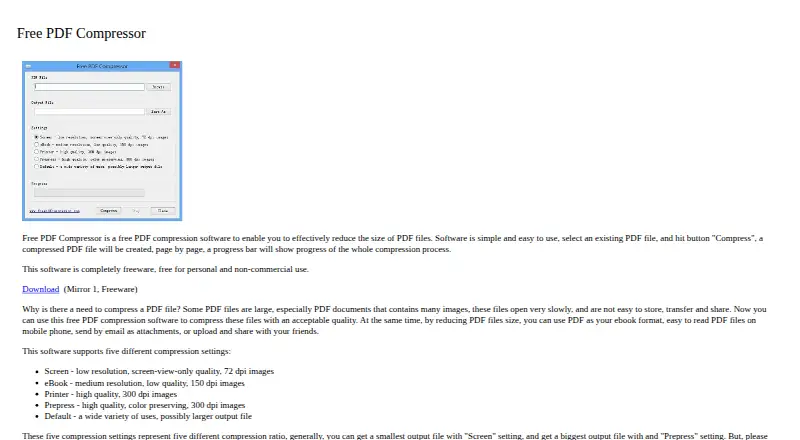
Free PDF Compressor: A straightforward free desktop compressor with page-by-page processing and five PDF settings. Ranked #33 of 36 in PDF Compression Software by our editors (6.0/10); pricing: Free plan; best for basic free desktop compression.
At a glance
- Editor score6.0 / 10
- PricingFree plan
- Best forBasic free desktop compression
- Free planYes
- Paid fromFree
- Facts checked22 Sep 2026
Where it wins
- Free for personal and non-commercial use
- Five presets cover screen, eBook, printer, prepress, and general use
- Shows compression progress page by page
Where it doesn't
- Personal and non-commercial use only
- Desktop-focused workflow is not suited to browser-first teams
- Documented workflow centers on selecting a PDF at a time
Our verdict on Free PDF Compressor
Free PDF Compressor is freeware for reducing PDF file sizes for storage, sharing, email attachments, and reading on mobile devices. It is aimed at people who want a simple desktop utility: select a PDF, choose a compression setting, and create a smaller file while viewing page-by-page progress. The product is a practical fit for personal users and non-commercial work that does not require a broader document-processing platform.
Its main strength is control over image resolution and output priorities. The Screen setting uses 72 dpi images, while eBook uses 150 dpi and Printer uses 300 dpi. Prepress also uses 300 dpi and preserves color, giving users a setting for documents where color quality matters. A Default setting provides a general-purpose choice. This range makes the tool more useful than a single fixed compression mode, while keeping the decision process centered on a short list of presets rather than detailed manual controls.
The tradeoff is a narrow, file-focused workflow. The documented process begins with selecting a PDF and producing a compressed file, so it suits occasional or straightforward conversions better than teams seeking a larger automation or document-management setup. Its freeware licensing is also limited to personal and non-commercial use. Choose Free PDF Compressor when free desktop compression, preset-based choices, and visible progress are the priorities. Consider an alternative when commercial use, browser-based access, batch-oriented work, or broader PDF workflow capabilities are central requirements.
Your product? Our editors can test Free PDF Compressor in depth and publish a review, labelled as paid · from $149/mo →
Free PDF Compressor pricing
Free PDF Compressor fact sheet
| Free plan | Yes |
|---|---|
| Paid from | Free |
| Compression modes | Not verified |
| Maximum file size | Not verified |
| Batch compression | Not verified |
| Offline desktop app | Yes |
| API access | Not verified |
| Supported platforms | Not verified |
| Deployment | Desktop |
| Support | |
| Built for | Solo, Small business (editorial estimate) |
| Pricing | Free plan |
| Website | freepdfcompressor.com |
| Facts checked | 22 Sep 2026 |
Alternatives to Free PDF Compressor
- BentoPDF Hyper CompressA flexible compression engine with private processing and developer-focused interfaces.9.3
- iText pdfOptimizerA developer-focused PDF optimizer with detailed controls, automation, and flexible licensing.9.1
- PDFOptimA flexible PDF compressor with previews, batch processing, and cross-platform coverage.9.0


See all Free PDF Compressor alternatives →
Used Free PDF Compressor? Be the first to review it
The editor score above is our own research. What this page doesn't have yet is a reader's view — what you used Free PDF Compressor for, what worked and what didn't. No stars are seeded and no review is paid for; an editor reads every one before it appears.
Write a reviewTwo minutes · verified accounts only · read by an editor before it appears
Featured on iTechGuides

Free PDF Compressor is listed in our PDF Compression Software directory. Add the badge to your site — it links back to this page.
<a href="https://www.itechguides.com/products/free-pdf-compressor/"><img src="https://www.itechguides.com/best/badge/free-pdf-compressor.svg" alt="Featured on iTechGuides" width="230" height="46"></a>
Reviewed by iTechGuides Editors · Editorial team · Updated Oct 2026
Advertiser disclosure: iTechGuides is reader-supported. Vendors can pay for top positions in our rankings and for a place on other products' pages, and we may earn a commission when you click some links. Bought places stand at the number bought; this page and our disclosure say so. Paying vendors may get a fuller, more detailed review from our editors, and that review can change their score. How we rank.
Last updated · How we research and update