
FrameFlow
FrameFlow: Balanced hybrid monitoring with broad protocol coverage, but quote-based pricing limits upfront comparison. Ranked #29 of 54 in Network Monitoring by our editors (6.4/10); pricing: Pricing on request · 30-day trial; best for small teams needing hybrid monitoring.
At a glance
- Editor score6.4 / 10
- PricingPricing on request · 30-day trial
- Best forSmall teams needing hybrid monitoring
- Free planNo
- Synthetic checksYes
- Founded2003 · Ottawa, Ontario, Canada
- Facts checked22 Sep 2026
Where it wins
- Agentless SNMP, WMI, SSH, and other standard protocol monitoring
- Websites, servers, networks, cloud services, and applications in one console
- Remote nodes, diagrams, scripting, mobile alerts, and REST API integrations
Where it doesn't
- Pricing requires contacting sales
- No free plan is available
- Core software is locally deployed on Windows
Our verdict on FrameFlow
FrameFlow is IT monitoring software for teams responsible for servers, switches, routers, websites, services, applications, cloud services, and other infrastructure. Its hybrid approach combines locally deployed Windows software with cloud-based Telemetry, making it a fit for small teams that need to monitor distributed environments from a central console. Agentless monitoring through SNMP, WMI, SSH, and other standard protocols reduces dependence on installed agents, while server health, traffic, website, and SSL certificate checks cover common infrastructure needs.
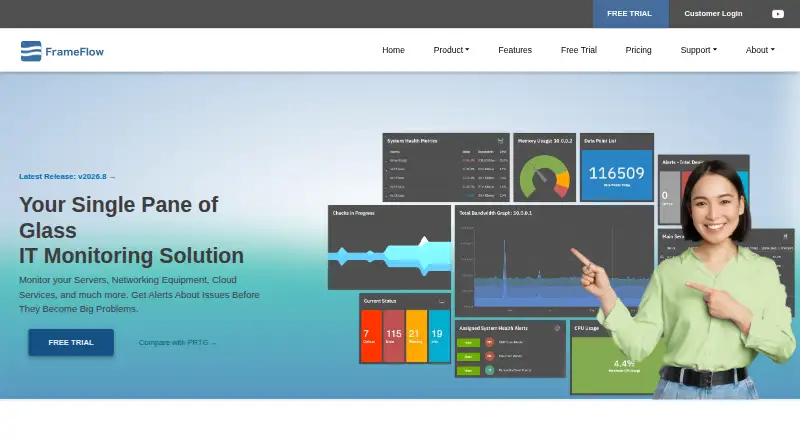
Coverage is the product’s main strength. FrameFlow can track CPU, memory, disk, bandwidth, ping response time, interface status, uptime, SNMP traps, website content, response times, and SSL certificates. Threshold-based alerts and customizable notification profiles support operational monitoring, while web dashboards and color-coded network diagrams provide visual views of the environment. Multi-site monitoring through remote nodes extends the console across locations, and custom PowerShell and other scripting monitors add flexibility for specialized checks.
The platform also connects monitoring to day-to-day response workflows through Microsoft Teams, Slack, PagerDuty, a REST API, and Telemetry alerts delivered by mobile push, SMS, email, and voice. Published plans include FF 25 Monitor, FF 50 Monitor, FF 100 Monitor, and FF Enterprise, with a 30-day free trial but quote-based pricing. FrameFlow suits teams that value broad hybrid coverage, network diagrams, scripting, and multiple alert channels. Teams seeking a free ongoing plan, public pricing, or a cloud-only core deployment should consider alternatives.
Your product? Our editors can test FrameFlow in depth and publish a review, labelled as paid · from $149/mo →
FrameFlow pricing
All 4 FrameFlow plans and prices →
FrameFlow fact sheet
| Free plan | No |
|---|---|
| Paid from | Not verified |
| Synthetic checks | Yes |
| Device limit | 25 devices |
| Traffic monitoring | Yes |
| Topology maps | Yes |
| Alert channels | Not verified |
| Deployment | Hybrid |
| Free trial | 30 days |
| Deployment | Self-hosted, Mobile |
| Platforms | Web, Windows, iOS, Android |
| Support | Email, Tickets, Docs |
| Built for | Small business, Mid-market, Enterprise (editorial estimate) |
| Integrations | 3 integrations: Microsoft Teams, Slack, PagerDuty See all → |
| Pricing | Pricing on request · 30-day trial (source) |
| Website | frameflow.com |
| Facts checked | 22 Sep 2026 |
FrameFlow integrations
FrameFlow lists 3 integrations on its own site.
- Microsoft Teams
- Slack
- PagerDuty
See all FrameFlow integrations →
Alternatives to FrameFlow
- ZabbixBroad infrastructure monitoring with a free self-hosted edition and paid cloud options.9.4
- CheckmkA broad hybrid monitoring platform with a capable free edition and costly paid entry.9.3
- ManageEngine OpManagerBroad monitoring, mapping, traffic analysis, automation, and distributed coverage across four editions.9.1



See all FrameFlow alternatives →
Also Ranked In
FrameFlow is ranked in 2 of our directories.
Used FrameFlow? Be the first to review it
The editor score above is our own research. What this page doesn't have yet is a reader's view — what you used FrameFlow for, what worked and what didn't. No stars are seeded and no review is paid for; an editor reads every one before it appears.
Write a reviewTwo minutes · verified accounts only · read by an editor before it appears
Featured on iTechGuides

FrameFlow is listed in our Network Monitoring directory. Add the badge to your site — it links back to this page.
<a href="https://www.itechguides.com/products/frameflow/"><img src="https://www.itechguides.com/best/badge/frameflow.svg" alt="Featured on iTechGuides" width="230" height="46"></a>
Reviewed by iTechGuides Editors · Editorial team · Updated Oct 2026
Advertiser disclosure: iTechGuides is reader-supported. Vendors can pay for top positions in our rankings and for a place on other products' pages, and we may earn a commission when you click some links. Bought places stand at the number bought; this page and our disclosure say so. Paying vendors may get a fuller, more detailed review from our editors, and that review can change their score. How we rank.
Last updated · How we research and update