
ForceTransfer
ForceTransfer: A web-only transfer service with strong controls, QR sharing, and team features. Ranked #55 of 105 in File Transfer Services by our editors (3.6/10); pricing: Free plan; best for feature-rich web-only sharing.
At a glance
- Editor score3.6 / 10
- PricingFree plan
- Best forFeature-rich web-only sharing
- Free planYes
- Paid from$24/mo
- Max file size50 GB
- Facts checked21 Sep 2026
Where it wins
- Free plans support transfers up to 6GB
- Password protection, download limits, and file requests
- QR codes, link rotation, previews, and audit logs
Where it doesn't
- Web-only access limits platform coverage
- Free transfers expire after one or three days
- Some advanced controls require paid plans
Our verdict on ForceTransfer
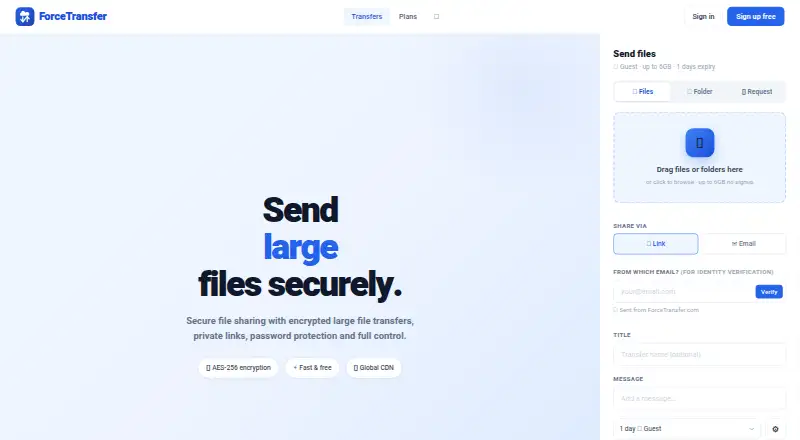
ForceTransfer is a web-based file-transfer service for individuals, power users, businesses, and teams. It sends large files and folders through shareable links, with controls for passwords, download limits, link privacy, notifications, previews, QR codes, and link rotation. Free access is available through Guest and Free plans, while paid tiers add larger limits, longer expiry, branding, team administration, and enterprise features.
Pricing is structured around distinct use cases. Guest costs $0 forever, requires no registration, supports transfers up to 6GB and files up to 2GB, and expires after 1 day. Free also costs $0 forever, supports up to 6GB per transfer and 4GB per file, allows 10 simultaneous transfers, and expires after 3 days. Business costs $24 per month and adds transfers up to 500GB, files up to 50GB, team management, custom domains or CNAME, audit logs, and webhooks. Team costs $29 per month per team for up to 10 users, 1TB per team, unlimited storage, and SSO and SAML. Pro costs $39 per month with transfers up to 100GB, files up to 10GB, password protection, download limits, and file requests. Enterprise includes unlimited storage, no expiry, unlimited file size, support for 9 cloud providers, SSO and SAML, and a guaranteed SLA.
The feature set extends beyond basic link sharing. File versioning, end-to-end encryption, custom branding, download statistics, notifications, and private links give organizations more control over how files are distributed and monitored. The web-only platform is a practical fit for browser-based sharing, but less suitable for teams that require broader platform coverage. Choose ForceTransfer for flexible sharing controls, file requests, branded delivery, or team governance; users seeking a simple, short-lived transfer link may find the free tiers sufficient.
Your product? Our editors can test ForceTransfer in depth and publish a review, labelled as paid · from $149/mo →
ForceTransfer pricing
All 6 ForceTransfer plans and prices →
ForceTransfer fact sheet
| Free plan | Yes |
|---|---|
| Paid from | $24/mo |
| Max file size | 50 GB |
| Link expiry | Not verified |
| Download tracking | Yes |
| API access | Not verified |
| Custom branding | Yes |
| Desktop app | Not verified |
| Deployment | Cloud |
| Platforms | Web |
| Compliance & security | SSO/SAML, 2FA |
| Built for | Small business, Mid-market, Enterprise (editorial estimate) |
| Pricing | Free plan (source) |
| Website | forcetransfer.com |
| Facts checked | 21 Sep 2026 |
Alternatives to ForceTransfer
- Progress MOVEit TransferA compliance-focused managed file transfer service for regulated organizations.9.3
- AWS Transfer FamilyA broad, usage-priced managed transfer service for teams built around AWS.9.2
- IBM Sterling Secure File TransferA multiprotocol transfer platform for organizations coordinating secure file flows across partner networks.9.1



See all ForceTransfer alternatives →
Used ForceTransfer? Be the first to review it
The editor score above is our own research. What this page doesn't have yet is a reader's view — what you used ForceTransfer for, what worked and what didn't. No stars are seeded and no review is paid for; an editor reads every one before it appears.
Write a reviewTwo minutes · verified accounts only · read by an editor before it appears
Featured on iTechGuides

ForceTransfer is listed in our File Transfer Services directory. Add the badge to your site — it links back to this page.
<a href="https://www.itechguides.com/products/forcetransfer/"><img src="https://www.itechguides.com/best/badge/forcetransfer.svg" alt="Featured on iTechGuides" width="230" height="46"></a>
Reviewed by iTechGuides Editors · Editorial team · Updated Oct 2026
Advertiser disclosure: iTechGuides is reader-supported. Vendors can pay for top positions in our rankings and for a place on other products' pages, and we may earn a commission when you click some links. Bought places stand at the number bought; this page and our disclosure say so. Paying vendors may get a fuller, more detailed review from our editors, and that review can change their score. How we rank.
Last updated · How we research and update