
Flowkeeper
Flowkeeper: A cross-platform Pomodoro timer with local tracking, task tools, and export options. Ranked #8 of 28 in Pomodoro Timer Apps by our editors (8.2/10); pricing: Free plan; best for open-source desktop productivity tracking.
At a glance
- Editor score8.2 / 10
- PricingFree plan
- Best forOpen-source desktop productivity tracking
- Free planYes
- Paid fromFree
- Facts checked20 Sep 2026
Where it wins
- Free and open source on Windows, macOS, and Linux
- Statistics and work summaries export to Markdown, CSV, and JSON
- Offline storage, shortcuts, and configurable external integrations
Where it doesn't
- No mobile version
- No online synchronization
- No paid tiers or cloud-based features
Our verdict on Flowkeeper
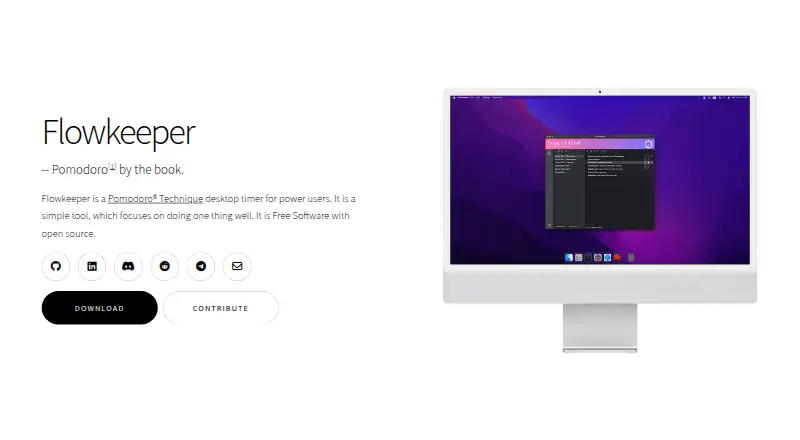
Flowkeeper is a free, open-source Pomodoro timer for desktop users who want task management alongside focused work sessions. It combines focus sessions with short and long breaks, task lists, backlogs, task categories, customizable groups, and keyboard shortcuts. Official builds support Windows, macOS, and Linux, while local offline storage keeps the working data on the desktop. It suits people who want a focused productivity tracker without a subscription or required online account.
Its strongest area is the depth of its personal tracking and export workflow. Weekly, monthly, and yearly statistics provide views of activity over time, while work summaries can be exported in Markdown, CSV, or JSON. Flowkeeper also supports importing and exporting Flowkeeper data, giving users a way to move or preserve their records. Configurable event-based integrations with external programs extend the timer beyond its own task lists, although the integrations are described as configurable rather than as a fixed catalog of connected services.
The trade-off is a deliberately desktop-centered setup. Data is stored locally by default, and the product does not currently provide a mobile version or online synchronization. That makes Flowkeeper a good fit for users who value open-source software, offline access, local control, and detailed desktop statistics. It is less suitable for people who need the same timer and task data across mobile devices or through online synchronization. Choose it for a focused, cross-platform desktop workflow; choose an alternative if mobile access or cloud syncing is central to your routine.
Your product? Our editors can test Flowkeeper in depth and publish a review, labelled as paid · from $149/mo →
Flowkeeper pricing
Flowkeeper fact sheet
| Free plan | Yes |
|---|---|
| Paid from | Free |
| Custom intervals | Not verified |
| Auto-start breaks | Not verified |
| Focus statistics | Yes |
| Platform coverage | Cross-platform |
| Built-in task list | Yes |
| Calendar integration | Not verified |
| Deployment | Desktop |
| Platforms | Windows, macOS, Linux |
| Support | Email, Community |
| Built for | Solo, Small business (editorial estimate) |
| Pricing | Free plan |
| Website | flowkeeper.org |
| Facts checked | 20 Sep 2026 |
Alternatives to Flowkeeper
- Focus To-DoA low-cost Pomodoro app for organizing tasks, tracking focus, and syncing across devices.9.4
- PomofocusA free, cross-platform timer that adds task estimates, reports, and project tracking.9.2
- SessionA focused Apple timer with calendars, blocking, analytics, and automation.9.0


See all Flowkeeper alternatives →
Flowkeeper vs the competition
- Flowkeeper vs Focus To-Do
- Flowkeeper vs Pomofocus
- Flowkeeper vs Session
- Flowkeeper vs Pomodoist
- Flowkeeper vs Focus Keeper
- Flowkeeper vs Forest


Compare Flowkeeper with any tool side by side →
Used Flowkeeper? Be the first to review it
The editor score above is our own research. What this page doesn't have yet is a reader's view — what you used Flowkeeper for, what worked and what didn't. No stars are seeded and no review is paid for; an editor reads every one before it appears.
Write a reviewTwo minutes · verified accounts only · read by an editor before it appears
Featured on iTechGuides

Flowkeeper is listed in our Pomodoro Timer Apps directory. Add the badge to your site — it links back to this page.
<a href="https://www.itechguides.com/products/flowkeeper/"><img src="https://www.itechguides.com/best/badge/flowkeeper.svg" alt="Featured on iTechGuides" width="230" height="46"></a>
Reviewed by iTechGuides Editors · Editorial team · Updated Oct 2026
Advertiser disclosure: iTechGuides is reader-supported. Vendors can pay for top positions in our rankings and for a place on other products' pages, and we may earn a commission when you click some links. Bought places stand at the number bought; this page and our disclosure say so. Paying vendors may get a fuller, more detailed review from our editors, and that review can change their score. How we rank.
Last updated · How we research and update