
Pomofocus
Pomofocus: A free, cross-platform timer that adds task estimates, reports, and project tracking. Ranked #2 of 28 in Pomodoro Timer Apps by our editors (9.2/10); pricing: Free plan; best for free cross-platform task and time tracking.
At a glance
- Editor score9.2 / 10
- PricingFree plan
- Best forFree cross-platform task and time tracking
- Free planYes
- Custom intervalsYes
- Facts checked20 Sep 2026
Where it wins
- Custom focus and break durations with estimated Pomodoros
- Daily, weekly, monthly, and yearly visual reports
- Todoist, Zapier, IFTTT, and webhook integrations
Where it doesn't
- No calendar integration
- Projects and yearly reports are premium features
- CSV exports and integrations are premium features
Our verdict on Pomofocus
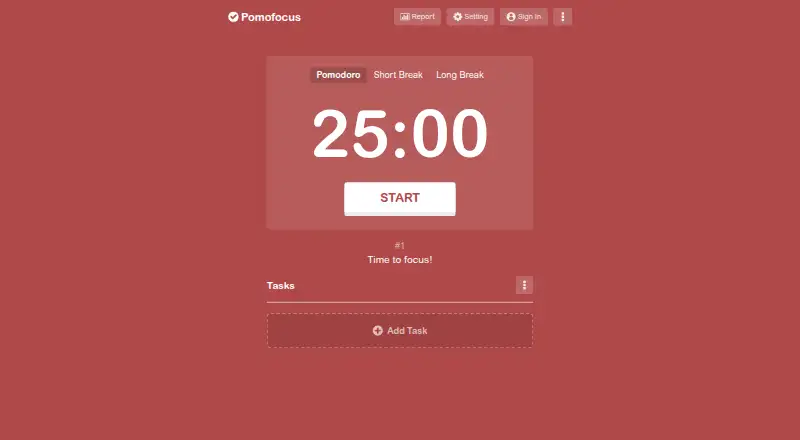
Pomofocus is a browser-based Pomodoro timer for studying, writing, coding, and daily work. Users can create a task list, estimate the number of Pomodoros required, select a task, and run focus and break sessions. Custom focus and break durations, reusable task templates, and finish-time estimates help connect timed sessions with a daily workload. Desktop downloads are available for macOS, Windows, and Linux, making it suitable for people who want the same task-and-timer workflow across major desktop platforms.
Its strongest area is the combination of task planning and reporting. Pomofocus supports project time tracking, while visual reports cover daily, weekly, and monthly focus. Premium features extend this reporting with yearly views and CSV downloads, and also add expanded templates. That makes the product more useful for reviewing time allocation over longer periods than a timer that only records individual sessions. Users who mainly need a focused timer and basic task estimates can stay with the free plan; people who need project-level history or exportable records should consider the premium features.
Pomofocus also fits workflows that connect timers with other services. Todoist integration is available, alongside Zapier, IFTTT, and webhook integrations. Premium features include Todoist and webhook integrations, ad removal, projects, yearly reports, CSV exports, and expanded templates. The trade-off is that calendar integration is not part of the product, so it is a better match for task-based focus planning than calendar-centered scheduling. Choose Pomofocus for customizable intervals, cross-platform access, task estimates, and reporting; choose an alternative if calendar integration is essential or if the needed reporting and integrations must be included without premium features.
Your product? Our editors can test Pomofocus in depth and publish a review, labelled as paid · from $149/mo →
Pomofocus pricing
Pomofocus fact sheet
| Free plan | Yes |
|---|---|
| Paid from | Not verified |
| Custom intervals | Yes |
| Auto-start breaks | Not verified |
| Focus statistics | Yes |
| Platform coverage | Cross-platform |
| Built-in task list | Yes |
| Calendar integration | No |
| Money-back guarantee | 7 days |
| Deployment | Cloud, Desktop |
| Platforms | Web, Windows, macOS, Linux |
| Support | |
| Built for | Solo, Small business (editorial estimate) |
| Integrations | 3 integrations: Todoist, Zapier, IFTTT |
| Pricing | Free plan |
| Website | pomofocus.io |
| Facts checked | 20 Sep 2026 |
Pomofocus integrations
Pomofocus lists 3 integrations on its own site.
- Todoist
- Zapier
- IFTTT
Alternatives to Pomofocus
- Focus To-DoA low-cost Pomodoro app for organizing tasks, tracking focus, and syncing across devices.9.4
- SessionA focused Apple timer with calendars, blocking, analytics, and automation.9.0
- PomodoistA cross-platform Pomodoro app for users who want tasks, planning tools, and self-hosting.8.8

See all Pomofocus alternatives →
Pomofocus vs the competition
- Pomofocus vs Focus To-Do
- Pomofocus vs Session
- Pomofocus vs Pomodoist
- Pomofocus vs Focus Keeper
- Pomofocus vs Forest
- Pomofocus vs PomodoroTimers



Compare Pomofocus with any tool side by side →
Also Ranked In
Pomofocus is ranked in 3 of our directories.
Used Pomofocus? Be the first to review it
The editor score above is our own research. What this page doesn't have yet is a reader's view — what you used Pomofocus for, what worked and what didn't. No stars are seeded and no review is paid for; an editor reads every one before it appears.
Write a reviewTwo minutes · verified accounts only · read by an editor before it appears
Featured on iTechGuides

Pomofocus is listed in our Pomodoro Timer Apps directory. Add the badge to your site — it links back to this page.
<a href="https://www.itechguides.com/products/pomofocus/"><img src="https://www.itechguides.com/best/badge/pomofocus.svg" alt="Featured on iTechGuides" width="230" height="46"></a>
Reviewed by iTechGuides Editors · Editorial team · Updated Oct 2026
Advertiser disclosure: iTechGuides is reader-supported. Vendors can pay for top positions in our rankings and for a place on other products' pages, and we may earn a commission when you click some links. Bought places stand at the number bought; this page and our disclosure say so. Paying vendors may get a fuller, more detailed review from our editors, and that review can change their score. How we rank.
Last updated · How we research and update