
Fileside
Fileside: Fileside suits users who want visual workspaces and deeper folder operations than standard file browsers. Ranked #67 of 100 in File Manager Software by our editors (3.0/10); pricing: 30-day trial; best for users who prefer visual multi-pane layouts.
At a glance
- Editor score3.0 / 10
- Pricing30-day trial
- Best forUsers who prefer visual multi-pane layouts
- Free planNo
- Supported platformswindows, macos
- Facts checked20 Sep 2026
Where it wins
- Saved tiled workspaces keep frequently used folder layouts ready
- Recursive search, previews, bookmarks, and thumbnail grids aid navigation
- Folder merging, undo, background transfers, and ZIP support expand file control
Where it doesn't
- There is no free plan; access is through paid Duo or Futuro editions
- The desktop app is limited to Windows and macOS
- It does not include AI-assisted features
Our verdict on Fileside
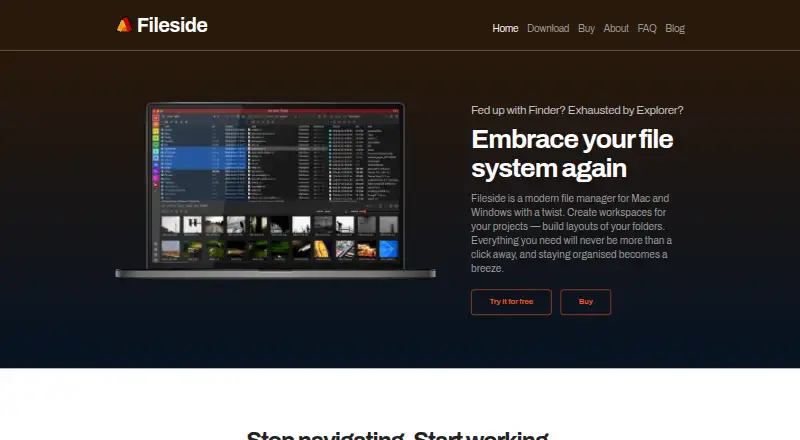
Fileside is a desktop file manager for Windows and macOS built around tiled, multi-pane folder layouts. It is aimed at people who organize project folders, revisit the same locations, and want a local-first alternative to Finder or Explorer. Saved custom workspaces let users preserve folder arrangements, while thumbnail grids, inline previews, full-screen previews, bookmarks, and a previously visited locations palette support visual navigation. Recursive folder search adds a direct way to locate files across nested folders.
Its strongest advantage is the depth of its file-handling workflow. Folder merging includes conflict strategies, and undo covers both file-system and layout operations. Background transfers help keep file movement separate from the main browsing flow, while ZIP archive creation and extraction handle a common archive task without requiring a separate listed feature. Together, these tools make Fileside more suitable for active folder organization than a basic two-pane browser, especially for users who value reusable layouts and visual context.
Fileside is a paid product with a 30-day trial and two editions. Duo Edition includes all 2.x versions and is valid for personal or commercial use on all your machines. Futuro Edition includes all future versions with the same machine and usage terms. The choice therefore centers on version coverage rather than different feature lists. Choose Fileside if multi-pane workspaces, previews, search, merging, and undo match your file-management habits. Choose another option if you need a free plan, a mobile-first workflow, or AI-assisted file management.
Your product? Our editors can test Fileside in depth and publish a review, labelled as paid · from $149/mo →
Fileside pricing
All 2 Fileside plans and prices →
Fileside fact sheet
| Free plan | No |
|---|---|
| Paid from | Not verified |
| Supported platforms | windows, macos |
| Dual-pane view | Yes |
| Tabbed interface | Not verified |
| Batch rename | Not verified |
| Archive support | Yes |
| Cloud storage access | Yes |
| Portable version | Not verified |
| Free trial | 30 days |
| Deployment | Desktop |
| Platforms | Windows, macOS |
| Support | Email, Docs |
| Built for | Solo, Small business, Mid-market (editorial estimate) |
| Pricing | 30-day trial (source) |
| Website | fileside.app |
| Facts checked | 20 Sep 2026 |
Alternatives to Fileside
- Total CommanderA feature-rich file manager for Windows users who want power beyond Explorer.9.3
- DolphinA capable free file manager, especially for Linux and KDE-oriented desktops.9.1
- WinSCPA capable Windows file manager for secure transfers, automation, and synchronization.9.0



See all Fileside alternatives →
Used Fileside? Be the first to review it
The editor score above is our own research. What this page doesn't have yet is a reader's view — what you used Fileside for, what worked and what didn't. No stars are seeded and no review is paid for; an editor reads every one before it appears.
Write a reviewTwo minutes · verified accounts only · read by an editor before it appears
Featured on iTechGuides

Fileside is listed in our File Manager Software directory. Add the badge to your site — it links back to this page.
<a href="https://www.itechguides.com/products/fileside/"><img src="https://www.itechguides.com/best/badge/fileside.svg" alt="Featured on iTechGuides" width="230" height="46"></a>
Reviewed by iTechGuides Editors · Editorial team · Updated Oct 2026
Advertiser disclosure: iTechGuides is reader-supported. Vendors can pay for top positions in our rankings and for a place on other products' pages, and we may earn a commission when you click some links. Bought places stand at the number bought; this page and our disclosure say so. Paying vendors may get a fuller, more detailed review from our editors, and that review can change their score. How we rank.
Last updated · How we research and update