FileMap Desktop
FileMap Desktop: A distinctive visual file canvas with a useful free tier and a costly collaboration plan. Ranked #15 of 47 in Desktop Organization Software by our editors (8.0/10); pricing: Free plan; best for teams wanting a cross-platform visual canvas.
At a glance
- Editor score8.0 / 10
- PricingFree plan
- Best forTeams wanting a cross-platform visual canvas
- Free planYes
- Paid from$15/user/mo
- Platform supportCross_platform
- Facts checked20 Sep 2026
Where it wins
- Infinite zoomable canvas for arranging and clustering desktop files
- Live desktop synchronization with file and folder previews
- Google Drive and OneDrive synchronization across Windows and macOS
Where it doesn't
- Real-time collaboration is available in the Studio plan
- Studio costs $15 per user per month when billed monthly
- Advanced 3D and PSD previews require the Studio plan
Our verdict on FileMap Desktop
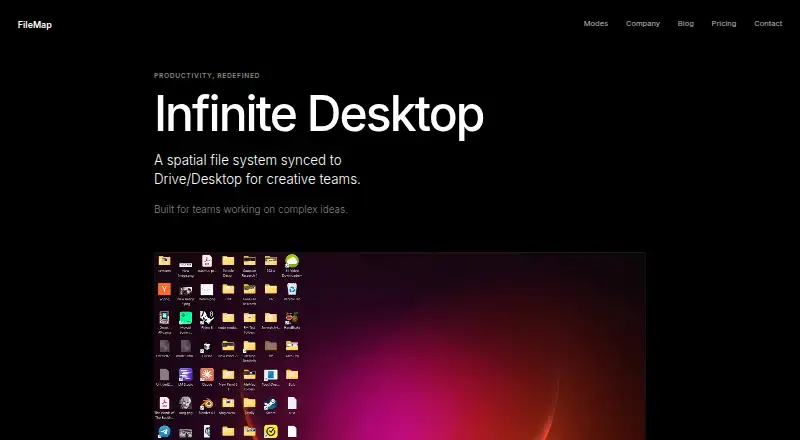
FileMap Desktop gives teams a visual alternative to conventional desktop file navigation. It presents existing files as objects on an infinite, zoomable canvas, allowing users to arrange, cluster, resize, preview, and navigate them while keeping the underlying desktop synchronized. Windows and macOS support make it suited to creative, architecture, and research teams that want a shared visual workspace rather than a standard folder-first workflow.
The freemium structure makes the product accessible for individual organization and initial evaluation. Starter costs $0 per month and includes local desktop sync, an infinite canvas, and basic visual clustering. Studio costs $15 per user per month with monthly billing. It adds real-time collaboration, Google Drive integration, and advanced previews for 3D and PSD files. The free tier covers the core visual organization experience, while the paid tier is aimed at teams that need shared workspaces and richer file handling.
FileMap Desktop’s main distinction is the depth of its visual canvas: zooming, clustering, resizing, previews, and live synchronization work together as an alternative layer over the desktop. Its ecosystem fit extends beyond local files through Google Drive and OneDrive synchronization, although Google Drive integration is specifically included with Studio. Teams seeking collaboration, cloud connectivity, or advanced previews should consider Studio; users focused on basic local organization can start with Starter. The $15 monthly Studio price makes the product less suitable for teams that need collaboration at a lower recurring cost.
Your product? Our editors can test FileMap Desktop in depth and publish a review, labelled as paid · from $149/mo →
FileMap Desktop pricing
All 2 FileMap Desktop plans and prices →
FileMap Desktop fact sheet
| Free plan | Yes |
|---|---|
| Paid from | $15/user/mo |
| Platform support | Cross_platform |
| Organization model | Not verified |
| Automatic sorting | Not verified |
| Maximum containers | Not verified |
| Saved layouts | Not verified |
| Multi-monitor support | Not verified |
| Deployment | Desktop |
| Platforms | Windows, macOS |
| Support | |
| Built for | Small business, Mid-market (editorial estimate) |
| Integrations | 2 integrations: Google Drive, OneDrive |
| Pricing | Free plan (source) |
| Website | filemap.com |
| Facts checked | 20 Sep 2026 |
FileMap Desktop integrations
FileMap Desktop lists 2 integrations on its own site.
- Google Drive
- OneDrive
Alternatives to FileMap Desktop
- AutoShelfDeep automated file sorting for Mac users who want precise control.9.4
- Desktop Frames+A flexible Windows desktop organizer with frames, profiles, rules, and search.9.3
- DeskBoxDeskBox combines automatic desktop organization with search, widgets, todos, and recovery tools.9.2


See all FileMap Desktop alternatives →
Used FileMap Desktop? Be the first to review it
The editor score above is our own research. What this page doesn't have yet is a reader's view — what you used FileMap Desktop for, what worked and what didn't. No stars are seeded and no review is paid for; an editor reads every one before it appears.
Write a reviewTwo minutes · verified accounts only · read by an editor before it appears
Featured on iTechGuides

FileMap Desktop is listed in our Desktop Organization Software directory. Add the badge to your site — it links back to this page.
<a href="https://www.itechguides.com/products/filemap-desktop/"><img src="https://www.itechguides.com/best/badge/filemap-desktop.svg" alt="Featured on iTechGuides" width="230" height="46"></a>
Reviewed by iTechGuides Editors · Editorial team · Updated Oct 2026
Advertiser disclosure: iTechGuides is reader-supported. Vendors can pay for top positions in our rankings and for a place on other products' pages, and we may earn a commission when you click some links. Bought places stand at the number bought; this page and our disclosure say so. Paying vendors may get a fuller, more detailed review from our editors, and that review can change their score. How we rank.
Last updated · How we research and update