
FileBrowser
FileBrowser: A capable one-time-purchase WebDAV file manager for offline iPhone and iPad access. Ranked #20 of 26 in WebDAV Client Software by our editors (7.1/10); pricing: Paid; best for iOS users wanting offline WebDAV file access.
At a glance
- Editor score7.1 / 10
- PricingPaid
- Best foriOS users wanting offline WebDAV file access
- Free planNo
- Paid from$7.99 one-time
- Founded2009
- Facts checked21 Sep 2026
Where it wins
- One-time $7.99 purchase with no subscription plan
- Offline files, editing, media viewing and iOS Files integration
- Connects to WebDAV, cloud storage, NAS and network protocols
Where it doesn't
- Available only on iOS and iPadOS
- No folder synchronization or scheduled tasks
- Not open source
Our verdict on FileBrowser
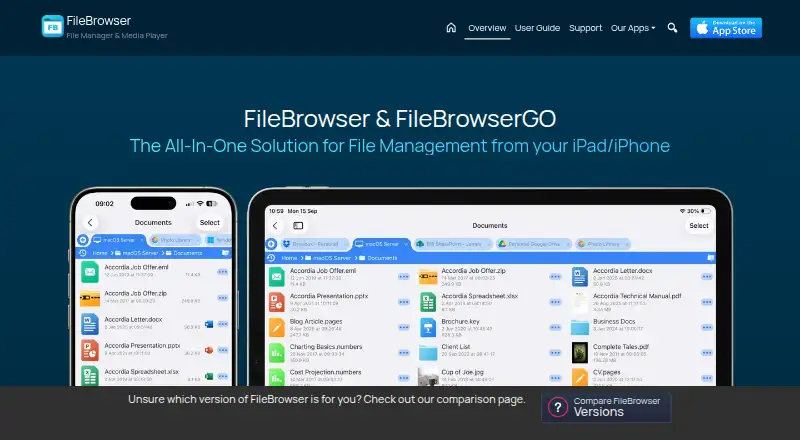
FileBrowser is an iPhone and iPad file-management app for accessing and organising files stored on WebDAV servers, cloud services, computers, NAS devices and network drives. It is aimed at home users and professionals who want mobile access to remote storage, including offline files, without a subscription. Files can be copied, moved, renamed, deleted, compressed or extracted, while in-place document editing saves changes to the original file. Built-in viewers handle documents, photos, video and music, and iOS Files integration keeps the app connected to the standard iOS file workflow.
The pricing is straightforward: FileBrowser costs $7.99 as a one-time purchase. Its single plan includes connections to WebDAV, FTP, FTPS, SFTP and SMB, along with Dropbox, Google Drive, Box, OneDrive, Nextcloud, Synology NAS and QNAP NAS. The app also includes a built-in WebDAV server for device-to-device file transfer. For buyers comparing subscription-based file tools, the one-time model is a clear fit when the required workflow is file access and management rather than ongoing synchronization.
FileBrowser’s standout strength is the combination of remote connections, offline access, editing and media handling in an iOS-focused app. Password, Touch ID and Face ID protection add device-level access controls. The trade-off is its narrow platform scope: it is designed for iPhone and iPad use, rather than a cross-platform desktop workflow. Standard FileBrowser also does not provide folder synchronization or scheduled tasks. Choose it for mobile WebDAV access, offline work and direct file operations; choose another product if automated synchronization or broader platform coverage is central to your workflow.
Your product? Our editors can test FileBrowser in depth and publish a review, labelled as paid · from $149/mo →
FileBrowser pricing
All 1 FileBrowser plans and prices →
FileBrowser fact sheet
| Free plan | No |
|---|---|
| Paid from | $7.99 one-time |
| Supported platforms | iOS, iPadOS |
| Drive mounting | Not verified |
| Folder synchronisation | No |
| Offline file access | Yes |
| Mobile apps | Yes |
| Scheduled synchronisation | No |
| Deployment | Mobile |
| Platforms | iOS |
| Support | Email, Docs |
| Built for | Solo, Small business (editorial estimate) |
| Integrations | 13 integrations: WebDAV, FTP, FTPS, SFTP, SMB, Dropbox … |
| Pricing | Paid (source) |
| Website | stratospherix.com |
| Facts checked | 21 Sep 2026 |
FileBrowser integrations
FileBrowser lists 13 integrations on its own site.
- WebDAV
- FTP
- FTPS
- SFTP
- SMB
- Dropbox
- Google Drive
- Box
- OneDrive
- Nextcloud
- Synology NAS
- QNAP NAS
- iOS Files
Alternatives to FileBrowser
- rcloneA flexible, open-source WebDAV tool for scripting, synchronization, mounting, and transfers.9.4
- CloudDrive2A flexible multi-cloud manager for mounting, transfers, backups, and WebDAV access.9.2
- filexA broad open-source file platform for teams managing self-hosted and connected storage.9.0



See all FileBrowser alternatives →
Also Ranked In
FileBrowser is ranked in 2 of our directories.
Used FileBrowser? Be the first to review it
The editor score above is our own research. What this page doesn't have yet is a reader's view — what you used FileBrowser for, what worked and what didn't. No stars are seeded and no review is paid for; an editor reads every one before it appears.
Write a reviewTwo minutes · verified accounts only · read by an editor before it appears
Featured on iTechGuides

FileBrowser is listed in our WebDAV Client Software directory. Add the badge to your site — it links back to this page.
<a href="https://www.itechguides.com/products/filebrowser/"><img src="https://www.itechguides.com/best/badge/filebrowser.svg" alt="Featured on iTechGuides" width="230" height="46"></a>
Reviewed by iTechGuides Editors · Editorial team · Updated Oct 2026
Advertiser disclosure: iTechGuides is reader-supported. Vendors can pay for top positions in our rankings and for a place on other products' pages, and we may earn a commission when you click some links. Bought places stand at the number bought; this page and our disclosure say so. Paying vendors may get a fuller, more detailed review from our editors, and that review can change their score. How we rank.
Last updated · How we research and update